

Identity management is a hot topic lately—stories about cyber breaches, industrial-scale data mining and the EU's GDPR all connect back to a company's identity system eventually. Too often those stories gloss over that fact that many of these data protection failures were avoidable if companies implemented more effective customer identity and access management (CIAM) solutions. Two popular solutions, Amazon Cognito and FusionAuth approach the problem from different perspectives.
Cognito is part of the Amazon Web Services family and provides a registration and login tool that connects your user data to the wider Amazon data processing and advertising network. FusionAuth takes a different approach with a full-service platform that gives you control of your own users and data. This contrast in perspective explains many of the differences between Amazon Cognito and FusionAuth.
What Cognito and FusionAuth Have In Common#
Hordes of Secure Users#
At their most basic point of comparison, Cognito and FusionAuth both allow applications to register and login users to web and mobile applications, and they both take advantage of OAuth tokens & API key management providing secure access with proven and standardized protocols. Ready to handle identity and access for the next 'killer app,' they both are designed for web-scale applications and can register an unlimited number of users without a hiccup.
Fast Implementation#
Cognito and FusionAuth are both designed to be quickly up and running with almost any platform. This is a tremendous benefit over developing your own secure authorization system which can take months or more of advanced developer effort. A 'roll your own' solution will also require constant evaluation and maintenance as technology and security threats evolve. Authorization with Cognito and FusionAuth are both designed to implement quickly on a variety of platforms allowing you to devote your valuable developer resources to application features that serve your customers and earn you revenue.
How Cognito and FusionAuth Are Different#
Free for Unlimited Users#
One of the biggest differences between Cognito and FusionAuth is cost. The FusionAuth Community plan is free for unlimited users when you self-host. No strings, gimmicks, or tricks. No cost increases when you hit a certain Monthly Active User threshold. Much like a database or a web server, secure authentication is so essential that developers should be able to implement it quickly and easily without cost concerns. You'll even find some of our more advanced features, such as passkeys, in the Community version.
Single-Tenant Security#
A big difference between Cognito and FusionAuth is both of FusionAuth's local and cloud options deliver true data isolation as single-tenant solutions. This eliminates the possibility of data leakage between unrelated companies, whether accidentally or through hacker activity. It also eliminates the risk of another company's poor security practices allowing access to your customer's data. FusionAuth also enables customers to implement a firewall at any layer, further protecting their data from unauthorized access.
FusionAuth's single-tenant architecture also allows for easier compliance with complex regulatory restrictions in many industries and countries. Germany's Bundesdatenschutzgesetz, Australia's Privacy Principles, Canada's PIPEDA, and most recently the European Union's GDPR all place different restrictions on how a user's personal data can be used and transmitted. FusionAuth provides the expanded control for companies required to comply with laws and regulations in their specific region.
For more details on the benefits and pitfalls of single- and multi-tenant solutions read this whitepaper.
Technical Constraints to Evaluate#
When choosing between Cognito and FusionAuth, certain technical constraints can significantly impact your implementation. Understanding these limitations up front can save you from costly migrations later.
Schema Flexibility#
With Cognito, you can add custom attributes after pool creation, but you cannot remove them or alter their mutability. Once you set an attribute as required vs. optional or mutable vs. immutable, that decision is permanent. If your data model is still evolving, a schema mistake on day one follows you forever. The only fix is creating a new User Pool and migrating users.
FusionAuth's user.data field accepts arbitrary JSON and can be restructured at any time without user migrations, though you need to be careful about type changes. Registration objects provide per-application data separation when needed, giving you the flexibility to evolve your data model as your business grows.
Custom Attribute Limits#
Cognito imposes a maximum of 50 custom attributes per User Pool—a hard limit that cannot be increased. More critically, custom attributes are not indexed and not searchable via the ListUsers API. Even among standard attributes, not all are searchable. Attribute names are limited to 20 characters, each attribute has a 2,048 byte maximum, and all must be prefixed with custom:.
This limitation forces a common architecture: store core identity in Cognito, store everything else in DynamoDB, and maintain synchronization logic between them. You can't query "all admins in the engineering department" from Cognito—you need a separate search infrastructure.
FusionAuth stores user data in a flexible JSON structure, indexed by Elasticsearch, and searchable via API or client library with no artificial attribute limits.
Rate Limits on Admin Operations#
Cognito enforces account-wide rate limits per AWS region. Several critical categories have hard caps that cannot be increased:
| Operation | Hard Limit | Impact |
|---|---|---|
UserUpdate (includes AdminUpdateUserAttributes) |
25 RPS | Bulk migrations, attribute syncs, compliance operations |
UserAccountRecovery (includes password changes) |
30 RPS | Mass password resets, security incident response |
UserList |
30 RPS | Admin dashboards, reporting, search |
UserResourceUpdate |
25 RPS | Group/role management at scale |
Provisioned capacity (available since January 2024) only applies to some categories like authentication and user creation. Paying for higher auth throughput won't help if your bottleneck is an admin operation.
A practical example: migrating 3 million users with post-creation updates at the 25 RPS UserUpdate cap takes over 26 hours.
With FusionAuth, throughput is determined by your infrastructure capacity or, if using FusionAuth Cloud, in consultation with the FusionAuth team. There are no service-imposed rate limits, though you'll need to manage capacity planning and scaling.
Multi-Tenancy Challenges#
If you're building B2B SaaS, both Cognito tenant mapping approaches have serious drawbacks:
Pool per tenant:
- True data isolation, per-tenant configuration
- Hard limit of 10,000 pools per AWS account (soft limit of 1,000)
- No cross-pool queries (can't build a global admin dashboard)
- Lambda triggers must be duplicated across every pool
- Each pool needs separate app client configuration
Single shared pool:
- Simpler management, cross-tenant search possible
- All tenants share rate limits (noisy neighbor problem)
- No per-tenant password policy, MFA requirements, or branding
- Tenant isolation enforced only by your application logic — a bug exposes data
- 50 custom attribute limit shared across all tenants' data needs
Most teams end up with a hybrid approach that's worse than either option: a single pool with extensive Lambda logic to simulate per-tenant behavior, adding latency to every login.
FusionAuth offers a first-class Tenant entity with isolated configuration (password rules, MFA, email templates, themes) per tenant, a single deployment, tenant-scoped API operations, and no artificial limit on tenant count.
JWT Customization Requires Lambda#
Adding custom claims (roles, tenant IDs, permissions) to JWTs in Cognito requires a Pre-Token Generation Lambda trigger that fires on every token minting event.
This introduces several challenges:
- Cold-start latency: 100-500ms+ added to login flows (worse for VPC-attached or certain runtimes)
- Hard 5-second timeout: If the Lambda doesn't respond in time, authentication fails
- Dependency issues: Lambdas often need to read from DynamoDB for custom claims, adding latency and timeout risk
- No caching or batching: Each token generation is an independent invocation
Note: As of November 2024, Essentials and Plus tiers support native access token customization without a Lambda. However, ID token customization still requires the Lambda on all tiers, and Lite-tier users have no native token customization.
FusionAuth's JWT Populate lambda runs in-process with no cold start or network hop. Claims can reference user data, registration data, or group membership directly—no external database lookup needed. You can also make HTTP requests if you need to reference external data.
Local Development Environment#
Cognito has no local emulator. Every authentication call during development must hit a live AWS endpoint, forcing developers to choose between:
| Approach | Trade-off |
|---|---|
| Shared dev pool | Rate limit contention, polluted test data, requires internet |
| Per-developer pools | Expensive to maintain, configuration drift vs. prod |
| LocalStack | Imperfect emulation—token validation and Lambda triggers may behave differently |
| Mocking/stubbing | Fastest loop, but doesn't catch integration bugs |
This creates a slow inner dev loop, flaky CI/CD (network-dependent), and "works on my machine" drift.
FusionAuth runs as a standard Docker container on any developer's laptop (docker compose up). It provides identical software and API behavior with production, works offline, gives each developer an isolated instance, and allows CI/CD to spin up disposable instances per test run.
Cross-Region Replication#
User pools cannot span regions—there's no built-in cross-region failover or replication. Each region is fully independent. A regional outage means your users cannot authenticate, validate tokens, or reset passwords until the region recovers.
Your disaster recovery options with Cognito are to accept regional risk, implement a complex dual-pool architecture, or maintain a backup auth mechanism.
With FusionAuth, you control the database layer and can architect multi-region failover. Active-passive disaster recovery (DR) is supported, and if you're using FusionAuth Cloud, DR can be included in your plan. You can deploy in any region, on any infrastructure.
Vendor Lock-In and Password Export#
You cannot export password hashes from Cognito. AWS states: "Password import is not supported, because security best practices require that passwords are not available as plain text, and we don't support importing hashes." This means users must reset passwords during any migration away from Cognito, or you must perform a slow, gradual migration.
FusionAuth Connectors enable a transparent slow migration that migrates passwords on login, but you can't do a clean bulk export from Cognito.
When migrating to FusionAuth from other systems, FusionAuth's Import Users API supports bulk import with password hashes for 10+ algorithms (bcrypt, salted-SHA-256, salted-PBKDF2-HMAC-SHA-256, phpass, and others) plus custom password hashing plugins. Cognito only supports CSV user import without password hashes or a User Migration Lambda that migrates users one at a time on login.
Flat Group Model—No Application-Scoped Roles#
Cognito's group model is pool-wide and flat. Groups map to IAM roles with a precedence system, and the cognito:groups claim lists all groups a user belongs to. However:
- You cannot search for users in a group
- You cannot search for groups by name (you can only list them)
- There's no concept of application-scoped roles—you can't express "user is admin in App A but viewer in App B" within a single pool
Common workarounds include using custom attributes to store per-app roles (hitting the 50-attribute cap and losing searchability) or maintaining a separate authorization layer in DynamoDB.
FusionAuth's Registrations provide per-application data separation. Roles are defined per-application, assigned per-registration, and appear in the JWT roles claim automatically. Groups can grant application roles to all members. A user can be admin in App A and viewer in App B without custom attribute hacks.
Limited Webhook and Event System#
Cognito provides Lambda triggers at fixed points in the authentication flow. While powerful for modifying auth behavior, they're not a general-purpose event system:
- No event for user deletion—if a user is deleted via the admin API or console, no Lambda fires
- No event for profile updates via admin APIs (only custom message triggers for attribute verification)
- No event for group membership changes outside the auth flow
- No webhook delivery—triggers are Lambda-only, tightly coupled to AWS
- All triggers share the 5-second hard timeout
If you need to synchronize user lifecycle events to downstream systems (CRMs, analytics, provisioning, audit logs), you must build that plumbing yourself—typically with CloudTrail log parsing or EventBridge rules watching API call patterns.
FusionAuth offers 50+ webhook event types covering the full user lifecycle: user CRUD, registration CRUD, login success/failure, group membership changes, password events, MFA method add/remove, IdP link/unlink, JWT refresh, and more. Events are delivered via HTTP POST to any endpoint or to Kafka. Some threat-detection events require the Enterprise plan.
Email and SMS Template Constraints#
Cognito's email customization relies on the Custom Message Lambda trigger, which returns plain strings—smsMessage, emailMessage, and emailSubject—assembled in Lambda code. There's no built-in template engine:
- 20,000 UTF-8 character limit for email and 140 UTF-8 characters for SMS
- No templating language—conditional logic, loops, and localization must be hand-coded in your Lambda
- Limited trigger sources—you can't customize arbitrary transactional emails
- Without Amazon SES configured, Cognito's default email sender has a low daily sending quota
- No built-in localization—you must detect the user's locale in your Lambda and branch accordingly
FusionAuth's email templates use Apache FreeMarker with full conditional logic, loops, and replacement variables (user data, tenant data, application context). Templates support per-locale localization natively. Full HTML with no artificial character limits (up to 65,535 bytes per template). Per-application email template overrides are available on paid plans.
Additional Considerations#
MFA flexibility: Cognito supports TOTP and SMS MFA on all tiers, and email OTP on Essentials and Plus tiers. MFA policy (required, optional, off) is configured per pool—you cannot require MFA for one application but make it optional for another within the same pool.
FusionAuth supports TOTP (all plans), SMS and email MFA (paid plans). MFA policy is configurable per tenant. Per-application MFA policy is available on the Enterprise plan, and the requirement can be evaluated dynamically via a login validation lambda.
Localization#
A company doing business through the internet today has a storefront open to customers from around the globe. While having a vast pool of potential customers is a benefit, many companies struggle to deliver their products and services to the wide range of languages they encounter. FusionAuth was designed to allow you to easily communicate with your customers in the language they prefer. You can create customized HTML and text email templates for the languages you support, and quickly add additional options as your community grows.
Configurable Password Hashing#
Every application has different security requirements. Some need to be HIPAA compliant, while others can be less stringent. We let you pick the level of security you need, and adjust it as quickly as your needs or threats evolve. We also allow you to use different password schemas for different groups of users, making it possible to consolidate multiple identity management systems into one efficient platform. This can be a completely transparent process without any downtime or customer friction.
For more details, read about how we migrated Switchboard.app from their previous solution.
Reporting and Analytics#
User reports have been in every slide presentation and corporate board meeting since the first bit of software hit the internet. From day one FusionAuth gives you the most requested reports like daily/monthly active users, logins and registrations without any additional configuration or setup.
Enterprise Identity Unification (EIU)#
Another way Cognito and FusionAuth differ is how they can handle complex bulk merger challenges. In today's fast-moving business world, companies merge with or acquire partners and competitors every day. It's a difficult challenge to combine and manage the unique databases of users that each company brings into the system. This is the realm of EIU and presents many complex issues such as duplicate users, incomplete or conflicting data, and varying password schemas.
FusionAuth allows a parent company to create unique tenants to isolate distinct datasets while still providing a single user management system for the overall organization. It gives the administrators incremental control over how and when the information is merged, and can even engage the users to manage, filter, and unify their own profile data.
If you would like more information on how FusionAuth enables effective EIU across multiple identity management systems, contact us.
Customization#
There is no doubt that Amazon is a huge corporation that reaches all corners of the planet. At their size, it is difficult to get new features or functionality. FusionAuth is dedicated to our customers. We have helped companies like Clover, Audacy, Little Caesars, and the Mayo Clinic meet their unique needs. This is an added benefit to having a single-tenant solution: your system can be customized to fit your specific requirements and specifications.
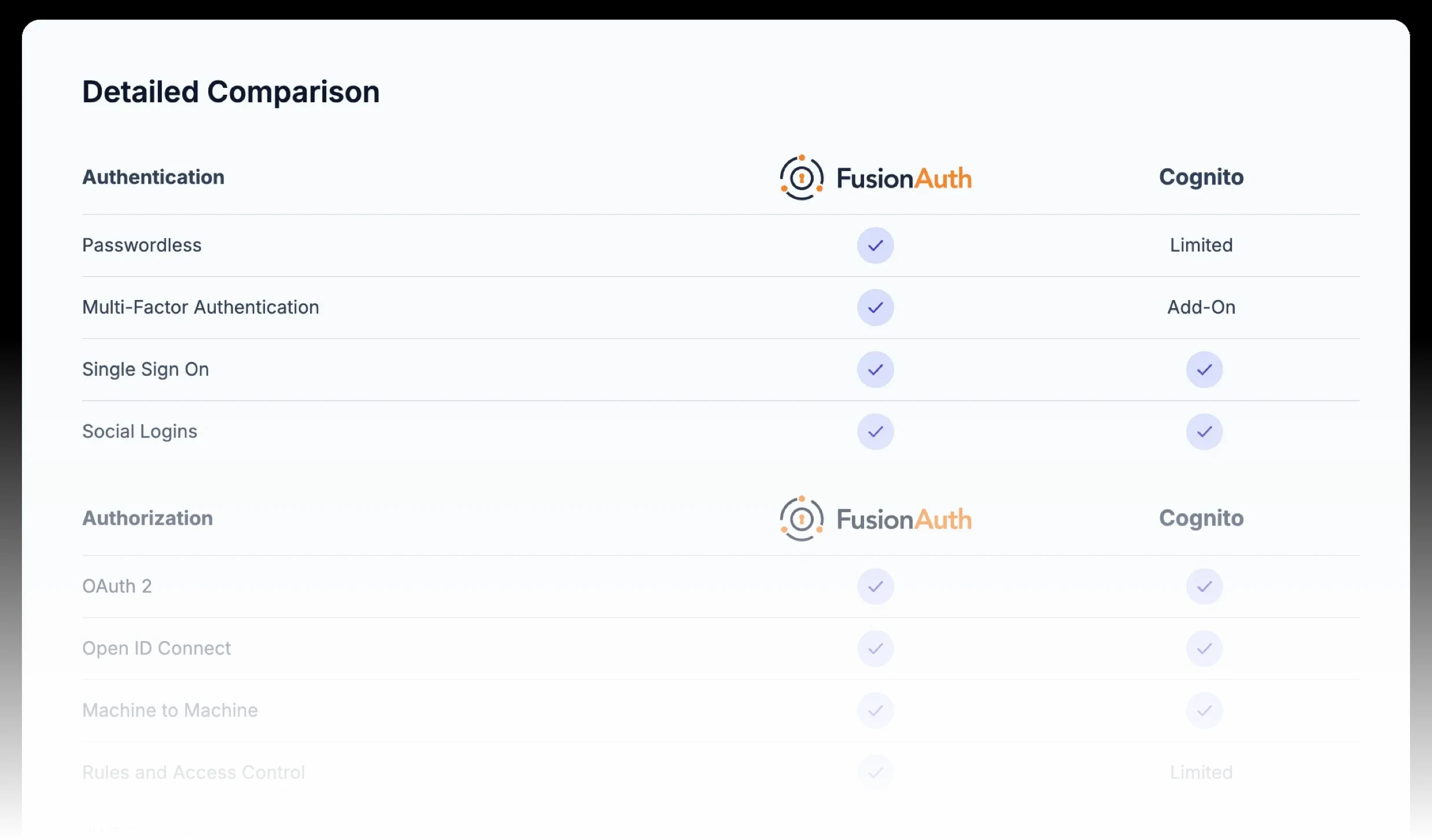
To see more details on how Cognito and FusionAuth stack up, see our comparison guide and please contact us if you have any questions.
When Cognito Is the Right Choice#
Despite these constraints, Cognito is genuinely a solid fit when:
- You're building an AWS-native startup or MVP with standard auth flows that don't require heavy admin or search operations
- Your use case is a simple B2C app with social login, stable attributes, and no complex compliance requirements
- You're developing internal tools with a small, known user population where AWS IAM integration is beneficial
- You need a prototype or MVP with "good enough" auth fast, knowing you may rebuild later
- Cloud-only deployment is acceptable and you don't have data sovereignty concerns
- Your applications are deeply integrated with AWS and need to vend scoped IAM credentials
Skip Cognito from the Start If#
- On-premise or air-gapped deployment is required
- You have a complex, evolving user data model with search and filter needs
- You're building multi-tenant B2B SaaS with per-tenant configuration requirements
- You have data sovereignty mandates that Cognito can't meet
- You need cross-region disaster recovery
- You're planning bulk operations that will exceed 25 RPS admin limits
- Enterprise customers are demanding SSO, SCIM, or source code escrow
- You need to authenticate users during CI/CD test runs at scale
- Your application requires application-scoped RBAC where users need different roles in different apps
- You need an event-driven architecture requiring identity lifecycle webhooks for downstream systems
Decision Scorecard#
Rate each technical factor from -2 (strongly favors Cognito) to +2 (strongly favors FusionAuth):
| Factor | Your Score |
|---|---|
| Schema stability (-2: fixed forever, 0: mostly stable, +2: actively evolving) | ___ |
| Custom attribute needs (-1: < 10 attrs, 0: moderate, +1: complex, +2: need search/filter) | ___ |
| Peak auth rate (-1: < 50 RPS, 0: 50-120, +1: 120-300, +2: > 300) | ___ |
| Bulk admin operations (-1: rare, 0: occasional, +1: regular, +2: critical path) | ___ |
| Multi-tenancy (-2: single tenant, -1: few tenants, +1: many tenants, +2: tenant-per-customer B2B) | ___ |
| JWT claim complexity (-1: standard claims fine, 0: a few custom, +1: many custom, +2: dynamic/contextual) | ___ |
| Local dev & CI/CD needs (-1: comfortable with AWS-only, 0: manageable, +1: important, +2: critical) | ___ |
| Deployment flexibility (-2: cloud-only fine, 0: prefer cloud, +1: need options, +2: on-prem required) | ___ |
| Disaster recovery (-1: single-region OK, 0: want DR, +1: need DR) | ___ |
| Vendor lock-in concern (-1: none, 0: minor, +1: moderate, +2: significant) | ___ |
| Data sovereignty (-1: AWS regions fine, 0: standard, +1: specific requirements, +2: strict) | ___ |
| Authorization model complexity (-1: flat roles fine, 0: moderate, +1: app-scoped roles, +2: complex RBAC/hierarchical) | ___ |
| Event-driven architecture needs (-1: none, 0: basic, +1: important, +2: critical—need webhooks for downstream systems) | ___ |
| Email/notification complexity (-1: basic verification emails, 0: moderate, +1: branded multi-language, +2: complex conditional) | ___ |
| TOTAL | ___ |
Interpreting your score:
- -20 to -5: Cognito is likely the right choice. Design for portability just in case.
- -4 to +7: It's a toss-up. Consider prototyping with both and decide based on team strengths.
- +8 to +28: FusionAuth is the better fit for your requirements.
You can also view technical documentation about how you can migrate from Cognito to FusionAuth.
View the Cognito Technical Migration GuideConsidering a switch from Cognito? Schedule a demo to see how FusionAuth offers greater control and flexibility.
Learn More About FusionAuth#
FusionAuth is designed to be the most flexible and secure Customer Identity and Access Management solution available. We provide registration, login, SSO, MFA, data search, user management and more, 100% free for unlimited users. Find out more about FusionAuth and download it today.