OAuth
On this page
FusionAuth supports the OAuth 2.0 grants defined in RFC 6749, RFC 8628, and RFC 8693, plus OpenID Connect Core and RFC 9207 issuer identification. A grant is the series of requests an app makes to get tokens. Use the Authorization Code grant to log users in, unless your app has a requirement that another grant meets better.
| Grant | Use the grant when |
|---|---|
| Authorization Code | A user logs in to a web, single-page, or mobile app. |
| Refresh Token | Your app needs a new access token without asking the user to log in again. |
| Client Credentials | One service calls another service with no user involved. |
| Device Authorization | A user logs in on a device with no browser or keyboard, such as a TV. |
| Token Exchange | A service calls another service on behalf of a user. Requires the Enterprise plan and FusionAuth 1.70.0 or later. |
| Implicit | An existing integration already uses the grant. Don't use the grant for new apps. |
| Password | An existing integration already uses the grant. Don't use the grant for new apps. |
Every grant except Client Credentials runs against an Application. Configure the Application first, as described in Configure Application OAuth Settings. The Client Credentials grant runs between EntitiesA FusionAuth object that represents something other than a user, such as a server or an organization. instead. See Configure Entities.
OAuth Modes describe higher-level ways to use OAuth, built from the individual grants. Response Modes control how FusionAuth delivers authorization response parameters to your app: query, fragment, or form_post.
Configure Application OAuth Settings#
Each app that logs users in through FusionAuth needs an Application with OAuth settings. To add an Application, navigate to Applications and click . To configure an existing Application, click on the Application. Then fill out the OAuth tab. The example shows an Application named Pied Piper:
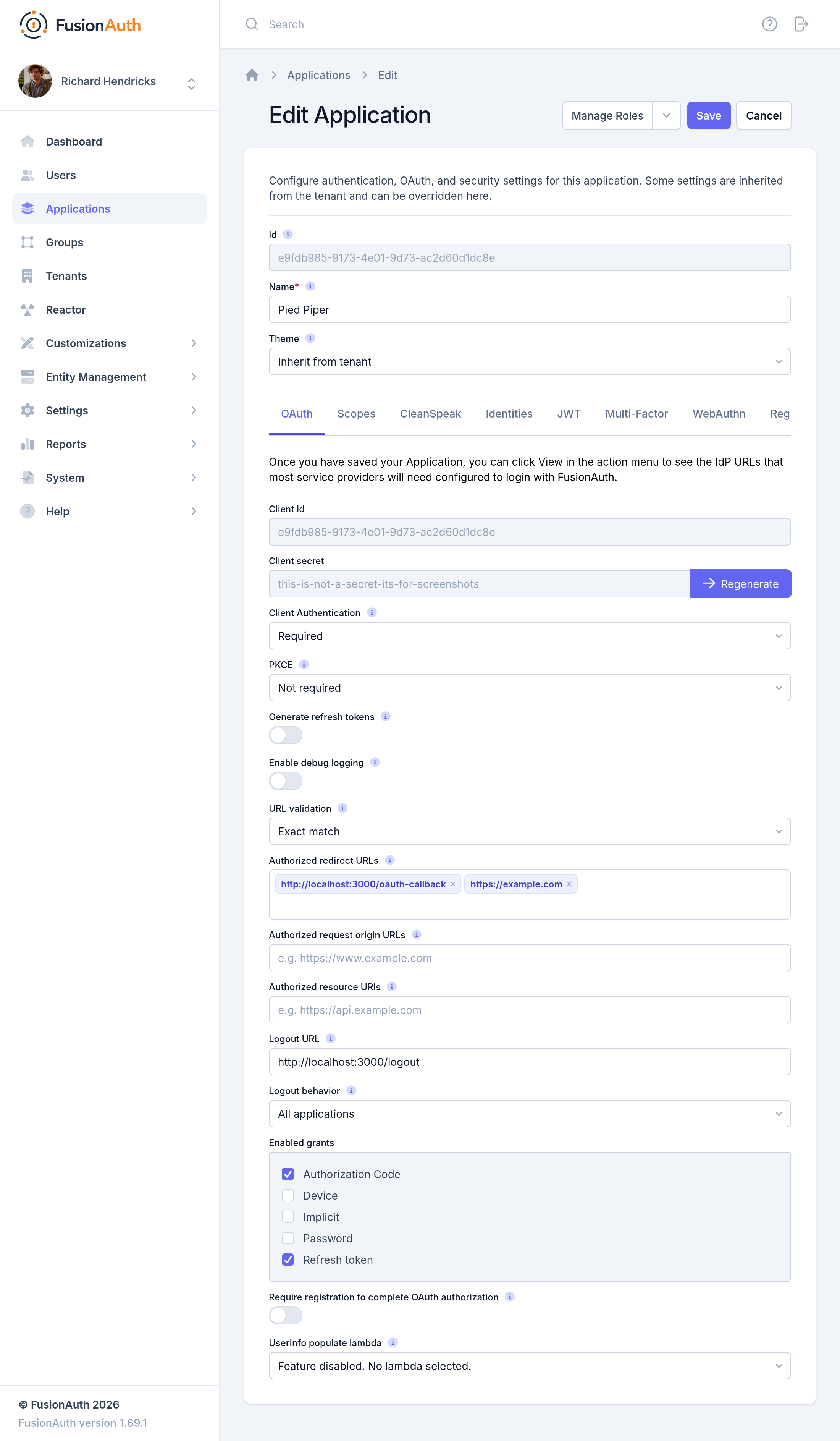
The Tenant holds more OAuth settings, such as token lifetimes. See Tenant Configuration.
OAuth Form Fields#
Client IdThe unique client identifier as defined by RFC 6749 Section 2.2. This value is read only and is equal to the unique Id of the Application.
Client secretThe client secret as defined by RFC 6749 Section 2.3.1. When Client Authentication is Required, this client secret will be required to obtain an access token from the Token endpoint.
This value may be regenerated if you think it has been compromised by clicking the regenerate button. If this Application is configured to require client authentication, regenerating the client secret will cause all clients to fail, and they will not be able to complete the OAuth login process. If this Application is not configured to require client authentication, regenerating this secret will not have any effect.
Client AuthenticationThis selector allows you to set a rule for accessing the Token endpoint.
The possible values are:
Required- Theclient_secretparameter must be used. This is the default setting. In most cases you will not want to change this setting.Not required- Use of theclient_secretparameter is optional.Not required when using PKCE- Requires the use of theclient_secretparameter unless a valid PKCE code_verifier parameter is used. This is useful for scenarios where you have a requirement to make a request to the Token endpoint where you cannot safely secure a client secret such as native mobile applications and single page applications (SPAs) running in a browser. In these scenarios it is recommended you use PKCE.
See the Token endpoint for more information.
PKCEThis selector allows you to set a rule for Proof Key for Code Exchange (or PKCE) requirements when using the authorization code grant.
The possible values are:
Required- Thecode_verifierparameter must be used. If you want to require PKCE for this application, set PKCE to this value.Not required- Use of thecode_verifierparameter is optional. This is the default setting.Not required when using client authentication- Requires the use of thecode_verifierparameter unless a validclient_secretparameter is used.
Generate refresh tokensWhen enabled, FusionAuth will return a refresh token when the offline_access scope has been requested. When this setting is disabled refresh tokens will not be generated even if the offline_access scope is requested.
In order to use the Refresh Token with the Refresh Grant to refresh a token, you must ensure that the Refresh Token grant is enabled. See the Enabled grants field.
Enable debug loggingEnable debug to create an event log to assist you in debugging integration errors.
URL validationControls the validation policy for Authorized redirect URLs and Authorized request origin URLs.
The possible values are:
Exact match- Only the configured values that do not contain wildcards are considered for validation. Values during OAuth 2.0 workflows must match a configured value exactly.Allow wildcards- Configured values with and without wildcards are considered for validation. Values during OAuth 2.0 workflows can be matched against wildcard patterns or exactly match a configured value.
Authorized redirect URLsWhen OAuth grants, such as the authorization code grant, require a browser redirect to a URL found in the redirect_uri parameter, the destination URLs must be added to this list. URLs that are not authorized may not be utilized in the redirect_uri parameter or the post_logout_redirect_uri parameter.
You can add as many URLs as you'd like to this list. Prior to version 1.43.0 only exact string matches with the provided redirect_uri will be allowed. No partial or wildcard matches will be accepted.
1.43.0Configured URLs containing wildcards are considered during validation when Authorized redirect URLs is set to Allow wildcards. Wildcards are allowed in the following positions:
- The left-most subdomain - A full or partial wildcard is allowed in the left-most subdomain. The replacement value cannot contain a
.. - The port number - A wildcard is allowed in place of the port number. Partial wildcards are not allowed in this position.
- A path segment - A full or partial wildcard is allowed in any path segment. The replacement value cannot contain a
/. - A query string value - A wildcard is allowed in place of a query string value. Partial wildcards are not allowed in this position. Wildcards are not allowed in query string names.
See the OAuth 2.0 URL Validation page for more detail.
Authorized request origin URLsThis optional configuration allows you to restrict the origin of an OAuth2 / OpenID Connect grant request. If no origins are registered for this Application, all origins are allowed.
By default FusionAuth will add the X-Frame-Options: DENY HTTP response header to the login pages to keep these pages from being rendered in an iframe. If the request comes from an authorized origin, however, FusionAuth will not add this header to the response. To load FusionAuth hosted login pages in an iframe, you will need to add the request origin to this configuration.
1.43.0Configured URLs containing wildcards are considered during validation when Authorized request origin URLs is set to Allow wildcards. Wildcards are allowed in the following positions:
- The left-most subdomain - A full or partial wildcard is allowed in the left-most subdomain. The replacement value cannot contain a
.. - The port number - A wildcard is allowed in place of the port number. Partial wildcards are not allowed in this position.
- A path segment - A full or partial wildcard is allowed in any path segment. The replacement value cannot contain a
/. - A query string value - A wildcard is allowed in place of a query string value. Partial wildcards are not allowed in this position. Wildcards are not allowed in query string names.
See the OAuth 2.0 URL Validation page for more detail.
Authorized resource URIsAn optional list of allowed resource server URIs for this Application, per RFC 8707 (Resource Indicators for OAuth 2.0). Defaults to an empty list.
Each URI must be an absolute URI and may not contain a fragment (#). When this list is non-empty, clients may pass a resource parameter during the OAuth authorize and token flows to request access tokens scoped to a specific resource server. These flows only accept URIs present in this list; all other values return an invalid_target error.
When this list is empty (the default), FusionAuth silently ignores any resource parameter sent by the client; existing application behavior is unchanged.
Examples of valid resource URIs:
https://api.example.comhttps://mcp.example.com/v2/api
Logout URLThe optional logout URL for this Application. When provided this logout URL should handle the logout of a user in your application.
If you need to end an HTTP session or delete cookies to logout a user from your application, these operations should be handled by this URL. When the /oauth2/logout endpoint is retrieved, each Logout URL registered for Applications in this tenant will be called within an iframe to complete the SSO logout.
If the OAuth2 logout endpoint is used with this Client Id, this configured Logout URL will be also utilized as the redirect URL. This behavior only occurs when the post_logout_redirect_uri parameter is not provided.
If this Application has not defined a Logout URL, the value configured at the Tenant level will be used. If no Logout URL has been configured, a redirect to / will occur. A specific redirect URL may also be provided by using the post_logout_redirect_uri request parameter.
See the Logout endpoint or the Logout And Session Management guide for more information.
Logout behaviorThis selector allows you to modify the behavior when using the Logout endpoint with this Client Id.
The possible values are:
All applications- This is the default behavior. Upon Logout of the FusionAuth SSO, call each registered Logout URLs for the entire tenant and then redirect to the Logout URL registered for this application.Redirect only- Do not call each registered Logout URL in the tenant, instead logout out of the FusionAuth SSO and then only redirect to the Logout URL registered for this application.
See the Logout endpoint for more information.
Enabled grantsThe enabled OAuth2 grants. If a grant is not enabled and a client requests this grant during authentication an error will be returned to the caller indicating the grant is not enabled.
- Authorization Code
- Device
- Implicit
- Password
- Refresh Token
When creating a new Application, the Authorization Code and Refresh Token grants will be enabled by default. See The OAuth 2.0 & OpenID Connect Overview for additional information on each of these grants.
Device Verification URLThe URL to be returned during the Device Authorization request to be displayed to the end user. This URL will be where the end user navigates in order to complete the device authentication workflow.
This field is required if Device is enabled in the OAuth Enabled grants for this Application and hidden when not.
Require registration to complete OAuth authorizationWhen enabled the user will be required to be registered, or complete registration before redirecting to the configured callback in the authorization code grant or the implicit grant. This configuration does not affect any other grant, and does not affect the API usage.
UserInfo populate lambdaThe lambda to be invoked during the generation of the UserInfo response when provided a token associated with this Application. See UserInfo populate lambda.
OAuth Scopes#
Grants that involve a user accept a space-delimited list of OAuth scopes in the scope parameter. To configure scope policies, add custom scopes, or ask users to consent to scopes for third-party apps, see Scopes.
Related
Learn how to get an access token for machine-to-machine requests with the OAuth Client Credentials grant.
API documentation for the FusionAuth Authorize OAuth2 endpoint.
Client Secret reference for FusionAuth OAuth2 endpoints.
API documentation for the FusionAuth Device OAuth2 endpoint.