# Enable SSO Across Applications
Learn how to let users log in once and reach every application in a FusionAuth tenant without logging in again.
> For the index of this section of the site, see [llms.txt](https://fusionauth.io/docs/llms.txt)
Single sign-on (SSO) lets a user log in to one application and then open your other applications without entering credentials again. FusionAuth provides SSO through the [SSO session](https://fusionauth.io/docs/authentication/sessions/how-sessions-work.md#the-sso-session) on the [hosted login pages](https://fusionauth.io/docs/concepts/integration-points.md#hosted-login-pages). For how the SSO session relates to your application sessions, see [How Sessions Work](https://fusionauth.io/docs/authentication/sessions/how-sessions-work.md).
## Prerequisites
* Two or more applications that log users in with the [Authorization Code grant](https://fusionauth.io/docs/authentication/oauth/authorization-code.md) and the hosted login pages. For the setup, see [Add Login to Your App](https://fusionauth.io/docs/authentication/oauth/add-login-to-your-app.md).
* All of the applications in the same [Tenant](https://fusionauth.io/docs/concepts/types/tenants.md). SSO doesn't span Tenants.
* A different host name for each application. Browsers share cookies across ports on the same host, so `localhost:3000` and `localhost:3001` overwrite each other's session cookies. For local development, add names such as `app-a.local` and `app-b.local` to your hosts file, pointing to `127.0.0.1`.
## Set Up SSO
The first two steps change FusionAuth settings and your theme. The last step changes your application code:
1. ### Configure Each Application
For each application, navigate to Applications -> Your Application -> OAuth and set the following fields:
* **Authorized redirect URLs** to the application's OAuth callback URL.
* **Logout URL** to a route in the application that ends the application session. FusionAuth loads this URL during logout. For more information, see [Log Users Out](https://fusionauth.io/docs/authentication/sessions/log-users-out.md).
SSO logs users in to Applications without a registration
Without **Require registration to complete OAuth authorization**, SSO logs a user in to every Application in the Tenant. The access token for an unregistered user has no **`applicationId`** or **`roles`** claims, so check those claims in your application. To block unregistered users, turn on **Require registration to complete OAuth authorization** and register the users who need access.
2. ### Create the SSO Session at Login
FusionAuth creates the SSO session only when the user checks **Keep me signed in** on the login page. To create the SSO session for every login, replace the checkbox with a hidden field. In your theme, edit the OAuth authorize template and replace the **`rememberDevice`** checkbox with the following field:
Create the SSO session at every login
```ftl
[@helpers.hidden name="rememberDevice" value="true"/]
```
To create no SSO session at all, such as on a kiosk, set **`value`** to `false` instead. Leave the checkbox in place when some users log in from shared computers. For how to edit theme templates, see [Advanced Themes](https://fusionauth.io/docs/theme/advanced-themes.md).
To change how long an idle SSO session lasts, see [Configure Session Lifetimes](https://fusionauth.io/docs/authentication/sessions/configure-session-lifetimes.md).
3. ### Redirect Users Without a Session to FusionAuth
When a request reaches an application and the user has no application session, redirect the browser to the FusionAuth authorize endpoint, as for any login. When the SSO session exists, FusionAuth redirects straight back with an authorization code, and the user sees no login form.
Don't wait for the user to click a login link. An application that shows a login link instead of redirecting still works with SSO, but the user has to click the link before FusionAuth logs the user in.
## Confirm the Result
1. Open application A in a private browser window. Log in with **Keep me signed in** checked, unless your theme sets the hidden field.
2. Open application B in the same window. Application B logs you in without a login form.
3. Log out of application A. Reload application B, and application B sends you to the login form.
When the last step leaves you logged in to application B, see [Troubleshoot Sessions and Logout](https://fusionauth.io/docs/authentication/sessions/troubleshooting.md#other-applications-stay-logged-in).
## Link to Your Applications From One Page
To give users one page that lists your applications, edit the Index template in your theme. FusionAuth shows the Index template at the root URL of your FusionAuth instance. Add a link to a protected page in each application:
Application links for the Index template
```html
App A
App B
```
Each link opens the application, which redirects to FusionAuth when the user has no application session. SSO then logs the user in. Link to the application, not to the FusionAuth authorize URL, so each application starts its own login with its own `state` and PKCE values. Avoid IdP-initiated login, where FusionAuth sends an unrequested login to the application. For a runnable version with two applications and a custom theme, see the [dashboard example repository](https://github.com/FusionAuth/fusionauth-example-multiapp-dashboard).
## Require a Fresh Login for One Application
SSO applies to every Application in the Tenant. To make one Application, such as an admin tool, ask for credentials even when the SSO session exists, add `prompt=login` to that application's authorize request. To ask for credentials only when the last login is older than a limit, add `max_age` with the limit in seconds, such as `max_age=900`. After the code exchange, check that the `auth_time` claim is recent. For more information, see [OIDC Prompt](https://fusionauth.io/docs/authentication/oauth/prompt.md).
To keep an Application out of SSO entirely, put the Application in a separate Tenant. Users then need a separate account in that Tenant.
For an extra factor before a sensitive action, rather than a full login, see [Step-Up Authentication](https://fusionauth.io/docs/authentication/multi-factor-authentication/step-up.md).
## Create an SSO Session From an Access Token
Available since `1.56.0`
When your application logs a user in outside the hosted login pages, such as with the Login API, the browser has no SSO session. FusionAuth can create the SSO session from a valid access token, so the user can then reach your other applications through SSO.
Turn on the Tenant setting once, then send each bootstrap request through a proxy:
1. ### Allow Access Token Bootstrap
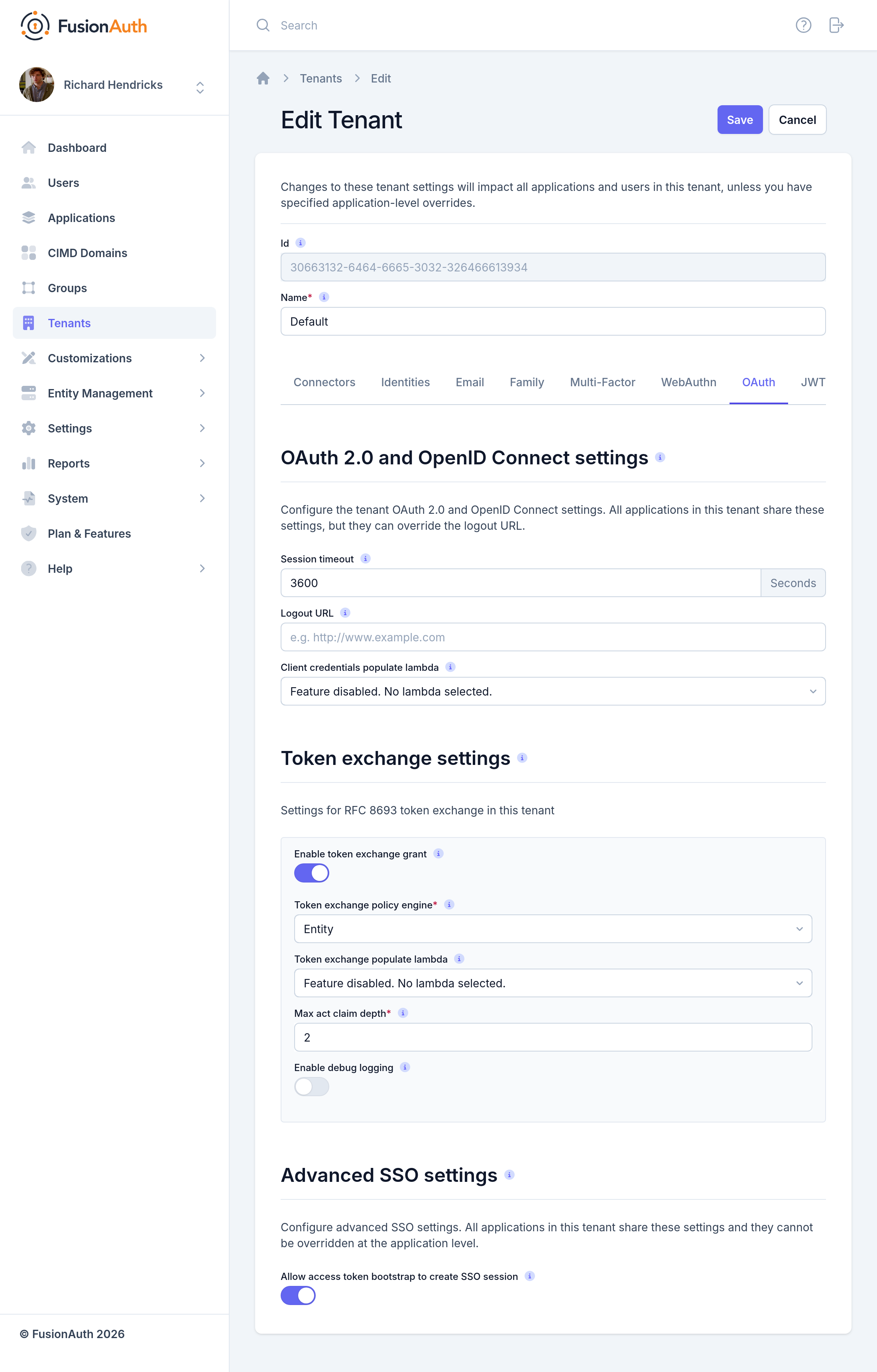
Navigate to Tenants -> Your Tenant -> OAuth and turn on **Allow access token bootstrap to create SSO session**. Click Save . With the API, set **`tenant.ssoConfiguration.allowAccessTokenBootstrap`** to `true` with the [Tenants API](https://fusionauth.io/docs/apis/tenants.md).
2. ### Send the Access Token to the Authorize Endpoint
Send a normal `GET` request to the [Authorize endpoint](https://fusionauth.io/docs/apis/oauth/authorize.md), with the access token in an `Authorization` header:
Authorization header for an SSO bootstrap request
```plaintext
Authorization: Bearer
```
A browser can't add the header to a redirect, so put a reverse proxy in front of FusionAuth. For example, when your application keeps the access token in an [HttpOnly cookie](https://fusionauth.io/docs/authentication/sessions/cookies.md), the proxy copies the cookie value into the `Authorization` header on requests to `/oauth2/authorize`.
FusionAuth accepts an access token that meets the following requirements:
* The token belongs to the same Tenant, and the `iss` claim matches the Tenant issuer.
* The token includes the `auth_time` claim. FusionAuth adds `auth_time` to every access token FusionAuth issues, so don't remove the claim in a JWT populate lambda.
* The token isn't sender-constrained with [DPoP](https://fusionauth.io/docs/authentication/oauth/dpop.md).
When the token is valid, FusionAuth creates the SSO session and completes the authorize request with a redirect to the `redirect_uri`. When the token is invalid, or belongs to a different user than an existing SSO session, FusionAuth ends the existing SSO session.
Related
[Authentication How Sessions Work in FusionAuth Learn about the sessions that keep a user logged in to FusionAuth and to your applications, and how the sessions relate. sessionsssosingle sign-on](https://fusionauth.io/docs/authentication/sessions/how-sessions-work.md)
[Concepts App Suite Let your users log in once and then transparently be logged into others. app suitemultiple applicationssingle sign-on](https://fusionauth.io/docs/concepts/patterns/app-suite.md)
[Authentication Sessions, SSO, and Logout Learn about how FusionAuth keeps users logged in across applications, and how to configure session lifetimes, single sign-on, and logout. sessionsssosingle sign-on](https://fusionauth.io/docs/authentication/sessions.md)
[Authentication Add FusionAuth Login to an External Application Learn how to let users log in to a third-party application, such as a SaaS product, with their FusionAuth accounts over OpenID Connect or SAML v2. single sign-onsso](https://fusionauth.io/docs/authentication/act-as-an-idp/add-login-to-external-app.md)
---
## Other pages in Sessions
> For the full index of this section, see [Authentication](https://fusionauth.io/docs/llms-authentication.txt).
- [Manage Application Sessions in FusionAuth With Refresh Tokens](https://fusionauth.io/docs/authentication/sessions/centralized-sessions.md): Learn how to track and revoke application sessions in FusionAuth by tying each session to a refresh token.
- [Configure Session and Token Lifetimes](https://fusionauth.io/docs/authentication/sessions/configure-session-lifetimes.md): Learn how to set how long users stay logged in to FusionAuth and to your applications.
- [Login Page Cookies](https://fusionauth.io/docs/authentication/sessions/cookies.md): Reference for the cookies that FusionAuth sets in the browser, including the SSO session cookie.
- [How Logout Works in FusionAuth](https://fusionauth.io/docs/authentication/sessions/how-logout-works.md): Learn about what each FusionAuth logout method ends, and how front-channel logout signs a user out of every application.
- [How Sessions Work in FusionAuth](https://fusionauth.io/docs/authentication/sessions/how-sessions-work.md): Learn about the sessions that keep a user logged in to FusionAuth and to your applications, and how the sessions relate.
- [Sessions, SSO, and Logout](https://fusionauth.io/docs/authentication/sessions.md): Learn about how FusionAuth keeps users logged in across applications, and how to configure session lifetimes, single sign-on, and logout.
- [Limit How Many Devices a User Can Log In From](https://fusionauth.io/docs/authentication/sessions/limit-concurrent-sessions.md): Learn how to cap the number of devices a user can stay logged in on at the same time.
- [Log Users Out of FusionAuth and Your Applications](https://fusionauth.io/docs/authentication/sessions/log-users-out.md): Learn how to log users out of one application or every application, and where to send users after logout.
- [View and Revoke User Sessions](https://fusionauth.io/docs/authentication/sessions/revoke-sessions.md): Learn how to list a user's sessions and end the sessions from the Admin UI, the API, or automatically.
- [Session and Token Lifetime Settings](https://fusionauth.io/docs/authentication/sessions/session-settings.md): Reference for every FusionAuth setting that controls session, token, and logout behavior.
- [Troubleshoot Sessions and Logout](https://fusionauth.io/docs/authentication/sessions/troubleshooting.md): Learn how to fix common problems with FusionAuth SSO, session lifetimes, and logout.