

Progressive delivery is the idea that instead of dumping a release of software onto your users, you allow them to control when new features are rolled out. It separates the deployment of software from feature enablement. This minimizes jerk, a term for unexpected user impact.
I recently hosted a webinar with Adam Zimman, one of the co-authors of "Progressive Delivery". We covered a wide range of topics, from Voyager One still receiving software updates to how BMW used feature flagging to comply with regional laws. You can watch the webinar here.
Identity is a critical part of progressive delivery. Adam covers two aspects of this in the webinar:
-
group your users: Dan might be a beta user who wants all new features rolled out immediately. Adam, on the other hand, wants a more stable and consistent user experience, with any changes introduced slowly (or after they are more thoroughly tested by early adopters in production). This categorization is tied to user identity and these preferences can be stored in one or more user attributes. Your application can then enable certain features for specific categories of users. The book calls this "progressive rollout".
-
allow users to opt in to certain categories: an individual user might want access to one set of new features (e.g. a new UI for a certain feature), or an organization admin could do the same for their entire team. This authority to determine when features are enabled is called "radical delegation".
Let's talk about how this would work.
High-Level Architecture#
Here's a high-level diagram of how a user would interact with an application architected for progressive delivery:
Progressive delivery interactions.
When a user logs in, the application forwards the authentication request to FusionAuth or another auth server. FusionAuth validates the credentials and returns a signed JWT. That JWT contains a rollout_level claim, which is an attribute that indicates which tier of features they should receive (for example, alpha, beta, or GA). In FusionAuth, this is done using the JWT populate lambda, which takes attributes from the user and adds them to the JWT. This pattern could also be used for longer-lived groupings, such as geography or pricing tier.
With the session established, the application passes the rollout_level to the feature management system, which evaluates the claim and returns the appropriate flag values for that user's level. The application renders the features that match, ensuring that new functionality is progressively exposed based on user attributes rather than a blanket release to all users.
You have two options for feature management:
- a specialized feature server, external from your application
- a feature flagging framework, which embeds the flagging logic
A specialized feature server (like LaunchDarkly, Flagsmith, or Unleash) offers governance, auditability, environment management, and reporting, but adds a dependency and cost. A feature flagging framework (like flipper, togglz or Microsoft.FeatureManagement) embedded in your application is cheaper and simpler, but you'll build out reporting and governance yourself as you scale.
FusionAuth Implementation#
Let's dig in a bit more into how FusionAuth can help with this kind of rollout plan.
The first step is identifying users by desired feature rollout. To do this, you'll add attributes to the user in the user.data field. The example above uses rollout_level, with a value corresponding to a tier like alpha, beta, or GA, but you could use numbers for more granularity.
Controlling The Attribute#
There are several ways to control rollout_level:
- user self-service, where the user controls their level
- admin control, where an admin user can assign a level to a user
- groups, where the rollout level is assigned to it and inherited by members
- tenants, where an entire set of users in a tenant are assigned a rollout level
Let's look at each of these and how you'd implement them in FusionAuth.
For user self-service, expose it to end users via account self-service. rollout_level is just one more form field the user can adjust. You ask them what level of feature rollout they prefer. You can use FusionAuth's self-service account pages, or build your own account pages that use the SDKs to set this value in FusionAuth.
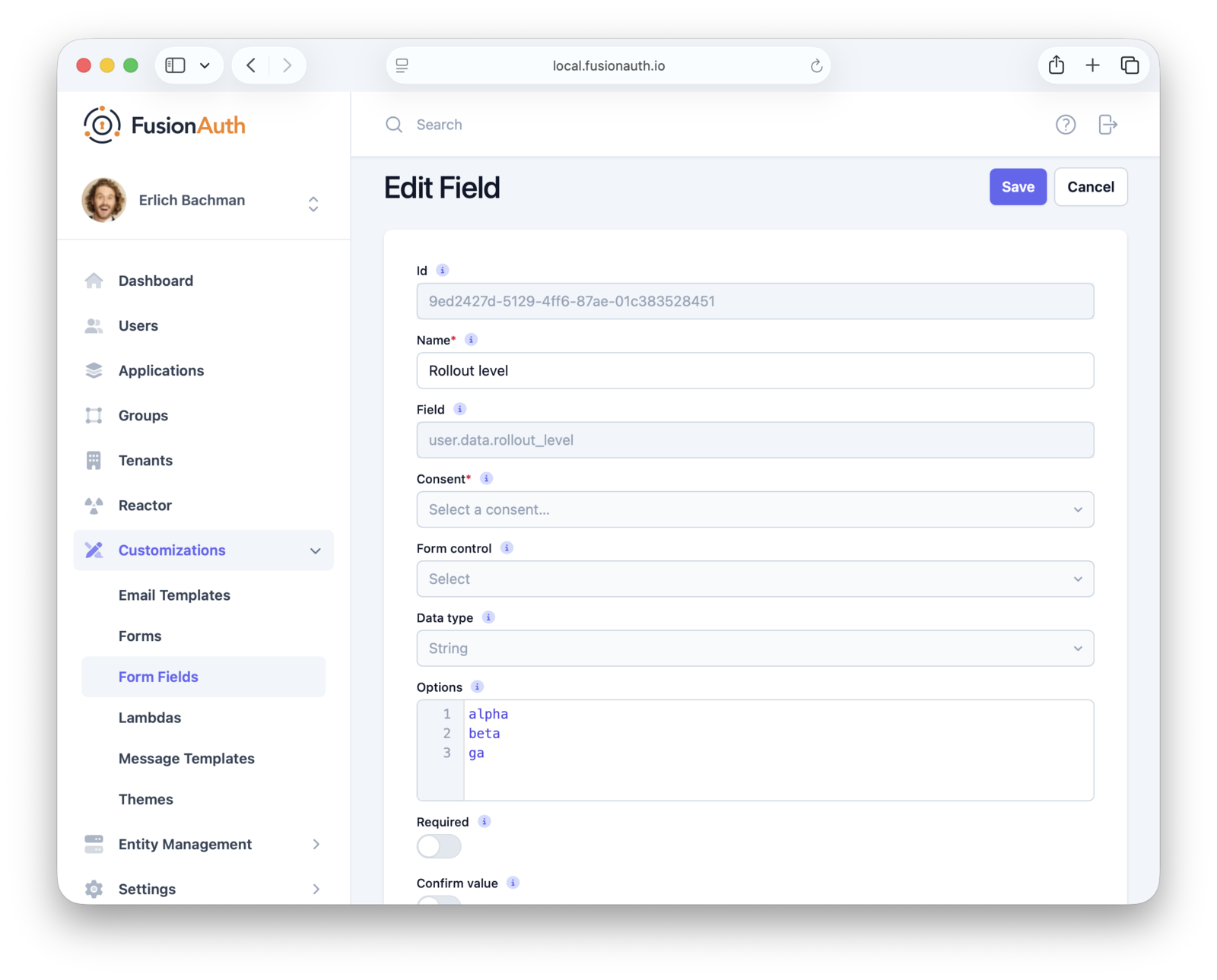
Above you can see creation of the rollout_level field; you'd then add it to the self-service form.
Alternatively, admins can set the rollout_level using custom admin forms in the FusionAuth admin UI. They can also use the SDK if the admin dashboard is in your application.
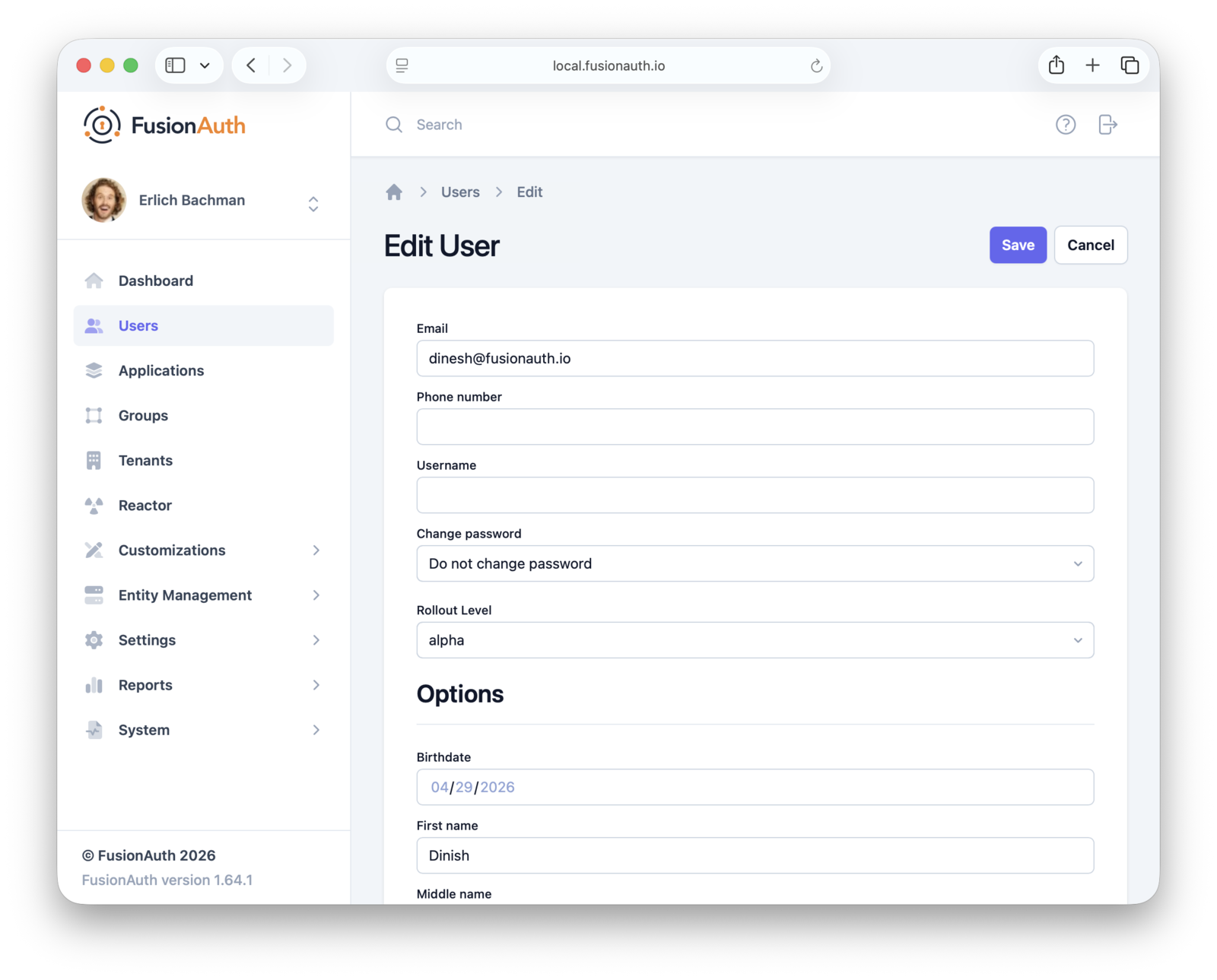
You can also manage this at the group level by associating a rollout tier with a specific group and placing users into it accordingly. You'll need to use the API or an SDK to set the group rollout tier. Here's an example of such code:
#!/bin/bash

FUSIONAUTH_URL="https://your-instance.fusionauth.io"
API_KEY="your-api-key"
GROUP_ID="$1"
ROLLOUT_LEVEL="$2"

if [[ -z "$GROUP_ID" || -z "$ROLLOUT_LEVEL" ]]; then
  echo "Usage: $0 <group-id> <alpha|beta|GA>"
  exit 1
fi

curl -s -X PATCH "$FUSIONAUTH_URL/api/group/$GROUP_ID" \
  -H "Authorization: $API_KEY" \
  -H "Content-Type: application/json" \
  -d "{
    \"group\": {
      \"data\": {
        \"rollout_level\": \"$ROLLOUT_LEVEL\"
      }
    }
  }"
which results in a group that looks like this (check out the data object):
{
  "group": {
    "data": {
      "rollout_level": "beta"
    },
    "id": "2b51db04-ceed-46ec-8506-73548a32c163",
    "insertInstant": 1777507062503,
    "lastUpdateInstant": 1777507081106,
    "name": "beta_users",
    "roles": {},
    "tenantId": "bafb4319-b7ca-ed27-fa2f-bbdba9d8ec06"
  }
}
Finally, you can also set the rollout_level for an entire tenant. This value then controls whether that set of users wants the latest features or prefers a more conservative feature rollout. To set it, you'd use a similar script or SDK as for the group configuration shown previously.
Delivering Attributes to Your Application#
Okay, so you've stored the rollout_level attribute on the user, group or tenant. But how does that attribute actually reach your application and the feature management system?
In FusionAuth, user attributes are delivered in a JWT after the user authenticates. You can customize your JWT format with a JWT populate lambda, as mentioned above. A lambda is also where you'd resolve precedence. If a user is assigned a rollout_level but is also in a group with a different setting, which one wins? The lambda code can determine this.
Here's example lambda code that pulls a value from a user data field.
function populate(jwt, user, registration, context) {
   if (user.data.rollout_level) {
     jwt.rollout_level = user.data.rollout_level;
   }
}
The user object is available to the JWT populate lambda.
Getting the rollout_level from a group or tenant is a bit more complex, because you need to call a FusionAuth API within the lambda (making fetch calls from a lambda is a paid feature). Here's an example that pulls from the group defined above.
function populate(jwt, user, registration, context) {
  var apiKey = context.services.secrets.get('FusionAuthAPIKey');

  var groupIds = user?.memberships?.map(m => m?.groupId) ?? [];

  var groupResponses = [];
  for (var groupId of groupIds) {
    var response = fetch(`http://localhost:9012/api/group/${groupId}`, {
      method: "GET",
      headers: {
        "Authorization": apiKey
      }
    });
    if (response.status === 200) {
      var group = JSON.parse(response.body);
      if (group.group?.data?.rollout_level) {
        jwt.rollout_level = group.group?.data?.rollout_level;
      }
    }
  }
}
In either case, you associate the lambda with your application, and then after the user logs in, you end up with a JWT that looks something like this:
{
  "aud": "85a03867-dccf-4882-adde-1a79aeec50df",
  "exp": 1777521955,
  "iat": 1777518355,
  "iss": "acme.com",
  "sub": "00000000-0000-0000-0000-000000000005",
  "jti": "e8df33c8-1715-4b31-a017-dbd9f6017dd7",
  "authenticationType": "PASSWORD",
  "tty": "at",
  "applicationId": "85a03867-dccf-4882-adde-1a79aeec50df",
  "roles": [],
  "auth_time": 1777518355,
  "tid": "30663132-6464-6665-3032-326466613934",
  "rollout_level": "beta"
}
Note the rollout_level claim. After verifying the signature of the JWT, this rollout_level claim is now available for all your downstream services.
These tokens should expire after seconds to minutes, depending on your settings. If you modify a user attribute, you can expect it to reach the JWT after, at most, the lifetime of the token. Within FusionAuth, you can set token lifetimes on an application by application basis. Weigh the impact of regular token refresh vs delay in propagating a change in tier to your feature management system.
Searching#
You can also use FusionAuth's search capabilities to query users or gather aggregate stats. For example, you might want to know how many users in a given tenant have enabled the beta rollout_level.
You can do this with this search query:
{
  "match": {
    "data.rollout_level": {
      "query": "beta"
    }
  }
}
This will give you all the users with that user.data field, but you can also query for just the total number of users using the accurateTotal attribute on the request and reading the total attribute on the response. There are similar APIs for finding the number of users in a group or tenant.
Running such search can help with decision making. For instance, you might want to monitor usage patterns of the beta group to decide when to promote a feature to GA.
Please see the search documentation for more details.
Connecting to Your Feature Flagging System#
Once that JWT is delivered to your application, verify the signature and other claims, then pass it to your feature management system and use the results from that system to control feature delivery.
Now, I don't want to minimize the engineering effort required to build out feature management in your application. That work happens in your application and the integration with a feature management system takes time and effort.
But with this pattern, you can undertake the effort knowing you have a solid identity source where user attributes are centrally managed in a flexible, performant way.
Summing Up#
Progressive delivery is fundamentally about deciding which users see which features when. That decision starts with knowing who your users are. Identity isn't just the login step that happens before the interesting work; it's the foundation that makes targeted rollouts possible in the first place.
By combining FusionAuth's flexible user attributes, data fields, search capabilities, and the JWT populate lambda, you have a centralized, performant place to manage the categorization that everything else depends on.
If you want to learn more, watch my full chat with Adam Zimman about progressive delivery and identity here.