Admin UI actions over themes blocks application since 1.61.2
-
@david-cuen Thanks for the detailed message. I hope to have some time today to try and replicate this. I will let you know what I see.
-
@david-cuen can you try to spin up a new instance and let me know if you see the problem? If not, it may have to do specifically with the themes themselves. If the new instance works correctly, import each theme and test. This may help narrow the issue.
-
Hi @mark-robustelli, thanks for your reply.
I have created a new instance as you suggested.With only the two default themes ("FusionAuth" and "FusionAuth - Simple"), everything works correctly.
I have been importing our themes one by one (all of them are advanced themes).
The search works correctly until it reaches 10 registered themes. After that number, the same error occurs.
It does not matter which themes are registered, but rather the total number of themes. Changing the themes creation order produces the same result.To discard problems in our themes data, I deleted them and started testing from scratch.
I created new themes using the default advanced theme "FusionAuth" as base and duplicating it.
When the 10 existing themes are reached, the problem occurs again.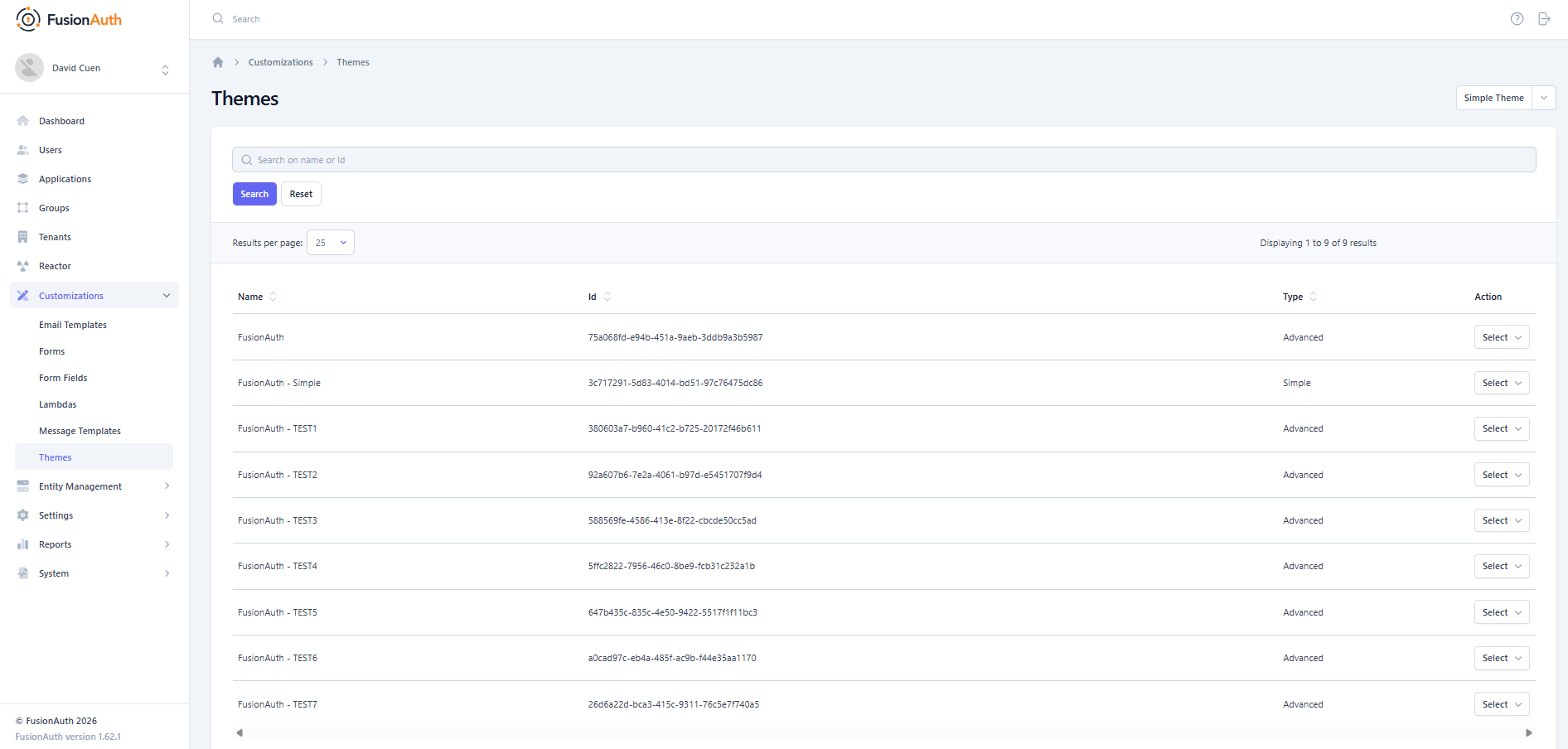
Creating new themes using the default simple theme as base, I have not been able to reproduce the problem exceeding 10 registered themes.
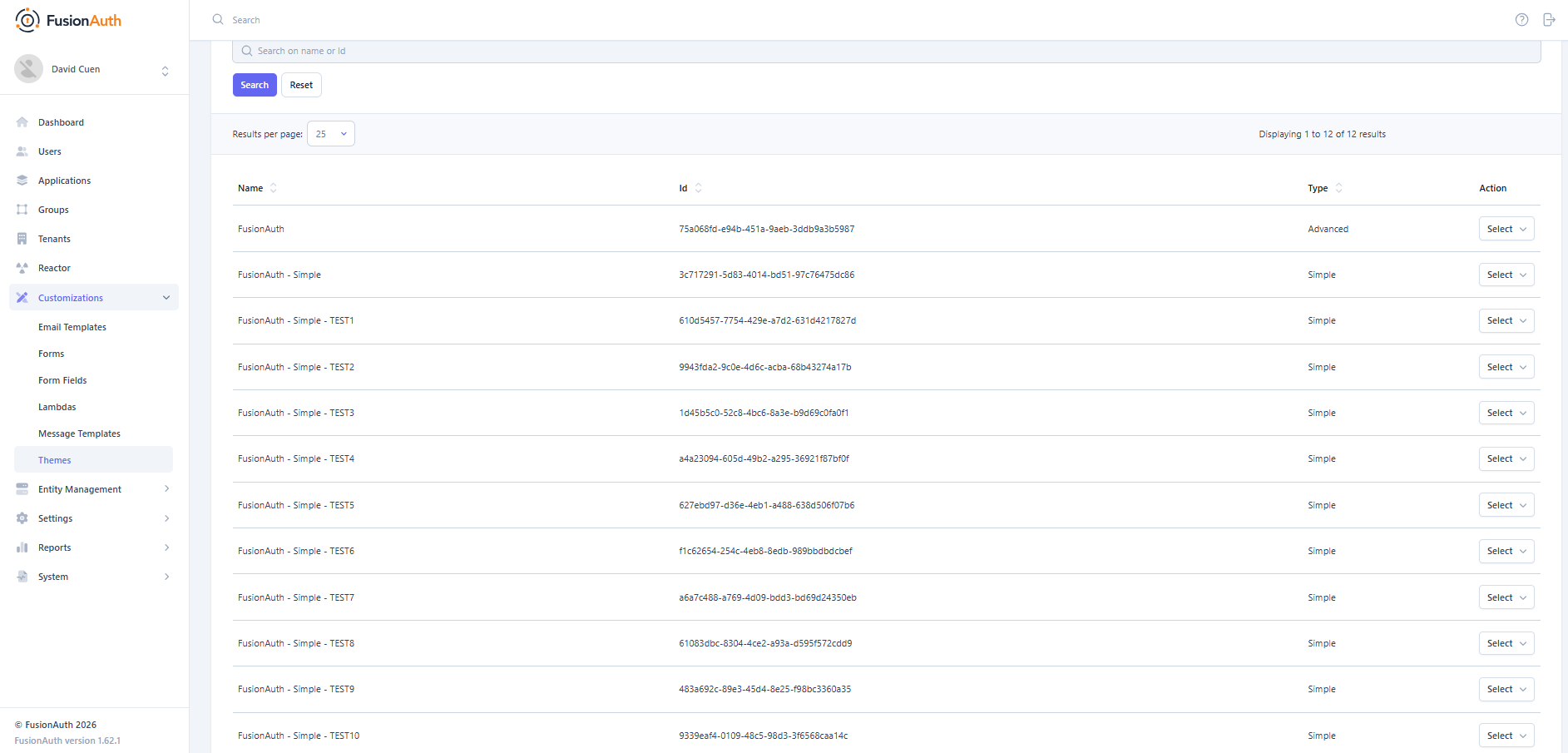
I assume that the problem is not related to the number of themes registered, but rather to the volume of data that they all contain.
-
@david-cuen Awesome that you have isolated the issues. I am going to test from my side and see if I can replicate with the 10+ themes. If I can then you should report this as a bug. I will let you know what I find. Hope to be able to get to this today.
-
@david-cuen OK, I was able to get more than 10, but you're right about it possibly being the size. Is it possible for you to share the theme you are using with us or me individually? I don't want you to give away any secrets, proprietary info or share anything private if you can't but getting a look at the theme may help.
-
@mark-robustelli I have downloaded the FusionAuth advanced default theme (id 75a068fd-e94b-451a-9aeb-3ddb9a3b5987) used in the tests with the FusionAuth CLI
The files are available in
https://github.com/davidcuenavoristravel/fusionauth-shared-themes/tree/main/default_theme/tplBest regards.
-
@david-cuen perfect. I was copying themes, but will us that one and let you know what I find.
-
@david-cuen Goodnews and badnews. The goodnews is that I imported the exact theme you pointed to and was able to copy that 11 times and not issues. My environment now has 26 themes. The badnews is that is not helping you. Sorry. I think we need to dig a little further. Based on the additional pages you mentioned (adding/editing tenant/application) I am wondering if something specific with the edits you have made to the themes. The fact that you change the order they are loaded in makes that less likely though. What are the sizes of the tpl folders for your themes?
-
@mark-robustelli The size of the tpl folders for each theme is around 352 KB - 404 KB.
I would like to mention that the hang occurs when launching the instance in a Linux environment with the Docker image.
If I launch a local instance on a Windows computer against the same PostgreSQL database, the hang problem does not occur.Version: 1.62.1
Platform: Windows 11 10.0 amd64Instances are launched with ENV var:
FUSIONAUTH_APP_MEMORY=1024M
DATABASE_CONNECTION_HEALTHCHECK_99PERCENT_MS=500When consulting Prometheus metrics with /api/status after the instance has recovered from the hang, errors appear in the theme search
            "prime-mvc.[/api/theme/search].errors": {
                "count": 2,
                "fifteenMinuteRate": 0.001224500060165843,
                "fiveMinuteRate": 0.002437052376257949,
                "meanRate": 0.0012614192847508726,
                "oneMinuteRate": 0.003282810949244636
            },
Any idea how to find the error that occurs in the internal call from fusionauth admin app to its API?
-
@mark-robustelli I've launched the instance in the infrastructure enabling an agentlib to perform remote debugging of the JVM.
Debugging the theme search process, I see following exception produced in the RESTClient response of the API call
com.inversoft.rest.JSONException: Failed to parse the HTTP response as JSON. Actual HTTP response body:
Note: Output has been truncated to the first 1024 of 2560141 bytes.

{"themes":[{"data":{},"defaultMessages":"#\n# Date and Time formats\n#\ndate-format=M/d/yyyy\ndate-time-format=M/d/yyyy hh:mm a z\ndate-time-seconds-format=M/d/yyyy hh:mm:ss a z\n\n#\n# Text used on the page (inside the HTML). You can create new key-value pairs here and use them in the templates.\n#\naccess-denied=Access denied\naccount=Account\naction=Action\nadd-two-factor=Add two-factor\nadd-webauthn-passkey=Add passkey\nback-to-login=Return to Login\ncancel=Cancel\ncaptcha-google-branding=This site is protected by reCAPTCHA and the Google <a href=\"https://policies.google.com/privacy\" class=\"text-indigo-500 hover:text-indigo-700 font-medium focus:outline-none focus:underline\">Privacy Policy</a> and <a href=\"https://policies.google.com/terms\" class=\"text-indigo-500 hover:text-indigo-700 font-medium focus:outline-none focus:underline\">Terms of Service</a> apply.\ncreated=Created\ncustomize=Customize\nauthorized-not-registered=Registration is required to access this application and your account has no
Cause:
"com.fasterxml.jackson.databind.JsonMappingException: Premature EOF (through reference chain: io.fusionauth.domain.api.ThemeSearchResponse["themes"]->java.util.ArrayList[9])"StackTrace:
com.inversoft.rest.JSONResponseHandler.apply(JSONResponseHandler.java:73) com.inversoft.rest.RESTClient.go(RESTClient.java:430) io.fusionauth.client.FusionAuthClient.searchThemes(FusionAuthClient.java:5372) io.fusionauth.app.action.admin.theme.IndexAction.lambda$search$0(IndexAction.java:52) io.fusionauth.client.LambdaDelegate.execute(LambdaDelegate.java:58) io.fusionauth.app.action.admin.theme.IndexAction.search(IndexAction.java:52) io.fusionauth.app.action.admin.BaseSearchAction.execute(BaseSearchAction.java:77) java.base/jdk.internal.reflect.DirectMethodHandleAccessor.invoke(DirectMethodHandleAccessor.java:103) java.base/java.lang.reflect.Method.invoke(Method.java:580) org.primeframework.mvc.util.ReflectionUtils.invoke(ReflectionUtils.java:443) org.primeframework.mvc.action.DefaultActionInvocationWorkflow.execute(DefaultActionInvocationWorkflow.java:77) org.primeframework.mvc.action.DefaultActionInvocationWorkflow.perform(DefaultActionInvocationWorkflow.java:60) org.primeframework.mvc.workflow.SubWorkflowChain.continueWorkflow(SubWorkflowChain.java:50) org.primeframework.mvc.message.DefaultMessageWorkflow.perform(DefaultMessageWorkflow.java:50) org.primeframework.mvc.workflow.SubWorkflowChain.continueWorkflow(SubWorkflowChain.java:50) org.primeframework.mvc.validation.DefaultValidationWorkflow.perform(DefaultValidationWorkflow.java:45) org.primeframework.mvc.workflow.SubWorkflowChain.continueWorkflow(SubWorkflowChain.java:50) org.primeframework.mvc.security.DefaultSecurityWorkflow.perform(DefaultSecurityWorkflow.java:79) org.primeframework.mvc.workflow.SubWorkflowChain.continueWorkflow(SubWorkflowChain.java:50) org.primeframework.mvc.parameter.DefaultPostParameterWorkflow.perform(DefaultPostParameterWorkflow.java:49) org.primeframework.mvc.workflow.SubWorkflowChain.continueWorkflow(SubWorkflowChain.java:50) org.primeframework.mvc.content.DefaultContentWorkflow.perform(DefaultContentWorkflow.java:74) org.primeframework.mvc.workflow.SubWorkflowChain.continueWorkflow(SubWorkflowChain.java:50) org.primeframework.mvc.parameter.DefaultParameterWorkflow.perform(DefaultParameterWorkflow.java:58) org.primeframework.mvc.workflow.SubWorkflowChain.continueWorkflow(SubWorkflowChain.java:50) org.primeframework.mvc.parameter.DefaultURIParameterWorkflow.perform(DefaultURIParameterWorkflow.java:92) org.primeframework.mvc.workflow.SubWorkflowChain.continueWorkflow(SubWorkflowChain.java:50) org.primeframework.mvc.scope.DefaultScopeRetrievalWorkflow.perform(DefaultScopeRetrievalWorkflow.java:50) org.primeframework.mvc.workflow.SubWorkflowChain.continueWorkflow(SubWorkflowChain.java:50) org.primeframework.mvc.action.DefaultActionMappingWorkflow.perform(DefaultActionMappingWorkflow.java:130) org.primeframework.mvc.workflow.SubWorkflowChain.continueWorkflow(SubWorkflowChain.java:50) org.primeframework.mvc.security.DefaultSavedRequestWorkflow.perform(DefaultSavedRequestWorkflow.java:65) org.primeframework.mvc.workflow.SubWorkflowChain.continueWorkflow(SubWorkflowChain.java:50) org.primeframework.mvc.cors.CORSFilter.doFilter(CORSFilter.java:188) org.primeframework.mvc.cors.CORSRequestWorkflow.perform(CORSRequestWorkflow.java:66) org.primeframework.mvc.workflow.SubWorkflowChain.continueWorkflow(SubWorkflowChain.java:50) org.primeframework.mvc.workflow.DefaultMVCWorkflow.perform(DefaultMVCWorkflow.java:109) org.primeframework.mvc.PrimeMVCRequestHandler.handle(PrimeMVCRequestHandler.java:76) io.fusionauth.http.server.internal.HTTPWorker.run(HTTPWorker.java:183) java.base/java.lang.VirtualThread.run(VirtualThread.java:329) -
@david-cuen sorry for the delayed response. I was unexpectedly out. Thanks for trying to dig a bit deeper. The message you definitely leads me to believe that it is either a specific theme or as you said a size thing. Both are a bit confusing to me as the size you mentioned for your themes does not seem that bit and you stated that you tried loading the themes in different orders and that did not seem to make a difference. I will see if I can dig a little deeper on these error messages and see if there is anything I can find.
-
@mark-robustelli The error occurs when the response from the theme search is greater than 2.5 MB.
I don't know if it's related or not, but it happens to me in versions of FusionAuth later than 1.60.2.
In the release notes for version 1.61.0, an upgrade of the Jackson dependencies has just been madehttps://fusionauth.io/docs/release-notes/#version-1-61-0
Upgrade com.fasterxml.jackson.* 2.17.2 -> 2.19.2In that version of Jackson, the collection deserialization process has been modified.
-
@david-cuen I wasn't able to find much else out on Friday. Awesome that it looks like you have it narrowed down to the size. I will try to replicate this. I will let you know if I can.
-
@david-cuen This is really weird. I was not able to replicate it. There is one more thing I may try later if I get some time. That is to make one template that big and try that.
In the mean time, I went back to look at the error message. "Premature EOF" and the fact that it was working on a windows box has be back to believing that a funky character or something is causing the error on the linux box. I wish we could narrow it down. Have you tried to install into another linux environment, EC2 for example, and see if you get the same issue? (That may tell us if it is a linux thing or if it is your one specific environment.) Also, someone mentioned to ask if you have any proxies running in front of FusionAuth?
-
@mark-robustelli
The instance is currently running in an AWS EC2 Linux environment. I'm sorry, but I can't change the infrastructure.The error occurs when processing the response to the internal call made from FusionAuth with the RESTClient to the endpoint
http://localhost:9012/api/theme/search.
As far as I know, there is no proxy running in front of this internal FusionAuth call.I have tried making calls to /api/theme/search from outside of the instance container.
The result is always correct and with the complete JSON response.Regarding funky characters in themes, in my tests they are all clones of the default advanced theme. So I can't understand the difference in the error when having +1 default advanced theme, only what was mentioned about the final size of the response.
I'm going to try to reproduce it using default simple theme clones.
-
@david-cuen Thanks for your patience and dedication to seeing this through. It would help a ton if you could find something reproducible. Let me know what you find and I can continue to try it on this end.
-
I’ve been investigating the issue over the last few weeks.
Having taken a JVM dump while the issue was occurring, here is the stack trace for the thread causing the deadlock
 {
   "tid": "8820",
   "name": "HTTP client [\/[0:0:0:0:0:0:0:1]:50154]",
   "stack": [
      "java.base\/jdk.internal.misc.Unsafe.park(Native Method)",
      "java.base\/java.lang.VirtualThread.parkOnCarrierThread(VirtualThread.java:677)",
      "java.base\/java.lang.VirtualThread.parkNanos(VirtualThread.java:648)",
      "java.base\/java.lang.System$2.parkVirtualThread(System.java:2652)",
      "java.base\/jdk.internal.misc.VirtualThreads.park(VirtualThreads.java:67)",
      "java.base\/java.util.concurrent.locks.LockSupport.parkNanos(LockSupport.java:408)",
      "java.base\/sun.nio.ch.Poller.pollIndirect(Poller.java:137)",
      "java.base\/sun.nio.ch.Poller.poll(Poller.java:102)",
      "java.base\/sun.nio.ch.Poller.poll(Poller.java:87)",
      "java.base\/sun.nio.ch.NioSocketImpl.park(NioSocketImpl.java:175)",
      "java.base\/sun.nio.ch.NioSocketImpl.timedRead(NioSocketImpl.java:280)",
      "java.base\/sun.nio.ch.NioSocketImpl.implRead(NioSocketImpl.java:304)",
      "java.base\/sun.nio.ch.NioSocketImpl.read(NioSocketImpl.java:346)",
      "java.base\/sun.nio.ch.NioSocketImpl$1.read(NioSocketImpl.java:796)",
      "java.base\/java.net.Socket$SocketInputStream.read(Socket.java:1099)",
      "java.base\/java.io.BufferedInputStream.fill(BufferedInputStream.java:291)",
      "java.base\/java.io.BufferedInputStream.read1(BufferedInputStream.java:347)",
      "java.base\/java.io.BufferedInputStream.implRead(BufferedInputStream.java:420)",
      "java.base\/java.io.BufferedInputStream.read(BufferedInputStream.java:399)",
      "java.base\/sun.net.www.http.ChunkedInputStream.fastRead(ChunkedInputStream.java:244)",
      "java.base\/sun.net.www.http.ChunkedInputStream.read(ChunkedInputStream.java:698)",
      "java.base\/java.io.FilterInputStream.read(FilterInputStream.java:119)",
      "java.base\/sun.net.www.protocol.http.HttpURLConnection$HttpInputStream.read(HttpURLConnection.java:3677)",
      "java.base\/java.io.BufferedInputStream.read1(BufferedInputStream.java:345)",
      "java.base\/java.io.BufferedInputStream.implRead(BufferedInputStream.java:420)",
      "java.base\/java.io.BufferedInputStream.read(BufferedInputStream.java:405)",
      "com.inversoft.rest.JSONResponseHandler$BetterBufferedInputStream.read(JSONResponseHandler.java:127)",
      "com.fasterxml.jackson.core.json.UTF8StreamJsonParser._loadMore(UTF8StreamJsonParser.java:220)",
      "com.fasterxml.jackson.core.json.UTF8StreamJsonParser._loadMoreGuaranteed(UTF8StreamJsonParser.java:2457)",
      "com.fasterxml.jackson.core.json.UTF8StreamJsonParser._finishString2(UTF8StreamJsonParser.java:2540)",
      "com.fasterxml.jackson.core.json.UTF8StreamJsonParser._finishAndReturnString(UTF8StreamJsonParser.java:2520)",
      "com.fasterxml.jackson.core.json.UTF8StreamJsonParser.getText(UTF8StreamJsonParser.java:294)",
      "com.fasterxml.jackson.databind.deser.std.StringDeserializer.deserialize(StringDeserializer.java:42)",
      "com.fasterxml.jackson.databind.deser.std.StringDeserializer.deserialize(StringDeserializer.java:11)",
      "com.fasterxml.jackson.databind.deser.impl.FieldProperty.deserializeAndSet(FieldProperty.java:137)",
      "com.fasterxml.jackson.databind.deser.BeanDeserializer.vanillaDeserialize(BeanDeserializer.java:302)",
      "com.fasterxml.jackson.databind.deser.BeanDeserializer.deserialize(BeanDeserializer.java:169)",
      "com.fasterxml.jackson.databind.deser.impl.FieldProperty.deserializeAndSet(FieldProperty.java:137)",
      "com.fasterxml.jackson.databind.deser.BeanDeserializer.vanillaDeserialize(BeanDeserializer.java:302)",
      "com.fasterxml.jackson.databind.deser.BeanDeserializer.deserialize(BeanDeserializer.java:169)",
      "com.fasterxml.jackson.databind.deser.std.CollectionDeserializer._deserializeNoNullChecks(CollectionDeserializer.java:501)",
      "com.fasterxml.jackson.databind.deser.std.CollectionDeserializer._deserializeFromArray(CollectionDeserializer.java:358)",
      "com.fasterxml.jackson.databind.deser.std.CollectionDeserializer.deserialize(CollectionDeserializer.java:245)",
      "com.fasterxml.jackson.databind.deser.std.CollectionDeserializer.deserialize(CollectionDeserializer.java:29)",
      "com.fasterxml.jackson.databind.deser.impl.FieldProperty.deserializeAndSet(FieldProperty.java:137)",
      "com.fasterxml.jackson.databind.deser.BeanDeserializer.vanillaDeserialize(BeanDeserializer.java:302)",
      "com.fasterxml.jackson.databind.deser.BeanDeserializer.deserialize(BeanDeserializer.java:169)",
      "com.fasterxml.jackson.databind.deser.DefaultDeserializationContext.readRootValue(DefaultDeserializationContext.java:342)",
      "com.fasterxml.jackson.databind.ObjectMapper._readMapAndClose(ObjectMapper.java:4971)",
      "com.fasterxml.jackson.databind.ObjectMapper.readValue(ObjectMapper.java:3924)",
      "com.inversoft.rest.JSONResponseHandler.apply(JSONResponseHandler.java:68)",
      "com.inversoft.rest.RESTClient.go(RESTClient.java:430)",
      "io.fusionauth.client.FusionAuthClient.searchThemes(FusionAuthClient.java:5372)",
      "io.fusionauth.app.action.admin.theme.IndexAction.lambda$search$0(IndexAction.java:52)",
      "io.fusionauth.client.LambdaDelegate.execute(LambdaDelegate.java:58)",
      "io.fusionauth.app.action.admin.theme.IndexAction.search(IndexAction.java:52)",
      "io.fusionauth.app.action.admin.BaseSearchAction.execute(BaseSearchAction.java:77)",
      "java.base\/jdk.internal.reflect.DirectMethodHandleAccessor.invoke(DirectMethodHandleAccessor.java:103)",
      "java.base\/java.lang.reflect.Method.invoke(Method.java:580)",
      "org.primeframework.mvc.util.ReflectionUtils.invoke(ReflectionUtils.java:443)",
      "org.primeframework.mvc.action.DefaultActionInvocationWorkflow.execute(DefaultActionInvocationWorkflow.java:77)",
      "org.primeframework.mvc.action.DefaultActionInvocationWorkflow.perform(DefaultActionInvocationWorkflow.java:60)",
      "org.primeframework.mvc.workflow.SubWorkflowChain.continueWorkflow(SubWorkflowChain.java:50)",
      "org.primeframework.mvc.message.DefaultMessageWorkflow.perform(DefaultMessageWorkflow.java:50)",
      "org.primeframework.mvc.workflow.SubWorkflowChain.continueWorkflow(SubWorkflowChain.java:50)",
      "org.primeframework.mvc.validation.DefaultValidationWorkflow.perform(DefaultValidationWorkflow.java:45)",
      "org.primeframework.mvc.workflow.SubWorkflowChain.continueWorkflow(SubWorkflowChain.java:50)",
      "org.primeframework.mvc.security.DefaultSecurityWorkflow.perform(DefaultSecurityWorkflow.java:79)",
      "org.primeframework.mvc.workflow.SubWorkflowChain.continueWorkflow(SubWorkflowChain.java:50)",
      "org.primeframework.mvc.parameter.DefaultPostParameterWorkflow.perform(DefaultPostParameterWorkflow.java:49)",
      "org.primeframework.mvc.workflow.SubWorkflowChain.continueWorkflow(SubWorkflowChain.java:50)",
      "org.primeframework.mvc.content.DefaultContentWorkflow.perform(DefaultContentWorkflow.java:74)",
      "org.primeframework.mvc.workflow.SubWorkflowChain.continueWorkflow(SubWorkflowChain.java:50)",
      "org.primeframework.mvc.parameter.DefaultParameterWorkflow.perform(DefaultParameterWorkflow.java:58)",
      "org.primeframework.mvc.workflow.SubWorkflowChain.continueWorkflow(SubWorkflowChain.java:50)",
      "org.primeframework.mvc.parameter.DefaultURIParameterWorkflow.perform(DefaultURIParameterWorkflow.java:92)",
      "org.primeframework.mvc.workflow.SubWorkflowChain.continueWorkflow(SubWorkflowChain.java:50)",
      "org.primeframework.mvc.scope.DefaultScopeRetrievalWorkflow.perform(DefaultScopeRetrievalWorkflow.java:50)",
      "org.primeframework.mvc.workflow.SubWorkflowChain.continueWorkflow(SubWorkflowChain.java:50)",
      "org.primeframework.mvc.action.DefaultActionMappingWorkflow.perform(DefaultActionMappingWorkflow.java:130)",
      "org.primeframework.mvc.workflow.SubWorkflowChain.continueWorkflow(SubWorkflowChain.java:50)",
      "org.primeframework.mvc.security.DefaultSavedRequestWorkflow.perform(DefaultSavedRequestWorkflow.java:65)",
      "org.primeframework.mvc.workflow.SubWorkflowChain.continueWorkflow(SubWorkflowChain.java:50)",
      "org.primeframework.mvc.cors.CORSFilter.doFilter(CORSFilter.java:188)",
      "org.primeframework.mvc.cors.CORSRequestWorkflow.perform(CORSRequestWorkflow.java:66)",
      "org.primeframework.mvc.workflow.SubWorkflowChain.continueWorkflow(SubWorkflowChain.java:50)",
      "org.primeframework.mvc.workflow.DefaultMVCWorkflow.perform(DefaultMVCWorkflow.java:109)",
      "org.primeframework.mvc.PrimeMVCRequestHandler.handle(PrimeMVCRequestHandler.java:76)",
      "io.fusionauth.http.server.internal.HTTPWorker.run(HTTPWorker.java:183)",
      "java.base\/java.lang.VirtualThread.run(VirtualThread.java:329)"
   ]
 }
I enabled trace logging in
io.fusionauth.http.server.internalto analyse the process in HTTPWorker2026-03-12 03:53:18.758 PM TRACE io.fusionauth.http.server.internal.HTTPWorker - [993] Running HTTP worker. Block while we wait to read the preamble 2026-03-12 03:53:18.758 PM TRACE io.fusionauth.http.server.internal.HTTPWorker - [993] Set state [Process]. Call the request handler. 2026-03-12 03:53:18.773 PM TRACE io.fusionauth.http.server.internal.HTTPWorker - [993] Handler completed successfully 2026-03-12 03:53:18.773 PM TRACE io.fusionauth.http.server.internal.HTTPWorker - [993] Enter Keep-Alive state [KeepAlive] Reset socket timeout [60000]. 2026-03-12 03:53:18.773 PM TRACE io.fusionauth.http.server.internal.HTTPWorker - [993] Running HTTP worker. Block while we wait to read the preamble 2026-03-12 03:53:18.775 PM TRACE io.fusionauth.http.server.internal.HTTPWorker - [993] Set state [Process]. Call the request handler. 2026-03-12 03:53:18.776 PM TRACE io.fusionauth.http.server.internal.HTTPWorker - [993] Handler completed successfully 2026-03-12 03:53:18.776 PM TRACE io.fusionauth.http.server.internal.HTTPWorker - [993] Enter Keep-Alive state [KeepAlive] Reset socket timeout [60000]. 2026-03-12 03:53:18.776 PM TRACE io.fusionauth.http.server.internal.HTTPWorker - [993] Running HTTP worker. Block while we wait to read the preamble 2026-03-12 03:53:18.777 PM TRACE io.fusionauth.http.server.internal.HTTPWorker - [993] Set state [Process]. Call the request handler. 2026-03-12 03:53:19.977 PM TRACE io.fusionauth.http.server.internal.HTTPServerThread - [993] Check worker in state [Write] 2026-03-12 03:53:21.978 PM TRACE io.fusionauth.http.server.internal.HTTPServerThread - [993] Check worker in state [Write] 2026-03-12 03:53:23.979 PM TRACE io.fusionauth.http.server.internal.HTTPServerThread - [993] Check worker in state [Write] ... ... 2026-03-12 03:55:54.019 PM TRACE io.fusionauth.http.server.internal.HTTPServerThread - [993] Check worker in state [Write] 2026-03-12 03:55:56.019 PM DEBUG io.fusionauth.http.server.internal.HTTPServerThread - [993] Check worker in state [Write] writingSlow=[true] writeThroughput=[16271] minimumWriteThroughput=[16384] 2026-03-12 03:55:56.019 PM DEBUG io.fusionauth.http.server.internal.HTTPServerThread - [993] Closing connection readingSlow=[false] writingSlow=[true] timedOut=[false] Min write throughput [16384], actual throughput [16271]. 2026-03-12 03:55:56.019 PM DEBUG io.fusionauth.http.server.internal.HTTPServerThread - [993] Closing client connection [/127.0.0.1:36278] due to inactivity 2026-03-12 03:55:56.021 PM TRACE io.fusionauth.http.server.internal.HTTPServerThread - Thread dump from server side. 2026-03-12 03:55:56.024 PM DEBUG io.fusionauth.http.server.internal.HTTPWorker - [993] Closing socket. The socket was closed by a client, proxy or otherwise.The HTTPWorker begins the process of reading and writing the response for the request, and continues for 2.6 minutes until the HTTPServerThread terminates it because the minimumWriteThroughput (16KB/sec) threshold has not been met.
HTTPServerCleanerThread kills the server-side connection mid-response due to a write throughput check that measures average bytes/sec since the first socket write.
The client is waiting for data that the server is generating very slowly.Analyzing why the server is writing so slowly (16271 bytes/sec):
The call is http://localhost:9012 — FusionAuth calls itself. Client and server virtual threads share the same JVM's carrier thread pool.
With Kubernetes CPU limit = 1000m, JDK 21 uses UseContainerSupport (default), so availableProcessors() = 1 → only 1 carrier thread.com.inversoft.rest.JSONResponseHandler$BetterBufferedInputStream.read(byte[], int, int) is synchronized — causes virtual thread carrier thread pinning in JDK 21.
- Client virtual thread enters synchronized read() → calls ChunkedInputStream.fastRead() → calls socket.read() which blocks → PINS the carrier thread (can't unmount from synchronized block)
- Server virtual thread needs to write more data but cannot get a carrier thread (carrier thread pinned by client)
- Neither makes progress → throughput decays over time as numberOfBytesWritten is fixed but elapsed keeps growing
BetterBufferedInputStream.read()pins that single carrier thread while blocking onChunkedInputStream.fastRead(), leaving no carrier thread for the server to write more data. The resulting ping-pong limits throughput to ~16 KB/sec on a 2.5MB response.HTTPServerCleanerThread computes average throughput since the very first write (not a recent window). With 2.5MB written at 16271 bytes/sec average, that's ~156 seconds (2.6 min) before the average decays below the 16384 bytes/sec threshold.
With 9 themes, the response is small enough to fit entirely within the kernel’s socket buffer (~128KB). The server writes the entire content in one go without blocking on
socket.write()(the buffer does not fill up), transitions to the KeepAlive state, and the cleaner can no longer terminate the connection due to write throughput.As a workaround, I resolved the issue increasing the Kubernetes CPU limit from 1000m to 1050m.
Kubernetes translates the CPU limit into the container’s cgroups, setting 2 carrier threads instead of 1.With that CPU limit, all themes are recovered properly, also with 35 themes (~6.2 MB response).
Can you reproduce it setting Kubernetes CPU limit to 1000m (1 core) in your environment?