

In FusionAuth FGA By Permify, you can run individual permission checks quickly. Each check takes about 15 milliseconds (ms), which is as fast as a single frame on a 60 Hz monitor. But if your app needs to display a user's permissions to 30 documents on a dashboard, the resulting half-second delay is noticeable and annoying.
In December 2025, FusionAuth FGA By Permify added a new Bulk Check API endpoint to fix this problem. You can now perform a bulk permissions check, enabling you to verify multiple users' permissions across multiple resources in a single API call.
Consider the previous example: Instead of performing 30 individual checks that unnecessarily occupy your network and the FusionAuth FGA By Permify server, you can check all 30 documents in a single API call. You also save your app server from having to coordinate and collect the results of multiple calls. A bulk permissions check reduces latency and has less overhead than sending checks one by one.
The Bulk Check API lets you verify up to 100 permissions in a single call.
(If you'd like to see the code for this feature, it was made in this GitHub commit. The original feature request was GitHub request 1199.)
The rest of this post demonstrates how to perform a bulk check.
The example schema#
Let's use a simple schema of doctors, patients, and medical records:
entity user {
	relation hasDoctor @user
	relation hasGuardian @user
	relation isChild @user
}

entity record {
	relation owner @user
	relation consultant @user
	action view = (owner not owner.isChild) or
                   owner.hasGuardian or owner.hasDoctor or consultant
	action edit = owner.hasDoctor
}
In the schema above, users can have doctors, and users can be children who have guardians. Adult users can see their own medical records, and doctors can edit their patients' records. Doctors consulting on a record can only view that record, not edit it. Children cannot see their medical records.
The following screenshot shows a visualization of the schema above. To take a closer look, copy the schema code into the Permify Playground.
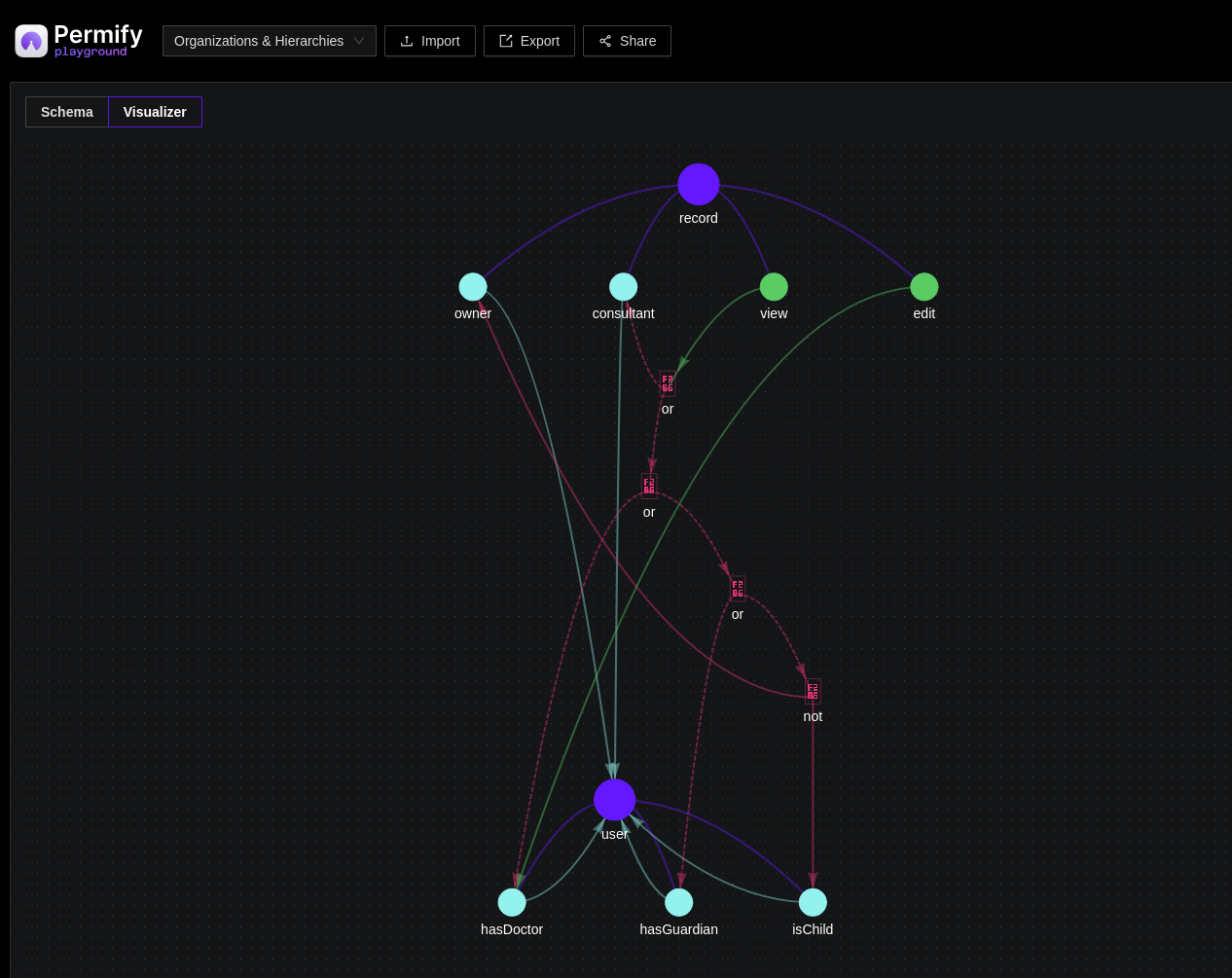
(A FusionAuth FGA By Permify schema does not restrict cardinality, meaning that a record may have many owners. Restricting a record to one owner is something you need to manage in your own data.)
The example data#
Let's create:
- A user who is also a doctor and a mother, called Alice.
- Her child, Bob.
- Alice's patient, Carol.
- Another patient, Dan, whom Alice does not treat.
- Another doctor, Eve, who treats that patient.
- A final patient, Frank, whom the other doctor Eve treats and whom Alice consults on.
- Medical records for all the users.
Given the schema rules, Alice can view but not edit her own record, as well as her child Bob's. Her child Bob cannot view his own record. Alice can edit her patient Carol's record, but not the record of the patient that she has no consulting or doctoral relationship with, Dan. Lastly, Alice can view but not edit the record of the patient on whom she consults, Frank.
Create the example in FusionAuth FGA By Permify#
The bulk check is in the next section. To run this example on your own computer, follow the instructions below before continuing.
- Run FusionAuth FGA By Permify in Docker using the in-memory database with the following command (Permify needs only 78 MB disk space):
docker run --rm --name="permify" -p 3476:3476 -p 3478:3478 ghcr.io/permify/permify serve
- In another terminal, create the schema and data in FusionAuth FGA By Permify using the following command:
# write schema - https://docs.permify.co/api-reference/schema/write-schema
schemaVersion=$(curl --location --request POST 'localhost:3476/v1/tenants/t1/schemas/write' \
  --header 'Content-Type: application/json' \
  --data-raw '{
  "schema": "entity user {\n  relation hasDoctor @user\n  relation hasGuardian @user\n  relation isChild @user\n}\n entity record {\n  relation owner @user\n  relation consultant @user\n  action view = (owner not owner.isChild) or owner.hasGuardian or owner.hasDoctor or consultant\n  action edit = owner.hasDoctor\n}"
}' | jq -r '.schema_version')

# write data - https://docs.permify.co/api-reference/data/write-data
curl --location --request POST 'localhost:3476/v1/tenants/t1/data/write' \
  --header 'Content-Type: application/json' \
  --data-raw '{
  "metadata": {"schema_version":"'"$schemaVersion"'"},
  "tuples":[
    {"entity":{"type":"user","id":"Carol"},"relation":"hasDoctor","subject":{"type":"user","id":"Alice"}},
    {"entity":{"type":"user","id":"Bob"},"relation":"isChild","subject":{"type":"user","id":"Bob"}},
    {"entity":{"type":"user","id":"Bob"},"relation":"hasGuardian","subject":{"type":"user","id":"Alice"}},
    {"entity":{"type":"user","id":"Dan"},"relation":"hasDoctor","subject":{"type":"user","id":"Eve"}},
    {"entity":{"type":"user","id":"Frank"},"relation":"hasDoctor","subject":{"type":"user","id":"Eve"}},

    {"entity":{"type":"record","id":"AliceRecord"},"relation":"owner","subject":{"type":"user", "id":"Alice"}},
    {"entity":{"type":"record","id":"BobRecord"},"relation":"owner","subject":{"type":"user", "id":"Bob"}},
    {"entity":{"type":"record","id":"CarolRecord"},"relation":"owner","subject":{"type":"user", "id":"Carol"}},
    {"entity":{"type":"record","id":"FrankRecord"},"relation":"owner","subject":{"type":"user", "id":"Frank"}},
    {"entity":{"type":"record","id":"FrankRecord"},"relation":"consultant","subject":{"type":"user", "id":"Alice"}},
    {"entity":{"type":"record","id":"EveRecord"},"relation":"owner","subject":{"type":"user", "id":"Eve"}},
    {"entity":{"type":"record","id":"DanRecord"},"relation":"owner","subject":{"type":"user", "id":"Dan"}}
  ]
}'
If you get a connection error when running the command above, ensure your Permify Docker image is at least version 1.6.6.
While the commands above use the default tenant, t1, if you have a multi-tenant system, you need to set your tenant ID in every call.
Run the bulk permissions check#
A hospital administrator wants to check that both doctors (Alice and Eve) have the appropriate permissions for all medical records as part of a system audit.
Writing a permissions-verifying app is simple with a bulk permissions check. In one call to FusionAuth FGA By Permify, you can check the view and edit permissions to all records for both doctors. The following call uses curl in the terminal:
curl --location --request POST 'localhost:3476/v1/tenants/t1/permissions/bulk-check' \
--header 'Content-Type: application/json' \
--data-raw '{
	"metadata": {	"depth": 20 },
	"items": [
		{ "entity": { "type": "record", "id": "AliceRecord" }, "permission": "view", "subject": { "type": "user", "id": "Alice" } },
		{ "entity": { "type": "record", "id": "BobRecord" },   "permission": "view", "subject": { "type": "user", "id": "Alice" } },
		{ "entity": { "type": "record", "id": "CarolRecord" }, "permission": "view", "subject": { "type": "user", "id": "Alice" } },
		{ "entity": { "type": "record", "id": "FrankRecord" }, "permission": "view", "subject": { "type": "user", "id": "Alice" } },
		{ "entity": { "type": "record", "id": "EveRecord" },   "permission": "view", "subject": { "type": "user", "id": "Alice" } },
		{ "entity": { "type": "record", "id": "DanRecord" },   "permission": "view", "subject": { "type": "user", "id": "Alice" } },

		{ "entity": { "type": "record", "id": "AliceRecord" }, "permission": "view", "subject": { "type": "user", "id": "Eve" } },
		{ "entity": { "type": "record", "id": "BobRecord" },   "permission": "view", "subject": { "type": "user", "id": "Eve" } },
		{ "entity": { "type": "record", "id": "CarolRecord" }, "permission": "view", "subject": { "type": "user", "id": "Eve" } },
		{ "entity": { "type": "record", "id": "FrankRecord" }, "permission": "view", "subject": { "type": "user", "id": "Eve" } },
		{ "entity": { "type": "record", "id": "EveRecord" },   "permission": "view", "subject": { "type": "user", "id": "Eve" } },
		{ "entity": { "type": "record", "id": "DanRecord" },   "permission": "view", "subject": { "type": "user", "id": "Eve" } },

		{ "entity": { "type": "record", "id": "AliceRecord" }, "permission": "edit", "subject": { "type": "user", "id": "Alice" } },
		{ "entity": { "type": "record", "id": "BobRecord" },   "permission": "edit", "subject": { "type": "user", "id": "Alice" } },
		{ "entity": { "type": "record", "id": "CarolRecord" }, "permission": "edit", "subject": { "type": "user", "id": "Alice" } },
		{ "entity": { "type": "record", "id": "FrankRecord" }, "permission": "edit", "subject": { "type": "user", "id": "Alice" } },
		{ "entity": { "type": "record", "id": "EveRecord" },   "permission": "edit", "subject": { "type": "user", "id": "Alice" } },
		{ "entity": { "type": "record", "id": "DanRecord" },   "permission": "edit", "subject": { "type": "user", "id": "Alice" } },

		{ "entity": { "type": "record", "id": "AliceRecord" }, "permission": "edit", "subject": { "type": "user", "id": "Eve" } },
		{ "entity": { "type": "record", "id": "BobRecord" },   "permission": "edit", "subject": { "type": "user", "id": "Eve" } },
		{ "entity": { "type": "record", "id": "CarolRecord" }, "permission": "edit", "subject": { "type": "user", "id": "Eve" } },
		{ "entity": { "type": "record", "id": "FrankRecord" }, "permission": "edit", "subject": { "type": "user", "id": "Eve" } },
		{ "entity": { "type": "record", "id": "EveRecord" },   "permission": "edit", "subject": { "type": "user", "id": "Eve" } },
		{ "entity": { "type": "record", "id": "DanRecord" },   "permission": "edit", "subject": { "type": "user", "id": "Eve" } }
	]
}' | jq
The items array contains a list of objects in the form: the resource, the permission, and the requester. For example: Alice's medical record, the view action, and Alice the user.
The items above have been visually grouped by view or edit, and by Alice or the other doctor, Eve.
To write the call in other languages, like Go and JavaScript, see the API example code.
The call returns the following result:
{
  "results": [
    { "can": "CHECK_RESULT_ALLOWED", "metadata": { "check_count": 6 }}, // alice view own record
    { "can": "CHECK_RESULT_ALLOWED", "metadata": { "check_count": 4 }}, // alice view her child
    { "can": "CHECK_RESULT_ALLOWED", "metadata": { "check_count": 3 }}, // alice view her patient
    { "can": "CHECK_RESULT_ALLOWED", "metadata": { "check_count": 2 }}, // alice view consulting patient
    { "can": "CHECK_RESULT_DENIED",  "metadata": { "check_count": 5 }}, // alice view another doctor - no
    { "can": "CHECK_RESULT_DENIED",  "metadata": { "check_count": 5 }}, // alice view another patient - no

    { "can": "CHECK_RESULT_DENIED",  "metadata": { "check_count": 5 }}, // another doctor view
    { "can": "CHECK_RESULT_DENIED",  "metadata": { "check_count": 5 }},
    { "can": "CHECK_RESULT_DENIED",  "metadata": { "check_count": 5 }},
    { "can": "CHECK_RESULT_ALLOWED", "metadata": { "check_count": 3 }},
    { "can": "CHECK_RESULT_ALLOWED", "metadata": { "check_count": 6 }},
    { "can": "CHECK_RESULT_ALLOWED", "metadata": { "check_count": 3 }},

    { "can": "CHECK_RESULT_DENIED",  "metadata": { "check_count": 2 }}, // alice edit own record - no
    { "can": "CHECK_RESULT_DENIED",  "metadata": { "check_count": 2 }}, // alice edit her child - no
    { "can": "CHECK_RESULT_ALLOWED", "metadata": { "check_count": 2 }}, // alice edit her patient
    { "can": "CHECK_RESULT_DENIED",  "metadata": { "check_count": 2 }}, // alice edit consulting patient - no
    { "can": "CHECK_RESULT_DENIED",  "metadata": { "check_count": 2 }}, // alice edit another doctor - no
    { "can": "CHECK_RESULT_DENIED",  "metadata": { "check_count": 2 }}, // alice edit another patient - no

    { "can": "CHECK_RESULT_DENIED",  "metadata": { "check_count": 2 }}, // another doctor edit
    { "can": "CHECK_RESULT_DENIED",  "metadata": { "check_count": 2 }},
    { "can": "CHECK_RESULT_DENIED",  "metadata": { "check_count": 2 }},
    { "can": "CHECK_RESULT_ALLOWED", "metadata": { "check_count": 2 }},
    { "can": "CHECK_RESULT_DENIED",  "metadata": { "check_count": 2 }},
    { "can": "CHECK_RESULT_ALLOWED", "metadata": { "check_count": 2 }},
  ]
}
In addition to the CHECK_RESULT_ALLOWED and CHECK_RESULT_DENIED values above, FusionAuth FGA By Permify may also return CHECK_RESULT_UNSPECIFIED if an error occurs. You typically should check to see if the result is CHECK_RESULT_ALLOWED to fail closed. However, if you pass in an ID that doesn't exist, like AliceChild2, Permify just returns CHECK_RESULT_DENIED instead of an error.
FusionAuth FGA By Permify does not return the Ids of the entities checked. Instead, it returns an array of responses in the same order you passed the requests. You need to map the responses yourself.
The check_count in the metadata tells you how many entities Permify investigated before deciding whether a user had permission or not. This field is useful for optimization, as you can see whether any of your checks use an excessive number of entities. You cannot ask FusionAuth FGA By Permify to remove this metadata field.
If you need more than 100 checks, partition your data into sets of 100 and send multiple bulk requests to FusionAuth FGA By Permify.
When to use a bulk permissions check, and when not to#
Bulk permission checks are useful when you need to query many permissions at once. For example, when:
- auditing users and permissions,
- checking which of dozens of UI elements on a dashboard to show or hide enable,
- validating complex access control logic in your API endpoints,
- and validating batch operations.
In simple cases, even when checking multiple permissions for a single user, the older API queries may be more useful than bulk permissions. For example, if you want a list of all the records Alice can view, it's not practical to list all the records in the database in your query. Rather run the appropriate lookup call:
curl --location --request POST 'localhost:3476/v1/tenants/t1/permissions/lookup-entity' \
--header 'Content-Type: application/json' \
--data-raw '{
  "metadata": { "depth": 20 },
  "entity_type": "record",
  "permission": "view",
  "subject": { "type": "user", "id": "Alice" }
}'
The result:
{"entity_ids":["AliceRecord","BobRecord","CarolRecord","FrankRecord"],"continuous_token":""}
Next steps#
We recommend reviewing your calls to FusionAuth FGA By Permify to check for any places where you can save bandwidth and time by switching to a bulk permissions check.
If you have any further questions, please use the community support on Discord or open a support ticket if you have paid support.