

In our previous post, Announcing FusionAuth 1.59.0 - The Identity Ibex, we explored the shift towards separate Email and Phone Identities. This was a foundational change that treated phone numbers as first-class identities, but the user journey still largely followed the traditional "Register first, Verify later" pattern.
While that works for many, it leaves a gap where unverified data can clutter your systems and bots can skew your metrics. Fortunately, FusionAuth has the capability to bridge that gap: Identity Pre-Verification. This allows you to verify a User's Identity before they are ever created in your database.
Why Implement Identity Pre-Verification?#
Identity Pre-Verification is a game-changer for maintaining a clean, secure, and high-integrity user database. Here is why it belongs in your registration strategy:
- Eliminate "Zombie" accounts: In traditional flows, a User record is created immediately upon form submission. If the Email or Phone number is never verified, you end up with "zombie" accounts pending registrations that never complete. This clutters your database, skews your analytics, and creates unnecessary overhead. Pre-Verification ensures a User record is only created after proof of ownership is established.
- Stop Registration Spam at the Source: Bots and malicious actors often use fake or stolen identities to create accounts. By requiring Identity Pre-Verification as an atomic part of the registration flow, you prevent these accounts from ever being provisioned. This reduces the attack surface and keeps your user base authentic.
- Improved User Experience and Recovery: Have you ever tried to sign up for a service, only to be told your Email is already in use because of a typo or a forgotten, unfinished registration from months ago? Identity Pre-Verification keeps the Identity "unclaimed" until successful verification, preventing these collisions and making the signup process smoother for genuine users.
- Better Data Privacy and Compliance: By not storing unverified PII (Personally Identifiable Information) in your primary user table, you simplify your data governance and minimize the amount of data you need to manage for users who may never actually become customers.
What Is Required For Identity Pre-Verification?#
To get started with built-in Identity Pre-Verification in FusionAuth, you'll need the following:
- FusionAuth 1.62.0: Ensure you are running the latest version to access these features.
- A Licensed Paid Plan: While basic verification is available to all, enforcing Pre-Verification via Advanced Registration Forms is a premium feature.
- Messaging Configuration: You must have a configured SMTP server for Email or a Messenger (like Twilio) for SMS Verification.
- Tenant Identities Enabled: In your Tenant settings under the Identities tab, you must enable Verify identity for either Email or Phone.
- Advanced Registration Form: You'll need to create a Form that includes a Verification step between the identity collection step (e.g., Email) and the final account creation step (e.g., Password).
What Does Identity Pre-Verification Not Solve?#
While Identity Pre-Verification is a robust tool for data integrity, it's important to understand its boundaries:
- Ownership vs. Identity: It confirms the user has access to the Email or Phone number (ownership). It does not verify their real-world identity (e.g., government ID, background check, or credit score).
- Bot Mitigation: While it stops bots from creating accounts, it doesn't stop them from triggering verification messages (SMS/Email pumping). You should always use CAPTCHA and Rate Limiting to protect your messaging costs and reputation.
Setting Up Identity Pre-Verification#
To enable Pre-Verification, you will need to configure your messaging, update your Tenant settings, and create an Advanced Registration Form.
1. Configure Messaging#
Identity Verification requires a way to send codes or links to your Users.
- Email: Navigate to Tenants -> Your Tenant -> Email and configure your SMTP settings. Ensure a test email is delivered successfully.
- Phone: Navigate to Settings -> Messengers and add a Messenger (such as Twilio). Then, go to Tenants -> Your Tenant -> Identities and select your Messenger in the Messaging settings section.
2. Enable Tenant Identity Verification#
Once messaging is configured, you must enable Verification for the Identity types you wish to use.
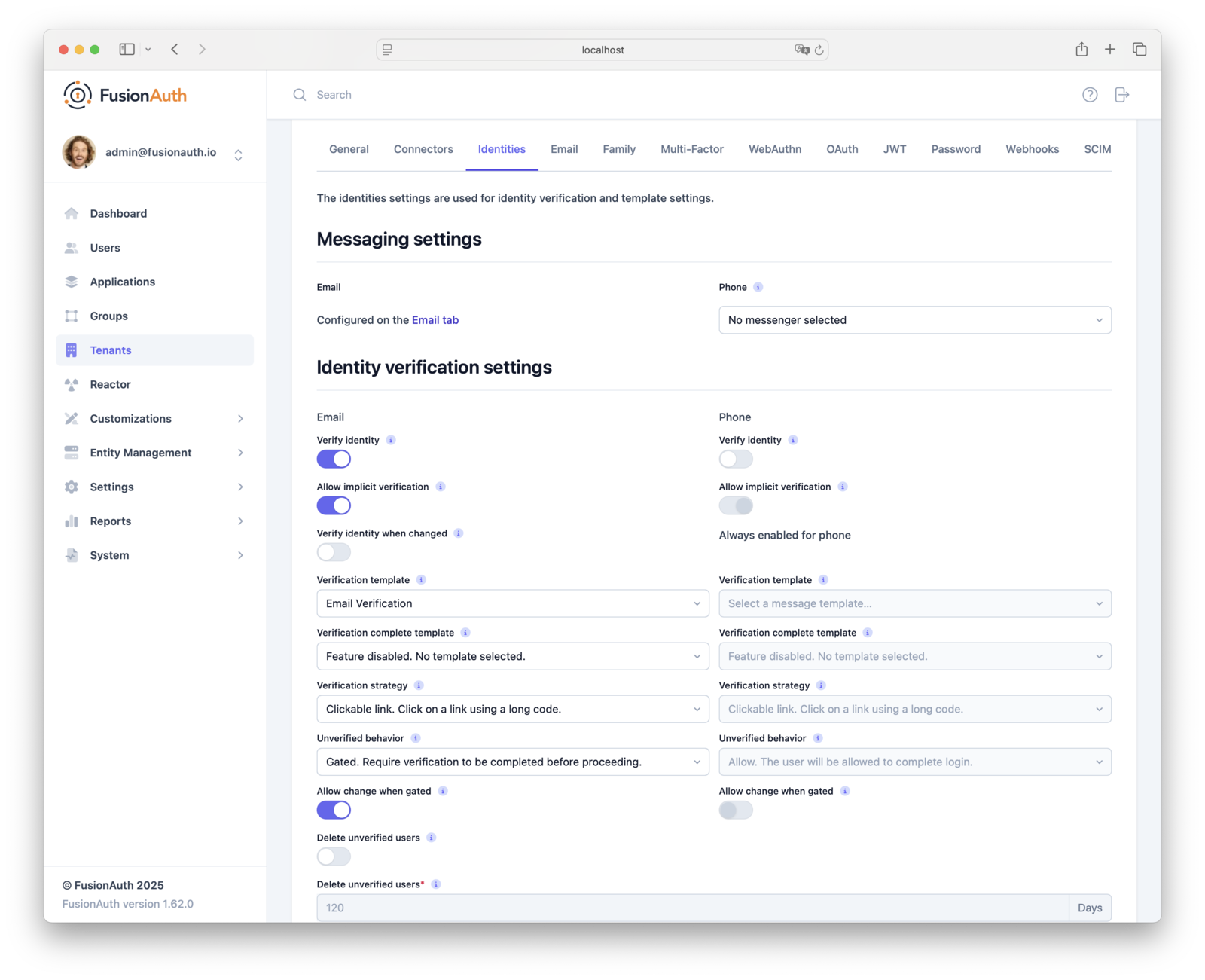
- Navigate to Tenants -> Edit Tenant -> Identities .
- In the Identity verification settings section for either Email or Phone:
- Enable Verify identity.
- Select the appropriate template (
Email VerificationorPhone Verification). - Set Unverified behavior to
Gated.
3. Create An Advanced Registration Form#
Verification is enforced through an Advanced Registration Form.
First, ensure that the Identity field is mandatory. Navigate to Customizations -> Form Fields and verify that user.email or user.phoneNumber has Required set to true.
Identity Verification only works with the user.email and user.phoneNumber Form Fields. Do not use custom fields as they are not Identity types.
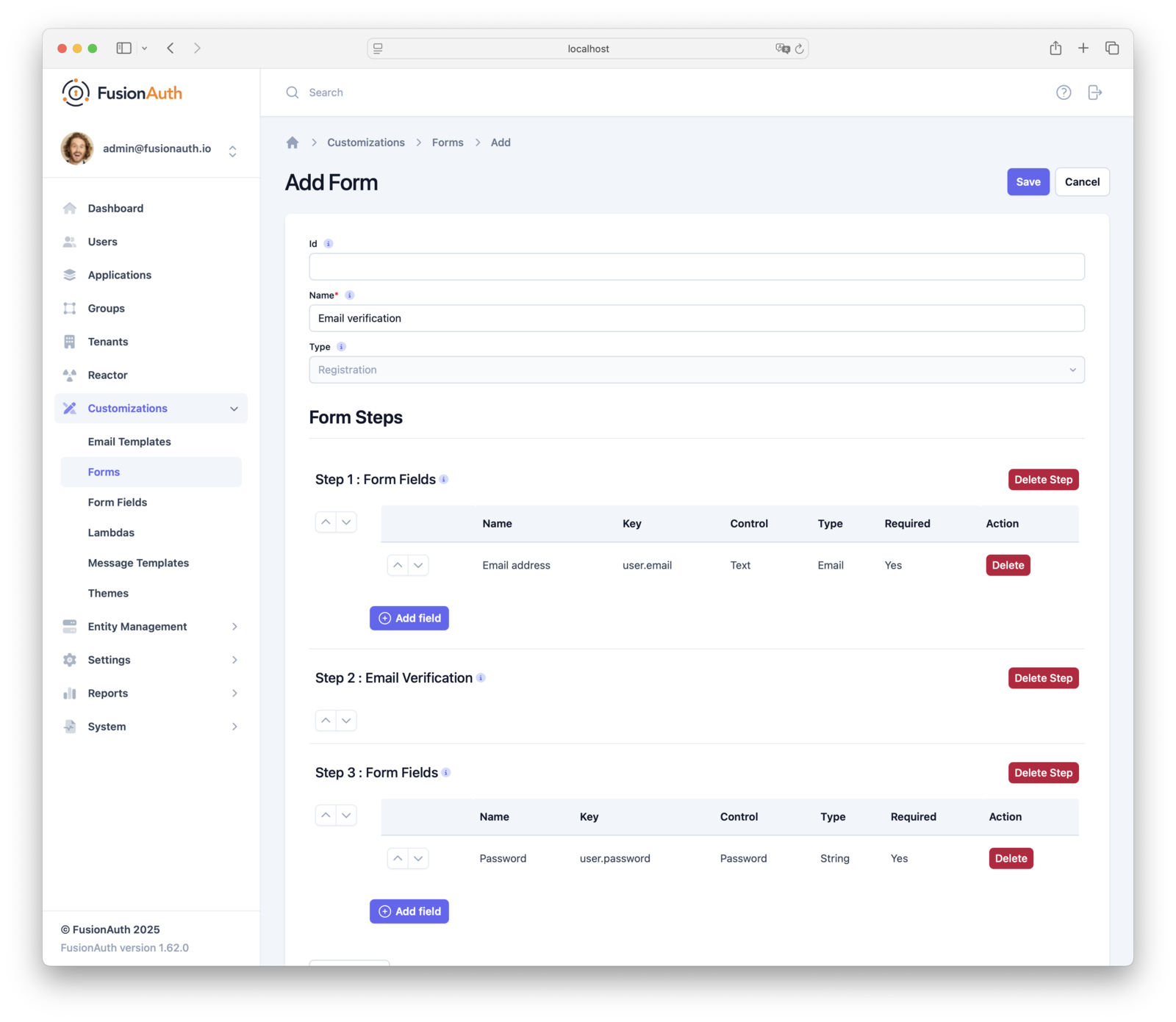
Next, create the Form by navigating to Customizations -> Forms :
- Step 1: Add the Identity field (Email address or Phone number).
- Step 2: Add a Verification step, selecting the corresponding Verification type.
- Step 3: Add any other required fields, such as First Name.
- Step 4: Always add the Password field as the final step.
4. Enable Self-Service Registration#
Finally, link the Form to your Application. Navigate to Applications -> Your Application -> Registration :
- Enable Self-service registration.
- Set the Registration type to
Advanced. - Select your new Form in the Advanced Registration Form dropdown.
Application Registration Verification is deprecated. When using Identity Pre-Verification, do not enable Registration Verification on the Application. Use Advanced Registration Forms with a Verification step instead.
A Kickstart Example#
Setting up Identity Verification can be done entirely via Kickstart, making it easy to replicate across environments. FusionAuth Kickstart is a declarative tool that allows you to automate the setup of your FusionAuth instance.
You can find a collection of examples in the FusionAuth Kickstart Example repository. In particular, the Identity Pre-Verification example provides a reference implementation. This example is not a complete project, but rather a way to provide you with an easy start to understanding the feature and what is required for it.
Make sure when using this example to replace "licenseId": "REPLACE_LICENSE_KEY" with your Enterprise Non-production key.
The example kickstart.json template does more than just enable Verification; it bootstraps a complete working environment. At a high level, it:
- Creates Email Templates: Provisions all necessary system templates, including
Email Verification. - Creates Message Templates: Sets up SMS templates like
Phone Verification. - Configures The Tenant:
- Enables SMTP with Mailcatcher as a receiver
- Sets the Identity verification settings like:
- Email Verify identity to
true. - Email Verification template to the provisioned
Email Verification. - Unverified behavior to
Gated.
- Email Verify identity to
- Defines Form Fields: Creates mandatory user.email and user.password fields.
- Creates An Advanced Registration Form: Builds a custom Registration Form with a
verifyEmailstep. - Configures The Application:
- Enables Self-Service Registration with the
Advancedtype. - Associates the custom Form.
- Provisions Users: Creates both an administrative User and a test User (Richard Hendricks), pre-registering them to their respective Applications.
Further Resources#
Ready to dive deeper? Check out the following resources in our documentation:
- Identity Pre-Verification Using Email
- Identity Pre-Verification Using Phone
- Identity Pre-Verification Via API
- Identity Verify API
Wrapping Up#
By implementing Identity Pre-Verification, you're doing more than just verifying an email; you're ensuring that every user in your system is high-quality and proven from day one. This leads to cleaner data, better marketing metrics, and a more secure application.
Ready To Clean Up Your Registration Flow?#
- Existing customers: Upgrade to the latest version of FusionAuth to start using these features.
- New to FusionAuth?: Download it for free or start a trial of our hosted cloud version.
- Questions?: Check out our community forum or reach out to our sales team.