FIDO2 is the FIDO Alliance's umbrella standard for passwordless authentication. It’s made up of two specifications: WebAuthn, the browser API that websites use to register and verify credentials, and Client to Authenticator Protocol 2 (CTAP2), the protocol that allows browsers to communicate with external authenticators like security keys. Passkeys are a user-friendly name for synced, discoverable WebAuthn credentials. Not a separate protocol, but a specific type of credential the FIDO2 architecture already supports.
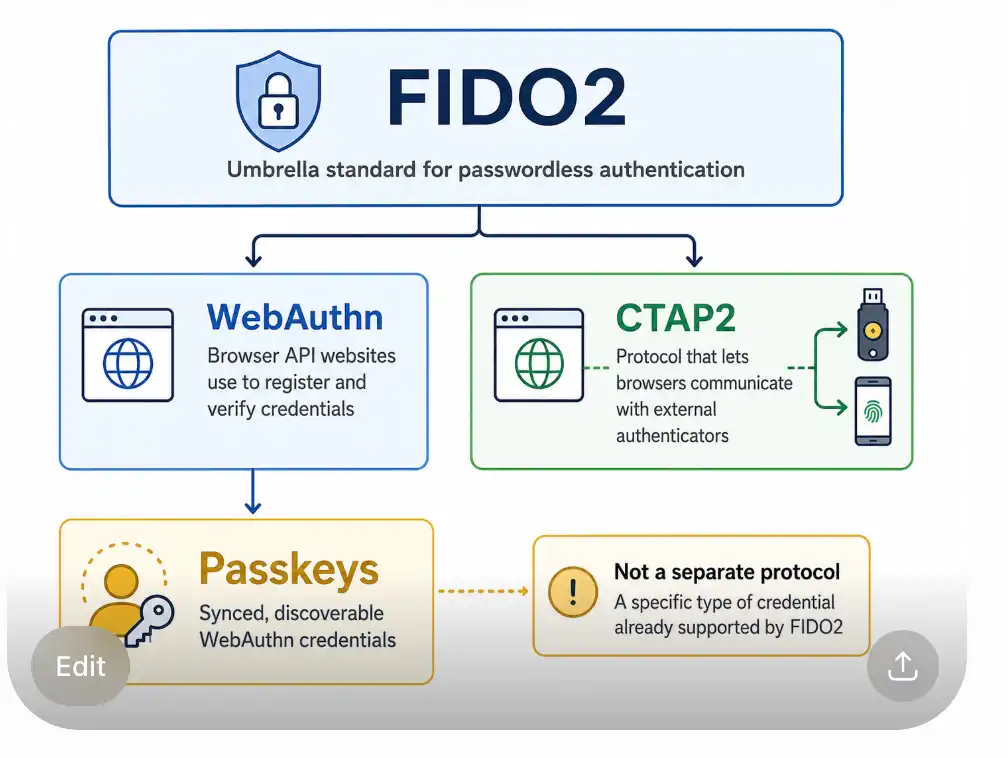
If you are evaluating passwordless authentication for your application, understanding how these four terms relate is the foundation for every technical decision that follows.
What Is FIDO2?
FIDO2 is the set of open standards that enables passwordless authentication using public-key cryptography. The FIDO Alliance, a cross-industry consortium, developed FIDO2 in partnership with the World Wide Web Consortium (W3C) to replace shared secrets (passwords) with cryptographic key pairs that never leave the user's device.
The mechanism is straightforward. During registration, a device generates a public-private key pair for a specific relying party (your application's domain). The public key is stored on the server; the private key stays on the device and is never transmitted. During authentication, the server issues a challenge, the device signs it with the private key, and the server verifies the signature with the stored public key. Without the private key, the signature can’t be forged, so there’s nothing to phish, nothing to breach from a server-side database, and no shared secret to intercept in transit.
FIDO2 was designed to address the structural weaknesses in passwords: credential stuffing, phishing, and database breaches. By grounding authentication in device-held keys bound to a specific origin, it eliminates entire categories of attacks. For a deeper look at what this means in practice, see Passwordless Authentication Security.
FIDO2 Architecture: WebAuthn and CTAP2
FIDO2 consists of two distinct specifications, each operating at a different layer.
WebAuthn
WebAuthn (Web Authentication) is a W3C specification that defines a JavaScript API — navigator.credentials.create() for registration and navigator.credentials.get() for authentication. Websites call this API to initiate and complete credential ceremonies with the browser. The browser handles all the low-level cryptographic operations and authenticator communication.
As a developer integrating with FusionAuth, WebAuthn is the layer you work with. Your application sends requests to FusionAuth's backend APIs, which coordinate the ceremony and communicate the results to your front end, which calls the WebAuthn JavaScript API. FusionAuth handles the challenge generation, response validation, and user record updates. For full ceremony details, see WebAuthn & Passkeys.
CTAP2
CTAP2 (Client to Authenticator Protocol 2) is the protocol that governs communication between a browser or platform and an external authenticator, like a hardware security key like a YubiKey. CTAP2 defines how a browser asks a security key to perform a registration or assertion and how the key responds.
For most application developers, CTAP2 is invisible. Browsers implement it on your behalf. You call the WebAuthn API; the browser determines whether the user's authenticator is a platform authenticator built into the device or a cross-platform key connected over USB, NFC, or Bluetooth, and handles the CTAP2 conversation accordingly. You do not write CTAP2 code. The distinction between WebAuthn (browser-to-website) and CTAP2 (browser-to-authenticator) is the key architectural insight. They solve different parts of the same problem.
To understand how authenticators fit into the full authentication ceremony, Authenticators, Ceremonies, WebAuthn, Oh My! is a thorough walkthrough.
What Are Passkeys?
A passkey is a discoverable, syncable FIDO2 credential. What is a Passkey? covers this in full, but the short version is that passkeys are WebAuthn credentials that can be stored in a platform's credential manager (iCloud Keychain, Google Password Manager, or Microsoft's account ecosystem) and synchronized across the user's devices.
Earlier FIDO2 credentials were device-bound: a credential registered on your laptop stayed on that laptop. If the device was lost, the credential was gone. Discoverable credentials with sync solve the recovery problem and dramatically reduce friction, because users don’t need to re-register on every new device.
"Passkey" is a product and user-experience term introduced jointly by Apple, Google, and Microsoft to make FIDO2 more accessible to general audiences. Under the hood, a passkey is still a WebAuthn credential using the same public-key cryptography. For a broader case for adopting them, see Why Passkeys Matter.
How FIDO2, WebAuthn, CTAP2, and Passkeys Work Together
These four terms describe a single end-to-end system at different levels of abstraction:
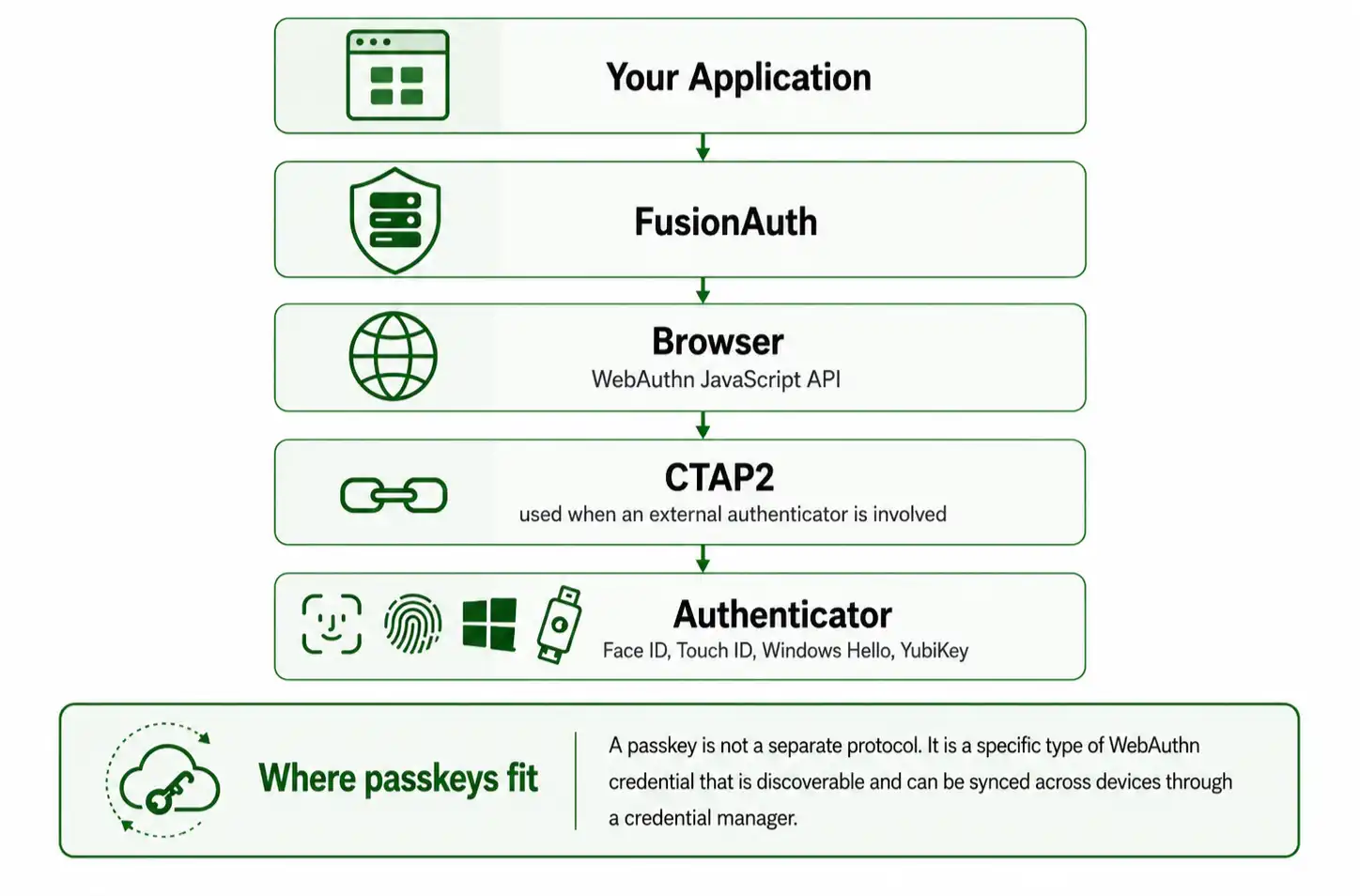
Your application calls FusionAuth. FusionAuth generates the ceremony options and challenge. The browser calls the WebAuthn API with those options. If the user has a platform authenticator like Face ID, Touch ID, or Windows Hello, the OS handles it directly. If the user has a hardware key, the browser speaks CTAP2. The authenticator signs the challenge. The browser returns the signed assertion. FusionAuth validates the signature and authenticates the user.
A passkey fits into this flow as a specific type of credential: one that’s portable across devices and stored in a credential manager that’s discoverable without requiring the user to supply a username first.
How FusionAuth Implements FIDO2
FusionAuth has supported WebAuthn since version 1.41.0. As of version 1.52.0, WebAuthn is available to all licensed instances, including the free Community plan. There are two ways to integrate:
- Use FusionAuth's hosted login pages and let the platform handle the ceremony client-side
- Call the WebAuthn APIs directly for full control.
The passwordless overview covers all of FusionAuth's passwordless options if you need to compare them first.
Hosted Login Pages
This is the simplest integration path. FusionAuth's hosted login pages handle all client-side ceremony logic, including the WebAuthn JavaScript API calls and the ArrayBuffer transformations required to move binary data between the FusionAuth API and the browser. No additional front-end code is required. You configure the workflows in the tenant admin UI and theme the pages to match your application.
FusionAuth supports two hosted-login WebAuthn workflows:
Re-authentication prompts users to register a passkey after their first successful password login, provided the browser reports a compatible platform authenticator is available. On subsequent visits, FusionAuth routes the user directly to a passkey authentication page listing their registered credentials. The user selects a passkey, completes the biometric prompt or PIN, and is authenticated.
Bootstrap authentication requires the user to supply an identifier (email or username) before beginning the WebAuthn ceremony. This is the right workflow when users may arrive on a device where their passkey is synced but where FusionAuth cannot infer their identity from a device cookie.
Direct WebAuthn APIs
When you need full control over the login experience, FusionAuth exposes the full WebAuthn ceremony as API calls. Your front end calls /api/webauthn/register/start to initiate registration, passes the challenge to the browser's navigator.credentials.create(), and completes the ceremony with /api/webauthn/register/complete.
Authentication follows the same pattern with /api/webauthn/start and /api/webauthn/login. To add WebAuthn credentials for a user through the API, you need an API key with at minimum POST permission on the ceremony endpoints.
Platform and Cross-Platform Authenticators
FusionAuth distinguishes between authenticator attachment types:
Platform authenticators are built into the device (Touch ID on a Mac, Face ID on an iPhone, Windows Hello on a Windows machine, Android biometrics). They’re available on the Community plan.
Cross-platform authenticators are removable hardware devices, most commonly YubiKeys, connected over USB, NFC, or Bluetooth. Using cross-platform authenticators requires an Enterprise plan.
Licensing Differences
Feature |
Community |
Starter |
Essentials |
Enterprise |
|---|---|---|---|---|
Platform authenticators (Touch ID, Face ID, Windows Hello, Android) |
✔ |
✔ |
✔ |
✔ |
iCloud Keychain / Google Password Manager (synced passkeys) |
✔ |
✔ |
✔ |
✔ |
Hosted login page WebAuthn workflows |
✔ |
✔ |
✔ |
✔ |
Direct WebAuthn APIs |
✔ |
✔ |
✔ |
✔ |
Cross-platform authenticators (YubiKey) |
✗ |
✗ |
✗ |
✔ |
Community requires a free license key from account.fusionauth.io.
Supported Authenticators
Authenticator |
Supported |
Notes |
|---|---|---|
Face ID |
✔ |
Platform authenticator |
Touch ID |
✔ |
Platform authenticator |
Windows Hello |
✔ |
Platform authenticator |
Android biometrics (Credential Manager) |
✔ |
Platform authenticator |
Google Password Manager |
✔ |
Synced passkey provider |
iCloud Keychain |
✔ |
Synced passkey provider |
YubiKey |
Enterprise only |
Cross-platform authenticator |
Current FIDO2 Support and Limitations
Capability |
Status |
Notes |
|---|---|---|
Passkey registration and authentication |
✔ Supported |
Available since v1.41.0 |
Re-authentication workflow |
✔ Supported |
Hosted login pages |
Bootstrap authentication workflow |
✔ Supported |
Hosted login pages |
Direct WebAuthn API |
✔ Supported |
Full ceremony control |
Platform authenticators |
✔ Supported |
Community plan and above |
Cross-platform authenticators (YubiKey) |
✔ Enterprise |
Enterprise plan required |
WebAuthn as a second factor (MFA) |
✔ Supported |
Cross-platform authenticators like hardware security keys require an Enterprise plan |
FusionAuth validates all WebAuthn responses against the W3C specification, including signature verification, challenge matching, and origin binding. The platform does not currently support using a passkey as a second factor alongside a password in a single login flow, though this is noted as planned functionality. Being transparent about what is and is not supported is how you avoid building a flow that fails in production.
When Should You Choose Passkeys?
Passkeys are well-suited to a wide range of applications, but the right workflow depends on your context.
Consumer applications are the clearest fit. Users expect a frictionless experience, and synced passkeys via iCloud Keychain or Google Password Manager let them log in on any device they own without ever registering again. The re-authentication workflow in FusionAuth handles this automatically after the first login.
Enterprise applications with high-assurance requirements benefit from cross-platform authenticators like YubiKeys, which are device-bound and not syncable. Exactly the property you want when the credential should not leave a specific workstation. This path requires the Enterprise plan.
Step-up authentication is a natural use case. Require a passkey assertion at sensitive transaction boundaries like billing changes or admin actions, even if the initial login used a password. FusionAuth's direct WebAuthn APIs make it straightforward to initiate a ceremony at any point in a user session.
Password replacement for new applications is now viable without requiring users to carry hardware tokens. Platform authenticators are present on virtually every modern smartphone, laptop, and tablet. If you are building a new application and considering whether to implement passwords at all, the passwordless overview is the right place to evaluate your options.
In general, if your users own modern devices, passkeys are ready. FusionAuth implements the standard faithfully so the question is mostly one of UX workflow design, not protocol feasibility.
Frequently Asked Questions
What's the difference between FIDO2, WebAuthn, and passkeys?
FIDO2 is the FIDO Alliance's umbrella standard for passwordless authentication, composed of two specifications: WebAuthn and CTAP2. WebAuthn is the W3C browser API that websites use to register and authenticate credentials; CTAP2 is the protocol browsers use to communicate with external hardware authenticators. A passkey is a user-friendly term for a synced, discoverable WebAuthn credential, one that can be backed up to iCloud Keychain, Google Password Manager, or a similar service and restored on a new device. Passkeys are not a separate protocol, they are a specific credential type within the FIDO2 architecture.
Does FusionAuth support FIDO2?
Yes. FusionAuth aligns with FIDO2 standards through its WebAuthn and passkey implementation, introduced in version 1.41.0. Platform authenticators (such as Touch ID, Face ID, Windows Hello, and Android biometrics) and passkeys are available on all editions—including the Community plan (starting in version 1.52.0 with a free registered license). Cross-platform authenticators and roaming security keys (such as YubiKeys) require an Enterprise plan.
What's CTAP2, and do I need to implement it?
Client to Authenticator Protocol 2 (CTAP2) is the protocol that governs communication between a browser and an external hardware authenticator, like a YubiKey. As an application developer integrating FusionAuth, you do not implement CTAP2. Browsers handle it on your behalf when a cross-platform authenticator is present. The layer you interact with is WebAuthn, the JavaScript API and the FusionAuth ceremony APIs built on top of it.
Which passkey authenticators work with FusionAuth?
FusionAuth supports Face ID, Touch ID, Windows Hello, and Android biometrics as platform authenticators on all plans, including Community. iCloud Keychain and Google Password Manager work as synced passkey providers. YubiKeys and other cross-platform hardware authenticators are supported on the Enterprise plan.
Can I build a passwordless login with FusionAuth?
Yes. FusionAuth offers two approaches: hosted login pages that handle all client-side WebAuthn ceremony logic with no additional front-end code, and a direct WebAuthn API for full control over the user experience. Both support the re-authentication and bootstrap authentication workflows. For a complete walkthrough of what passwordless means and how to evaluate the tradeoffs, see How Passwordless Authentication Works.
Can WebAuthn be used for MFA in FusionAuth?
Using a passkey as a second factor alongside a password in a single login flow is noted as planned functionality in FusionAuth. Today, the WebAuthn workflows in FusionAuth are designed for primary authentication: replacing the password entirely rather than augmenting it. The direct WebAuthn API can be used to perform a step-up assertion at sensitive points in a user session, which achieves a similar security outcome.