Complete Registration
On this page
1.65.0
An application's complete registration option allows you to collect missing user and registration data based on the configured form.
What Is Complete Registration#
During a hosted login flow when complete registration is enabled on an application, FusionAuth checks whether a registered user is missing any user or registration data required by the configured form. If any required fields are missing, FusionAuth requires the user to supply missing data before completing the hosted login flow.
While enabling self-service registration for the application allows creating new users and registrations, the complete registration option requires that the user and registration both exist. Applications with self-service registration enabled implicitly support the complete registration workflow.
Configuring Complete Registration#
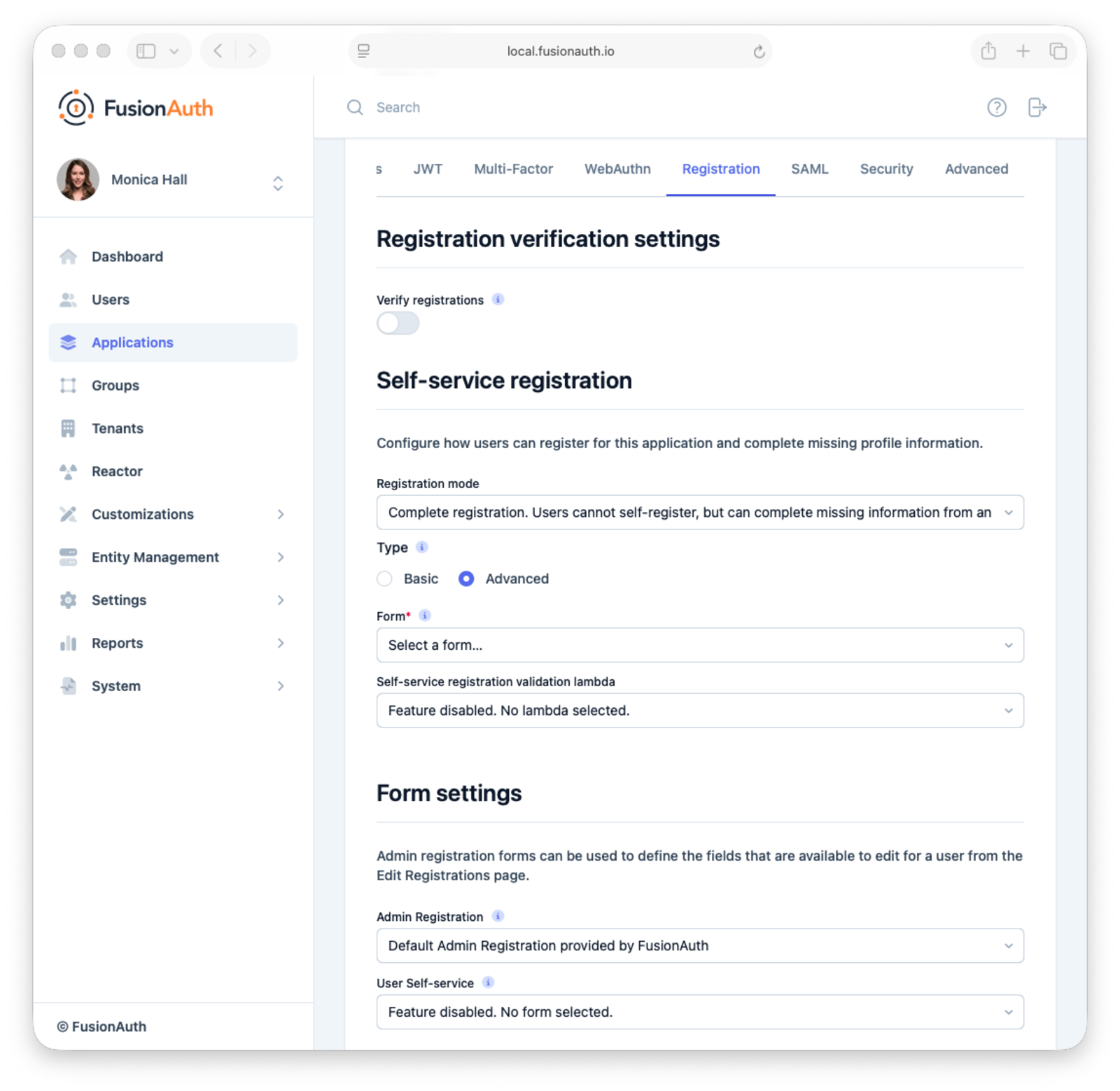
To enable complete registration for an application:
- Navigate to Applications tab.
- Edit the application you want to configure.
- Navigate to the Registration tab.
- Scroll to the Self-service registration section.
- Set the Registration mode to
Complete registration. - Configure the basic or advanced registration form.
- Save the application.
The Complete Registration Flow#
When a registered user authenticates using the hosted login pages to an application that has complete registration enabled:
- FusionAuth checks whether the user and registration data includes all required fields defined on the registration form.
- If any data is missing, FusionAuth prompts the user to provide missing data via the configured registration form.
- The user completes the form and submits.
- The hosted login flow continues.