Add an Identity Provider (IdP)
On this page
Identity Providers let users log in to FusionAuth through a third party. FusionAuth supports social Identity Providers, such as Facebook and Google, and enterprise Identity Providers, such as OpenID Connect and SAML v2.
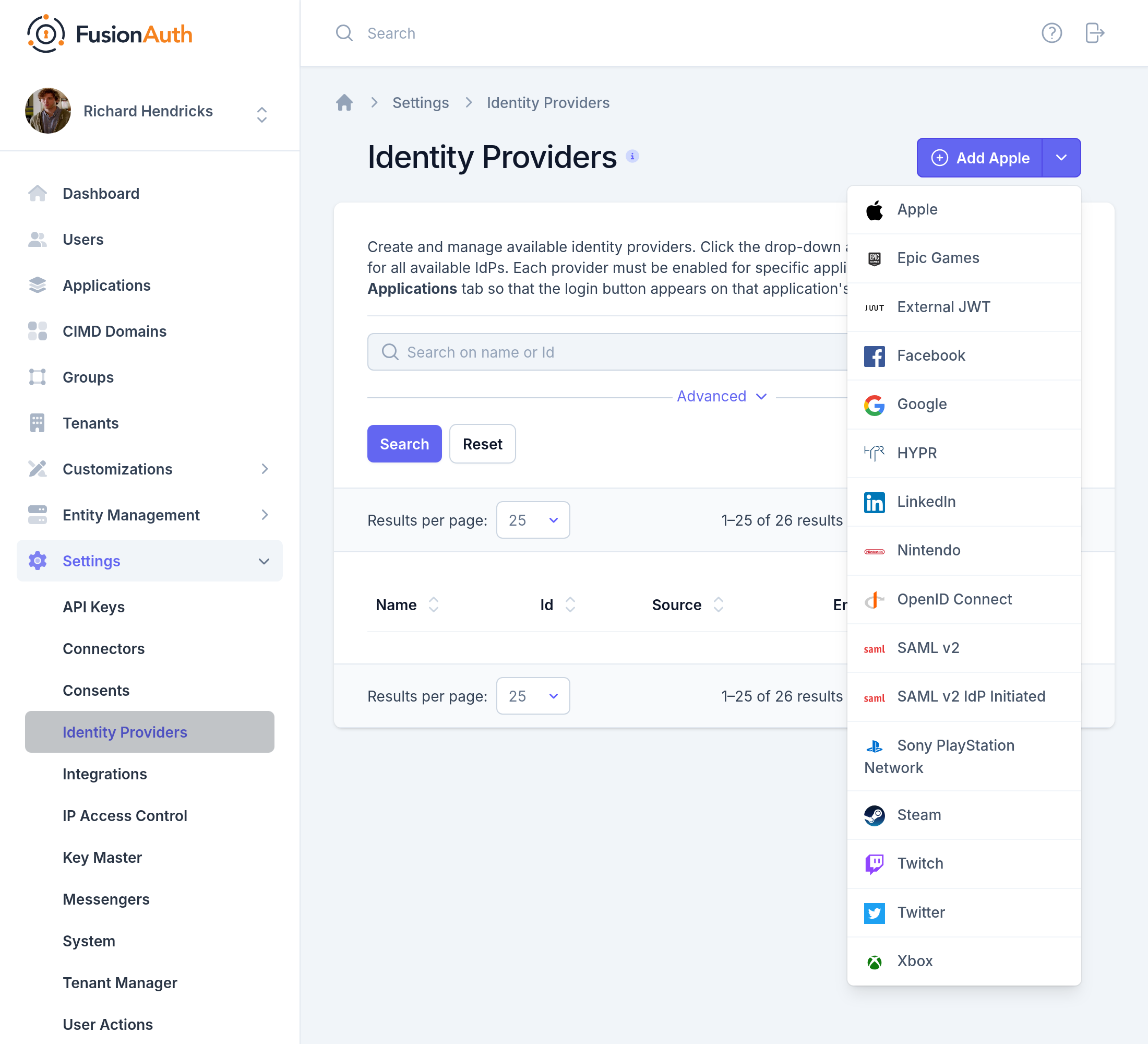
To manage Identity Providers in the Admin UI, navigate to Settings -> Identity Providers . To manage Identity Providers through the API, see the Identity Providers API.
Add an Identity Provider#
To enable an Identity Provider for an Application or CIMD domain:
-
In the Admin UI, navigate to Settings -> Identity Providers .
-
Click the arrow next to the add button, and select your Identity Provider.
-
Select the Tenant for the Identity Provider, or select
Global identity provider. You can't change the scope later. For more information, see Identity Provider Scope. -
Fill out the form. Your identity provider supplies most of the values. For a description of each field, see the guide for your Identity Provider.
-
On the Applications tab, turn on Enabled for each Application or CIMD domain that uses the Identity Provider.
-
To register new users for the Application with the Application's default roles, turn on Create registration. When Create registration is off, a user needs a registration for the Application before the user can log in through the Identity Provider.
-
Click .
The login page of each enabled Application then shows a login button for the Identity Provider. An Identity Provider with managed domains asks for the user's email address instead of showing a button.
Social Identity Providers#
FusionAuth supports the following social Identity Providers:
- Apple
- Epic Games (requires a paid plan)
- Nintendo (requires a paid plan)
- Sony (requires a paid plan)
- Steam (requires a paid plan)
- Twitch (requires a paid plan)
- Xbox (requires a paid plan)
Enterprise Identity Providers#
FusionAuth supports the following enterprise Identity Providers:
- External JWT
- HYPR
- OpenID Connect
- SAML v2
- SAML v2 IdP Initiated (requires a paid plan)
- Tenant Manager, where Tenant administrators configure OpenID Connect and SAML v2 Identity Providers
To request an Identity Provider that FusionAuth doesn't support, search the open feature requests on GitHub. Vote or comment on an existing request, or open a new request.
Account Security#
When you configure an Identity Provider, you trust the Identity Provider to authenticate users. The Identity Provider controls MFA requirements and configuration, roles and groups, email and phone verification, and account identifiers.
Limit who can set up an Identity Provider. Your security is only as strong as the security of the platform that you federate to.
A malicious Identity Provider can harm your system. For example, a malicious Identity Provider can create accounts with email addresses that already exist in FusionAuth. A malicious user can then log in to the Identity Provider, return to FusionAuth, and access user data. The result is an account takeover.
To reduce the risk, consider the following strategies:
- Don't set up the Identity Provider.
- Enable the Identity Provider only for the Applications or Tenants that need the Identity Provider.
- Use a reconcile lambda to check that the email address or identifier from the Identity Provider is one you expect.
- Use the
Disabledlinking strategy, and manage links with the Link API. Your business logic then runs before or during linking. For example, your code can refuse links for a certain domain, or call another API to validate a link first. - Use the Login Validation lambda to block a login.
OAuth Scope Parameter#
To request OAuth scopes on the FusionAuth access token, put the scopes in the scope parameter of the authorization request to FusionAuth.
The Scope field of the Identity Provider, when the Identity Provider has one, sets the scope parameter of the request to the Identity Provider.
Limitations#
Some Identity Providers, such as the Google and OIDC Identity Providers, request access tokens from a configured remote URL. Remote servers must respond within a certain time frame or the login workflow will fail. The limit is currently 10 seconds. It is not configurable.
Managed domains work on the login page only with the OIDC and SAML v2 Identity Providers. The External JWT Identity Provider uses managed domains to check JWTs in the Reconcile API.
FusionAuth's hosted login pages only support a single Google identity provider configuration using Google's GSI client at a time, which provides a more modern experience and One Tap support. See Google identity provider limitations for more information.
Add an OpenID Connect IdP
Learn how to let users log in to FusionAuth through an external OpenID Connect Identity Provider.
Add an External SAML v2 IdP
Learn how to let users log in to FusionAuth through an external SAML v2 Identity Provider.
Identity Provider Scope
Learn about global and tenant-scoped Identity Providers, and how to limit the links that each user can have to an Identity Provider.
Applications and Overrides
Learn how Identity Providers work with Applications, CIMD clients, and Application-specific overrides.
Linking Strategies
Learn how FusionAuth links a user from an Identity Provider to a FusionAuth user.
Managed Domains
Learn how managed domains connect email domains to an Identity Provider.
Hints
Learn how to send users from the hosted login pages straight to an Identity Provider with the idp_hint and login_hint parameters.
Attribute Mappings
Learn how to map claims from an Identity Provider response to FusionAuth user and registration fields without a lambda.
Related
Learn how Identity Providers work with Applications, CIMD clients, and Application-specific overrides.
Learn how to map claims from an Identity Provider response to FusionAuth user and registration fields without a lambda.
Learn how to send users from the hosted login pages straight to an Identity Provider with the idp_hint and login_hint parameters.
Learn about global and tenant-scoped Identity Providers, and how to limit the links that each user can have to an Identity Provider.