Identity Providers, Applications, and Overrides
On this page
Saving an Identity Provider in Tenant Manager reapplies the values that Tenant Manager manages. By design, Tenant Manager replaces attributeMappings and applicationConfiguration. For more information, see Tenant Manager Identity Provider Restrictions.
Identity Providers and Applications#
You enable each Identity Provider for each Application separately, on the Applications tab of the Identity Provider. The following Google Identity Provider is enabled for the PiperChat Application, with Create registration turned on:
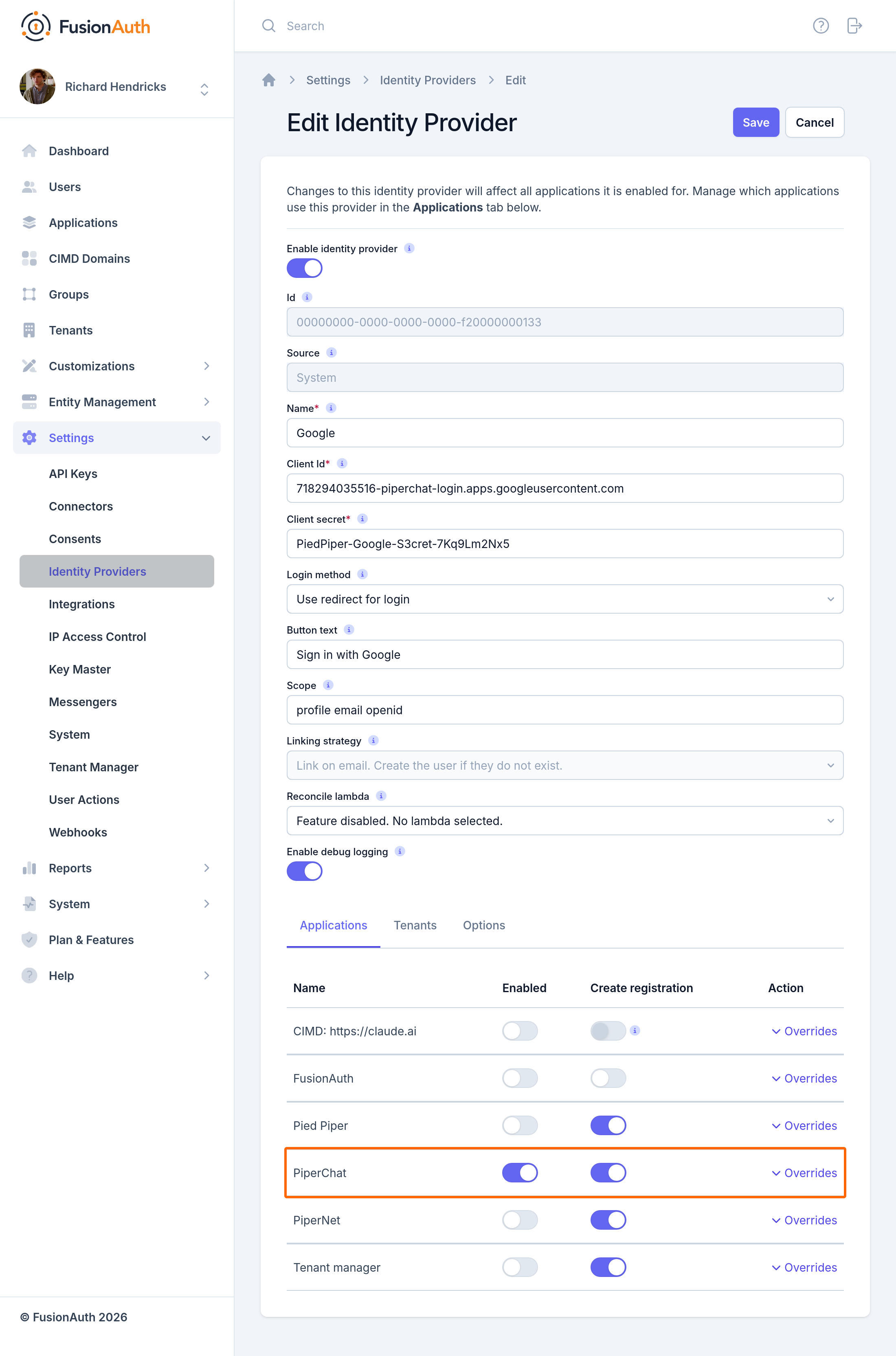
When Create registration is on, a user doesn't need a registration before logging in through the Identity Provider. For example, a new user logs in to PiperChat with Google. When the user doesn't exist in FusionAuth, FusionAuth creates the user. FusionAuth then registers the user for PiperChat and assigns the default roles of the Application.
When Create registration is off, FusionAuth doesn't register users automatically. Register each user for the Application before the user logs in with Google, or the user can't complete the login and get authorization for the Application.
FusionAuth can create a user during a login through an Identity Provider whether Create registration is on or off. The linking strategy decides whether FusionAuth creates the user. Create registration decides only whether FusionAuth registers the user, and so authorizes the user, for the Application. For more information, see Linking Strategies.
An enabled Identity Provider becomes an additional source of record (SoR) for users. When a user logs in to the Identity Provider, such as Google, the Identity Provider tells FusionAuth that the user exists and the credentials are valid. FusionAuth accepts the Identity Provider as a source of record, and creates a link, a user, or both, depending on the linking strategy. FusionAuth then checks Create registration to decide whether to register the user for the Application.
CIMD Clients#
Available since1.70.0
You can enable an Identity Provider for CIMD clients. Each CIMD domain appears in the Applications list with a CIMD: prefix, such as CIMD: https://claude.ai. A tenant-scoped Identity Provider lists only the CIMDAn OAuth 2.0 extension in which the client identifier is an HTTPS URL that hosts a JSON document describing the client's metadata. The authorization server retrieves the metadata from the URL instead of requiring a Dynamic Client Registration request. domains in the Identity Provider's Tenant. When you enable an Identity Provider for a CIMD domain, every client that registers through the domain can use the Identity Provider.
Some options work differently for CIMD domains:
- Create registration is always off, because FusionAuth doesn't register users for CIMD clients.
- IdP-initiated SAML login isn't supported. The SAML v2 IdP Initiated Identity Provider doesn't list CIMD domains. On a SAML v2 Identity Provider with Enable IdP initiated login turned on, you can't enable a CIMD domain.
To configure CIMD domains with the Identity Providers API, use the CIMD domain Id as the key in identityProvider.applicationConfiguration.
Overrides#
In FusionAuth 1.61.0 and later, you can create more than one instance of every Identity Provider type. A second instance of the Identity Provider type can replace Application overrides.
An override changes Identity Provider settings for one Application. For example, two Applications use the Apple Identity Provider. The first Application requests the email name scope, and the second Application requests only the email scope. Create the Apple Identity Provider with the scope email name, and enable the Identity Provider for both Applications. For the second Application, override Scope with email.
To override settings, expand Overrides in the Application's row on the Applications tab. You can override none, some, or all of the available settings. With the API, set the overrides in identityProvider.applicationConfiguration.
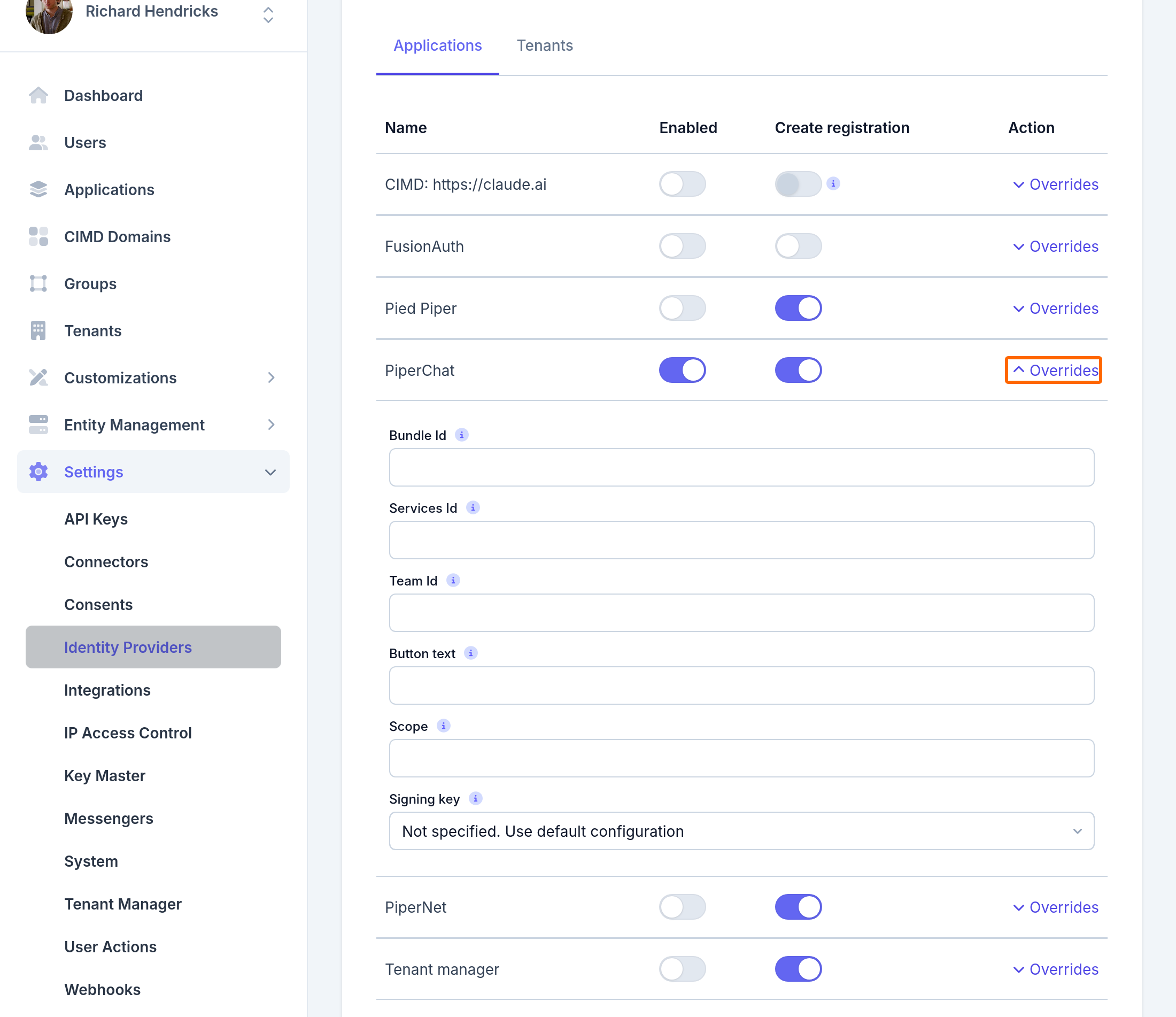
The External JWT Identity Provider has no overrides, because you can create more than one External JWT Identity Provider.
Overrides doesn't offer every setting. Linking strategy is one setting that has no override. To use two values of such a setting, create a second instance of the Identity Provider, and enable each instance for a different Application.
Related
Learn how FusionAuth links a user from an Identity Provider to a FusionAuth user.
Learn about the APIs for creating, retrieving, updating and deleting Applications.
Learn how to map claims from an Identity Provider response to FusionAuth user and registration fields without a lambda.
Learn how to send users from the hosted login pages straight to an Identity Provider with the idp_hint and login_hint parameters.