Log Users Out of FusionAuth and Your Applications
On this page
Logout ends the user's application session and the FusionAuth SSO sessionThe session FusionAuth keeps in the browser after a user logs in through the hosted login pages. While the SSO session lasts, FusionAuth logs the user in to other Applications in the Tenant without asking for credentials.. For what each logout method ends, see How Logout Works.
Log Out of Every Application#
The following steps use Express code from the SSO example repository. The same steps apply in any framework.
-
Add a Route That Ends the Application Session#
FusionAuth calls this route with a
GETrequest when the user logs out of any application in the Tenant. FusionAuth may call the route more than once, and for a user with no session, so return success either way:End the application session at the Logout URL /* End session for global SSO logout */ router.get('/endsession', function (req, res, next) { req.session.user = null; res.redirect(302, "/login"); });To also revoke the user's refresh tokens, call the Revoke Refresh Tokens API from the route.
/oauth2/logoutleaves refresh tokens in place. -
Let the Session Cookie Reach the Route#
FusionAuth loads each application's route in a hidden cross-site iframe. The browser sends the application's session cookie to the iframe only when the cookie uses
SameSite=None; Secure, andSecurecookies require HTTPS. Without the cookie, the route can't find the session to end:A session cookie that works in the logout iframe // FusionAuth logout loads this app's /endsession route in a hidden cross-site iframe. // browsers only send a cookie to a cross-site iframe when it's SameSite=None, and SameSite=None requires Secure. // Secure cookies only travel over https, so this app must run behind TLS for logout to reach it. // over plain http, express-session never sets a Secure cookie, so login loops back to FusionAuth. // to try the example without TLS, set INSECURE_COOKIES=true in .env: login and SSO work, but logging out // of the other app won't end this app's session. const insecureCookies = process.env.INSECURE_COOKIES === 'true'; // trust X-Forwarded-Proto from a local TLS proxy, so req.secure is true behind the proxy app.set('trust proxy', 1); app.use(expressSession({ resave: false, saveUninitialized: false, secret: 'fusionauth-node-example', cookie: { maxAge: 60 * 60 * 1000, sameSite: insecureCookies ? 'lax' : 'none', secure: !insecureCookies, }, }));Browsers that block third-party cookies can still drop the cookie. For a logout that doesn't depend on cookies in iframes, use centralized sessions.
-
Set the Logout URL#
Navigate to Applications -> Your Application -> OAuth for each Application. Set Logout URL to the route, such as
https://app.example.com/endsession. Leave Logout behavior set toAll applications. Click Save . -
Redirect to FusionAuth on Logout#
When the user clicks your logout button, end the application session, then redirect the browser to the Logout endpoint with the Application's client Id. In the example,
logoutUrlholds the Logout endpoint URL, such ashttps://auth.example.com/oauth2/logout?client_id=<client Id>:Redirect to FusionAuth on logout /* Logout page */ router.get('/logout', function (req, res, next) { req.session.user = null; res.redirect(302, logoutUrl); });FusionAuth ends the SSO session, loads every Logout URL in the Tenant in hidden iframes, and redirects to the Logout URL of the Application that started the logout.
Log Out of One Application#
Set the Application's Logout behavior to Redirect only. Logout from that Application then ends the SSO session and redirects, without loading the other applications' Logout URL.
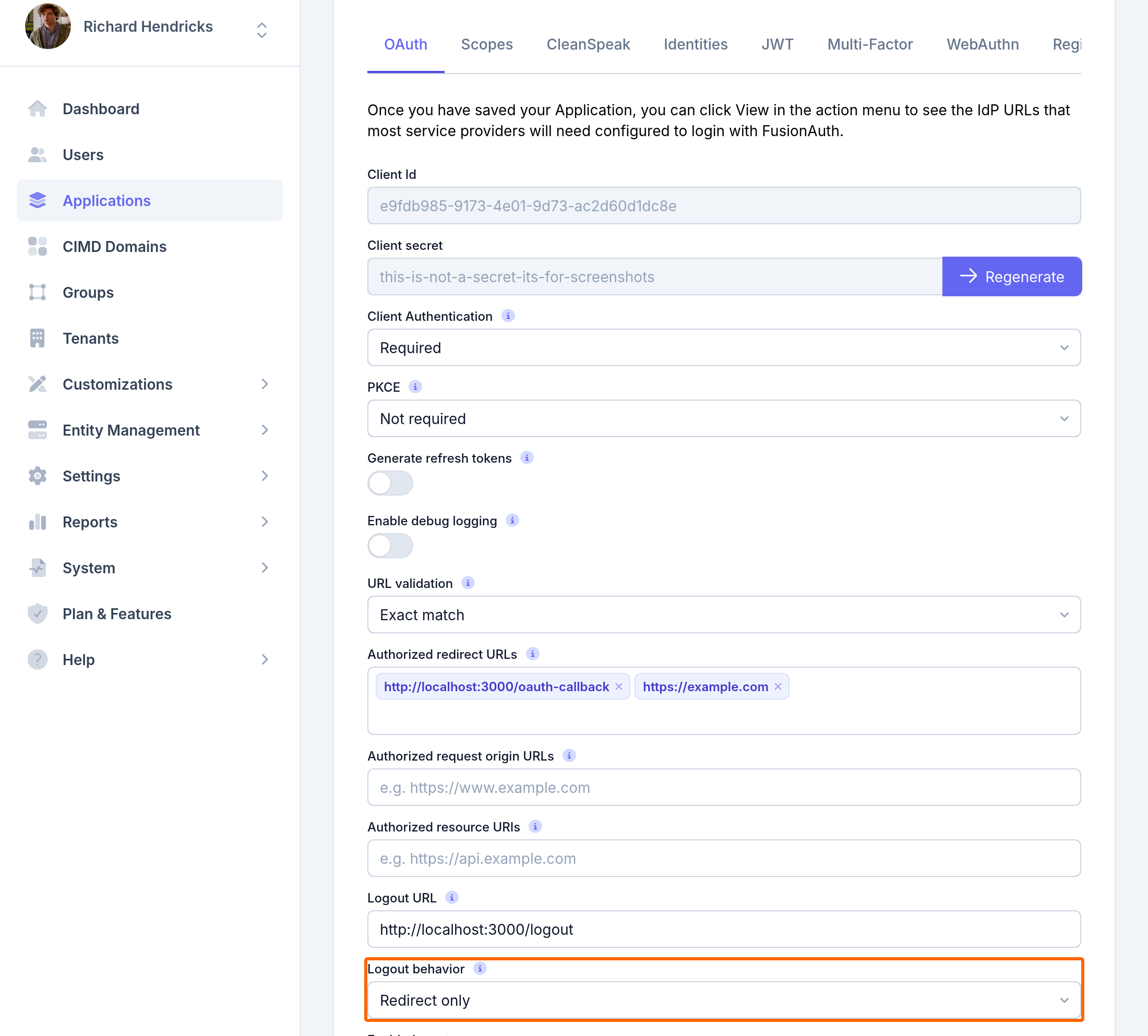
The other applications keep their sessions until the sessions expire. Because the SSO session ended, the next login redirect from any application shows the login form.
To end only the application session and keep the SSO session, end the application session without redirecting to /oauth2/logout. FusionAuth then logs the user back in at the next login redirect.
For finer control, such as logging out of two applications but not a third, use centralized sessions and revoke the refresh tokens you choose.
Send Users to a Different Page After Logout#
Add post_logout_redirect_uri to the logout request, URL-encoded. The value must match one of the Application's Authorized redirect URLs:
https://auth.example.com/oauth2/logout?client_id=<client Id>&post_logout_redirect_uri=https%3A%2F%2Fexample.com%2Fgoodbye
Without post_logout_redirect_uri, FusionAuth redirects to the Application's Logout URL, then the Tenant's Logout URL, then /.
Log Out of an Identity Provider#
FusionAuth logout doesn't end the user's session at an upstream Identity Provider, such as Google. Users usually expect to stay logged in to Google. When users must log out of the Identity Provider too, set post_logout_redirect_uri to the Identity Provider's logout URL, and add that URL to Authorized redirect URLs.
To know which Identity Provider a user logged in with, record the Identity Provider from the user.login.success event at login.
Log Out of the Account Management Pages#
The self-service account management pages keep their own session. To end the session, redirect the browser to /account/logout with the client Id of the Application that hosts account management:
https://auth.example.com/account/logout?client_id=<client Id>
FusionAuth ends the account management session, then continues to /oauth2/logout.
Log Out From a Shared Device#
On kiosks and shared computers, the next user must not inherit a session. Change the theme of the kiosk Application so FusionAuth creates no SSO session. For the theme change, see Create the SSO Session at Login. Then end the application session on logout and after a short idle period.
Confirm the Result#
- Log in to two applications in the same browser.
- Log out of the first application.
- Reload the second application. With
All applications, the second application sends you to the login form.
When the second application stays logged in, see Troubleshoot Sessions and Logout.
Related
Learn about what each FusionAuth logout method ends, and how front-channel logout signs a user out of every application.
Learn about how FusionAuth keeps users logged in across applications, and how to configure session lifetimes, single sign-on, and logout.
Learn how to fix common problems with FusionAuth SSO, session lifetimes, and logout.
Learn how users and clients log in with FusionAuth, and how FusionAuth acts as an identity provider for other applications.