Add a SAML v2 IdP-Initiated IdP
On this page
This feature requires at least a Starter plan.
1.26.0
IdP-initiated SSO with this Identity Provider is less secure than a service provider-initiated login, and FusionAuth doesn't recommend IdP-initiated SSO.
During an IdP-initiated login, the third-party Identity Provider sends FusionAuth a SAML Authentication Response that says a user has authenticated, without any context. FusionAuth didn't start the login, so FusionAuth can verify less. FusionAuth must also allow a cross-site request from the third party.
Enable IdP-initiated SSO only to support a legacy integration, or when the user experience matters more than the risk.
In version 1.43.0 and later, you need this configuration only for an IdP that supports only IdP-initiated login. The SAML v2 Identity Provider supports both IdP-initiated and SP-initiated login.
This Identity Provider lets FusionAuth accept a SAML response that a SAML v2 Identity Provider initiates. FusionAuth acts as the SAML v2 service provider (SP).
A SAML flow usually begins at a service provider such as FusionAuth. In a service provider initiated loginA SAML workflow where login starts at the Service Provider., the Identity Provider returns the SAML Authentication Response to the service provider in response to an authentication request. FusionAuth can validate certain parameters, and FusionAuth accepts only a response to a request that FusionAuth initiated.
During an IdP-initiated login, the third-party Identity Provider sends FusionAuth a SAML Authentication Response without a matching request. FusionAuth doesn't have the full context of the login, so FusionAuth can verify less, and FusionAuth must allow a cross-site request from the third party.
Some providers need specific configuration. The following guide covers one of those providers:
To request a guide for another provider, open a request on GitHub.
After you complete the configuration, users can log in to FusionAuth directly from the SAML v2 IdP.
IdP-initiated login doesn't support CIMD clients. The Applications list for this Identity Provider doesn't show CIMDAn OAuth 2.0 extension in which the client identifier is an HTTPS URL that hosts a JSON document describing the client's metadata. The authorization server retrieves the metadata from the URL instead of requiring a Dynamic Client Registration request. domains. Available since 1.70.0
Create a SAML v2 IdP Initiated Identity Provider#
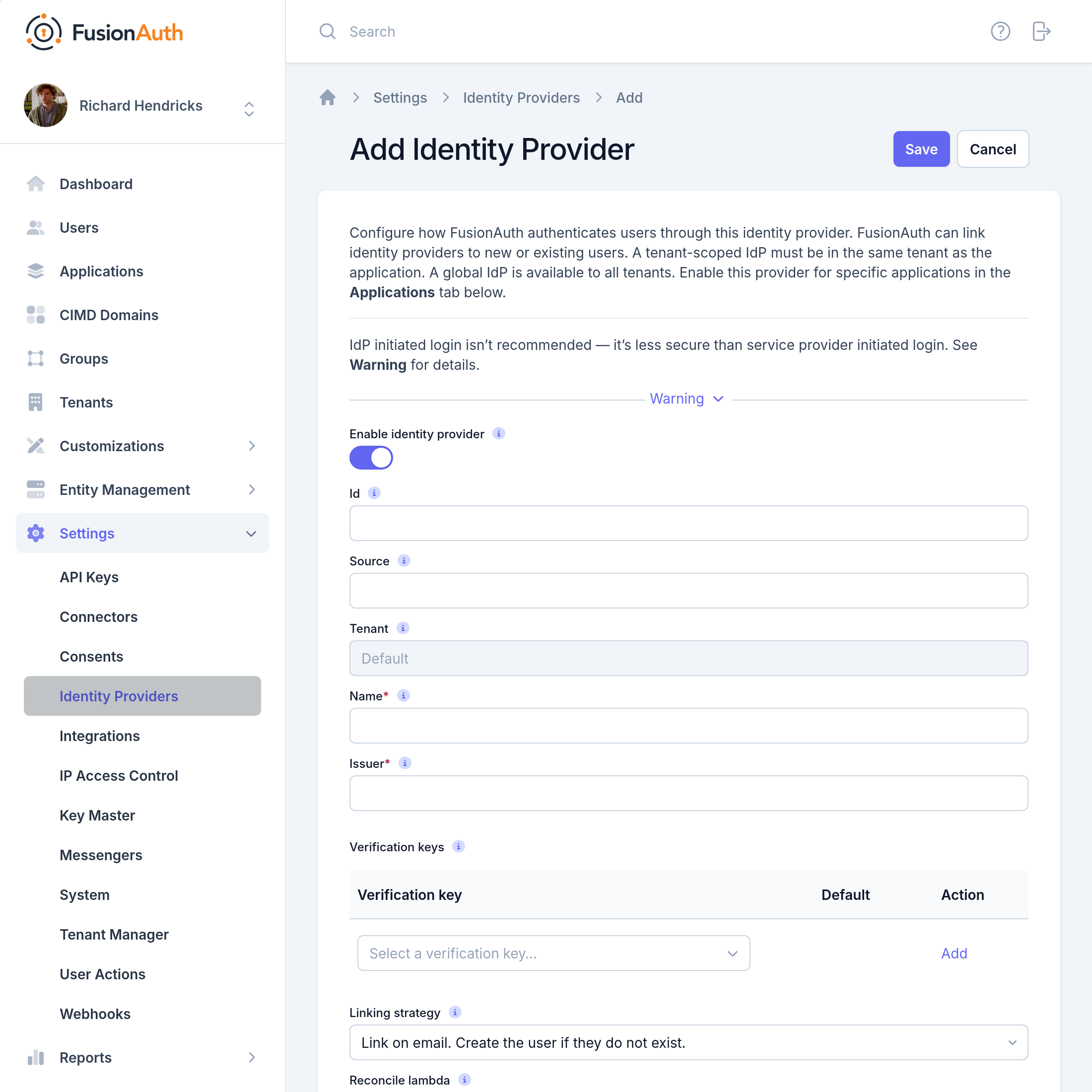
To create the Identity Provider, navigate to Settings -> Identity Providers , click Add provider , and select SAML v2 IdP Initiated . Then complete the required fields on the Add SAML v2 IdP Initiated panel.
Form Fields#
EnabledWhether this Identity Provider is enabled. When you disable the Identity Provider, FusionAuth disables the Identity Provider globally.
IdAn optional UUID. When you leave out the Id, FusionAuth generates a unique Id.
TenantThe Tenant that this Identity Provider belongs to. The field appears only when you select a specific Tenant on the previous page. When you select Global identity provider on the previous page, the field doesn't appear.
NameA unique name for the Identity Provider. FusionAuth uses the name for display only, and you can change the name later.
IssuerThe EntityIdA unique identifier, usually a URL, that names a SAML Identity Provider or Service Provider. The SAML entity Id is unrelated to FusionAuth Entities. (unique identifier) of the SAML v2 Identity Provider. The Identity Provider gives you this value.
Verification keysThe keys in Key MasterThe FusionAuth subsystem for managing cryptographic keys. that verify the signature on SAML responses from the Identity Provider. Import every signing certificate that the Identity Provider publishes, and add all of them. The key marked Default verifies responses whose signature doesn't include a certificate. For more information, see Signature Verification.
Linking strategyThe linking strategy for the SAML v2 Identity Provider. For more information, see Linking Strategies.
Available since 1.65.0 You can only change this value when the identity provider is disabled. To change the linking strategy for an identity provider that is already enabled, disable the provider, change the value, and then re-enable the provider.
Reconcile lambdaA lambda that maps custom claims from the SAML response to the FusionAuth User and Registration. For more information, see SAML v2 Reconcile Lambda.
To configure a lambda, navigate to Customizations -> Lambdas .
Enable debug loggingSome Identity Providers don't comply with the SAML and XML signing specifications, which makes the integration harder.
When you enable debug logging, FusionAuth writes debugging information to the Event Log during a SAML login. To view the Event Log, navigate to System -> Event Log .
Tenants#
The Tenants tab limits the number of links that each user in a Tenant can have to this Identity Provider. Links to other Identity Providers don't count toward the limit. On a global Identity Provider, the tab starts empty. To set a limit for a Tenant, click Add tenant configuration . On a tenant-scoped Identity Provider, the tab lists only the Identity Provider's Tenant.
Limit links per userWhen turned on, FusionAuth enforces Maximum link count for users in the Tenant.
Maximum link countThe maximum number of links that a user can have to this Identity Provider. When a user reaches the limit, FusionAuth rejects a new link. The Link API returns a 400, and the hosted login pages show an error.
For more information, see Identity Providers and Tenants.
Options#
Form Fields#
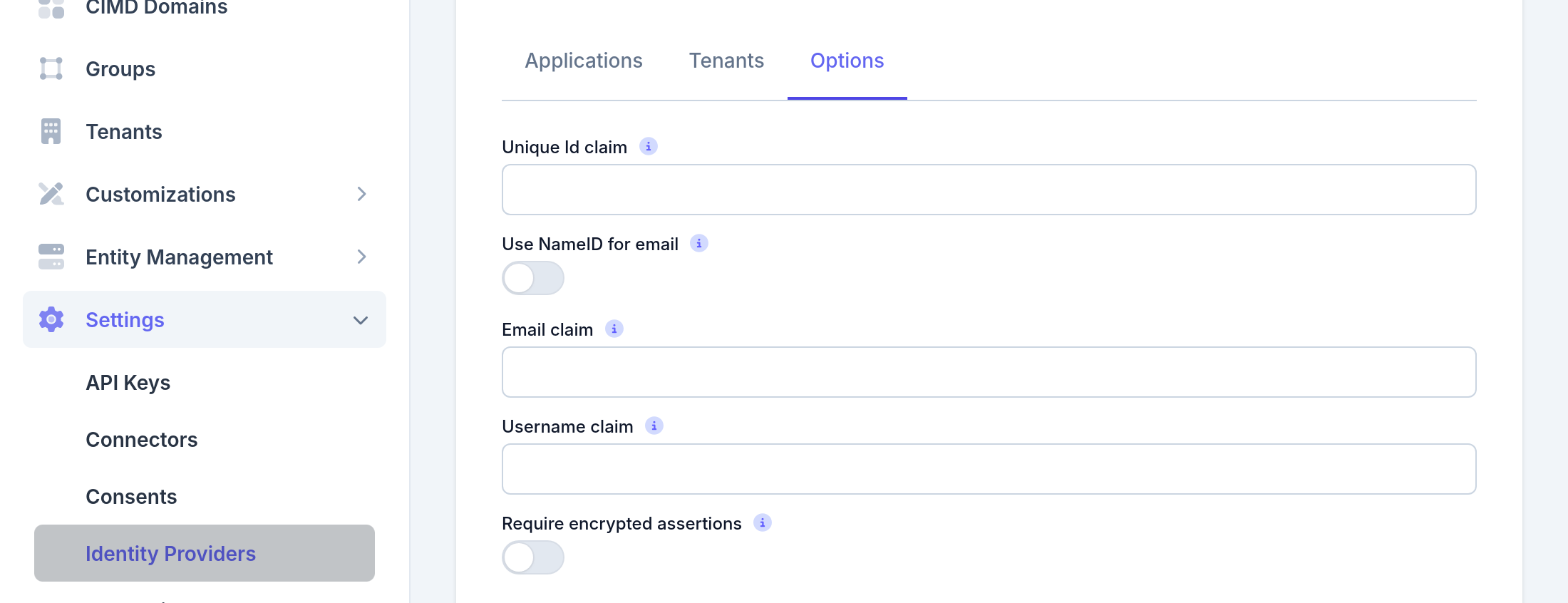
Unique Id claimThe name of the claim in the SAML response that contains the unique Id of the user. When you leave out the claim, FusionAuth uses the NameID.
Use NameId for emailWhen enabled, FusionAuth reads the email address of the user from the NameID in the SAML response.
Email claimThe name of the email claim in the SAML response.
When Use NameId for email is enabled, the Admin UI hides this field, and the field isn't required.
Username claimThe name of the username claim in the SAML response. FusionAuth never uses the NameID as the username. When you leave out the claim, the user has no username unless the reconcile lambda sets one. Set the claim when the Linking strategy links by username.
Require encrypted assertionsWhen enabled, FusionAuth requires encrypted assertions in SAML responses from the Identity Provider. FusionAuth rejects a SAML response that contains an unencrypted assertion.
Assertion decryption keyThe key that decrypts SAML responses. This field is required when Require encrypted assertions is enabled. To create, manage, or import a key, navigate to Settings -> Key Master .
The key must contain an RSA private key. Give the matching public key or certificate to the SAML Identity Provider, which uses the public key to encrypt assertions.
Integration Details#
After you configure the Identity Provider, FusionAuth displays the values that your SAML v2 Identity Provider needs to trust FusionAuth as a relying partyAn application that depends on another system to authenticate users. In OpenID Connect, the relying party is the client application. In WebAuthn, the relying party is the website that registers and verifies passkeys.. To view the values, navigate to Settings -> Identity Providers , and click next to your SAML provider.
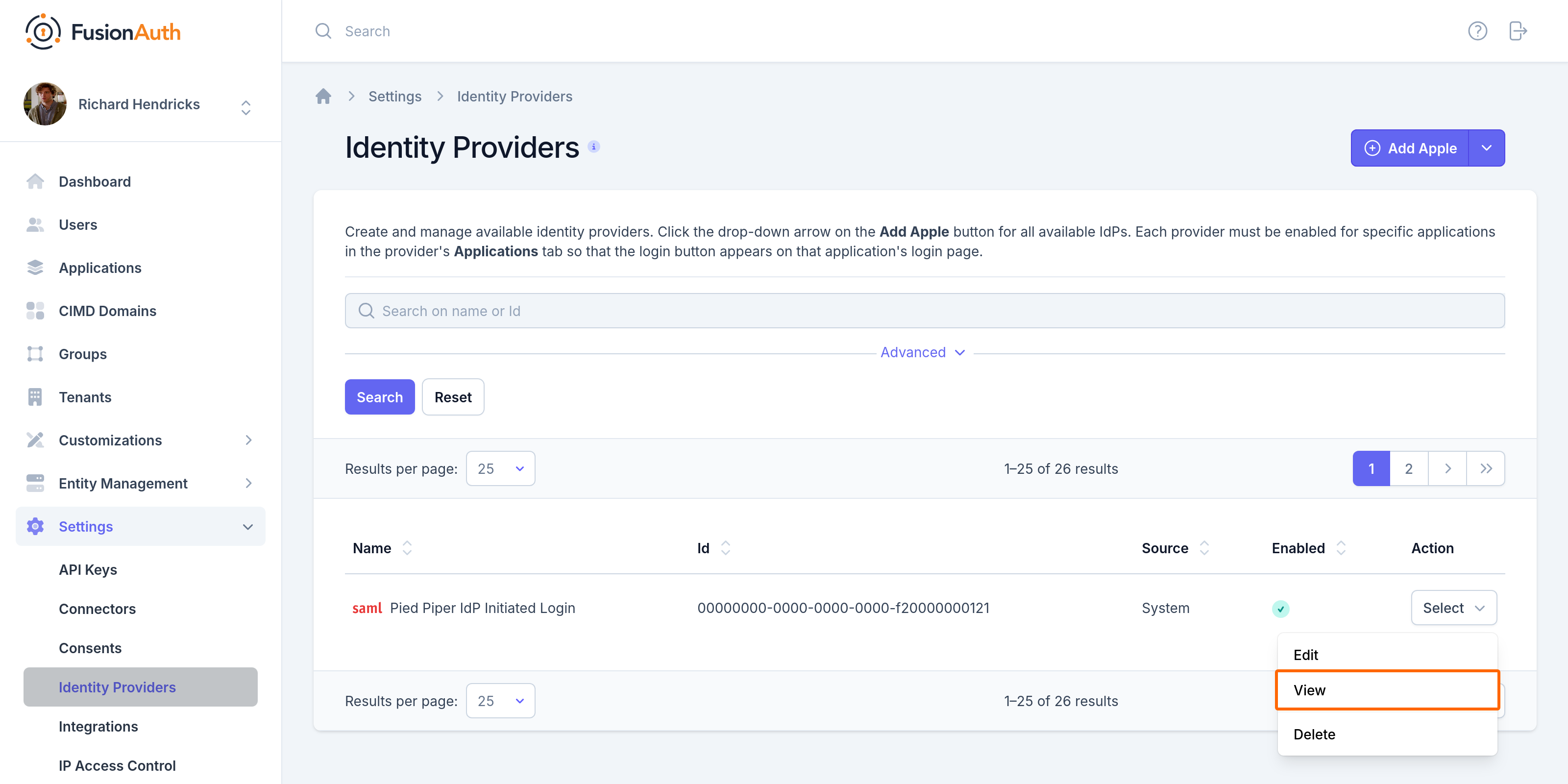
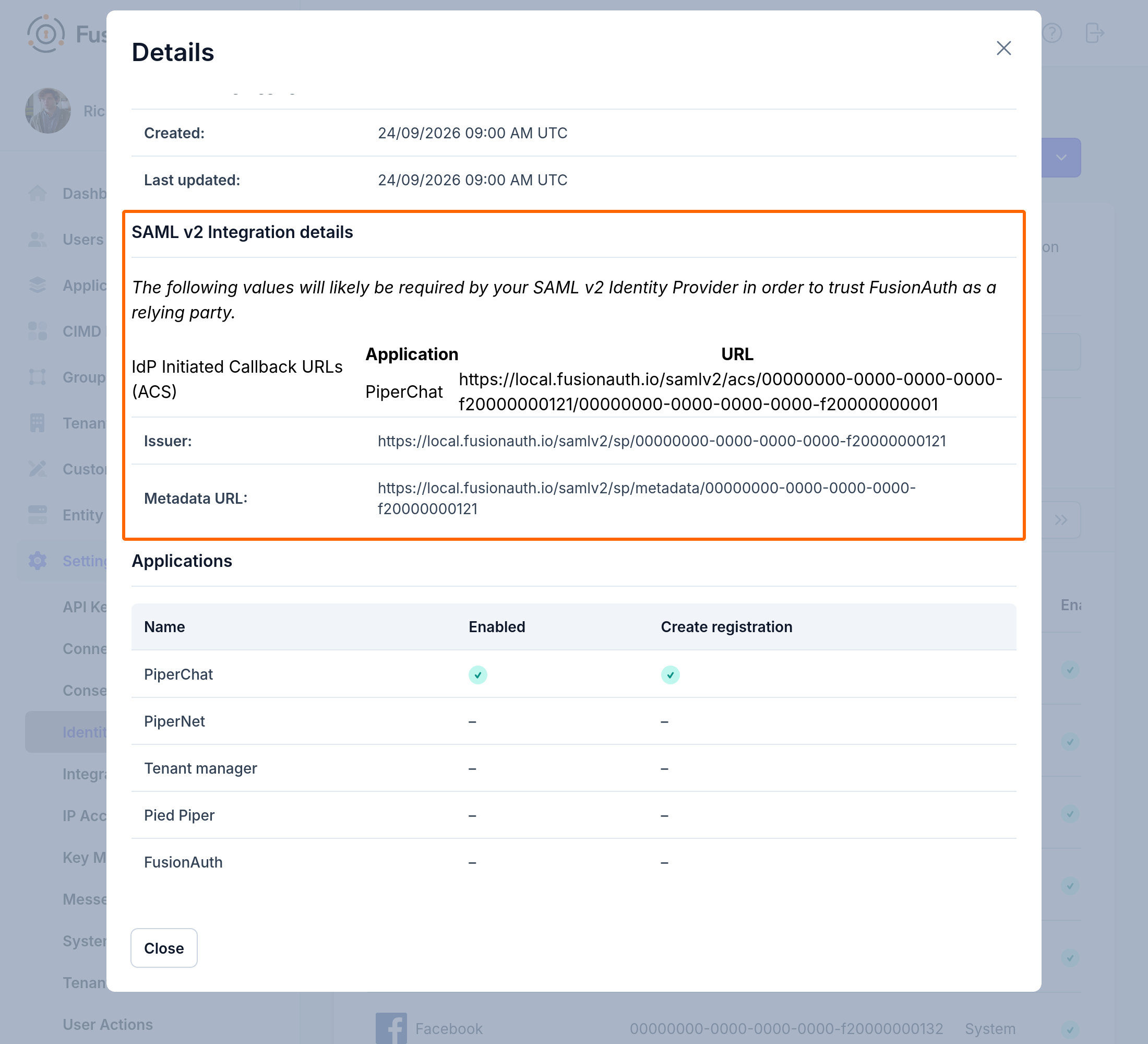
Scroll to the SAML v2 Integration details section. The section contains the values you need to configure the integration with the SAML v2 IdP.
SAML v2 Integration Details#
Fields#
IdP Initiated Callback URLs (ACS)An Assertion Consumer Service (or ACS) is the location at a service provider that accepts messages to establish a session based on the assertion.
By default the redirect URI will be the first Authorized redirect URI found in the FusionAuth Application OAuth configuration. To specify a redirect URI send the authorized URI in the RelayState parameter. Support for using the RelayState in this manner is supported in FusionAuth version greater than or equal to 1.41.0. In prior versions, append a query parameter named redirect_uri to the ACS in the IdP configuration.
This field will only be present if you have Enable IdP initiated login toggled on for this identity provider.
Note: IdP initiated logins go through a separate endpoint from SP initiated logins. For IdP initiated logins in order to receive a refresh token the query parameter ?scope=offline_access will need to be appended to the url. When logging into the FusionAuth Admin application this parameter is included by default and does not need to be supplied.
Callback URL (ACS)This is the Assertion Consumer Service (ACS) endpoint for SP initiated logins and otherwise follows the same rules as IdP Initiated Callback URLs (ACS).
IssuerThe service provider EntityId.
By default this value is {'<base_url>/samlv2/sp/<identityProviderId>'}. You can override it using identityProvider.issuer.
FusionAuth expects the Audience value in the SAML assertion to match this value.
Metadata URLThe URL where the service provider metadata resides.
CORS Configuration#
To complete the login request, the SAML v2 Identity Provider sends an HTTP POST request to the callback URLThe service provider endpoint that receives SAML responses from an identity provider. When FusionAuth acts as a service provider, the endpoint is /samlv2/acs. in FusionAuth. To let the request through the CORSA browser security mechanism that lets a web page request restricted resources from another domain when the server allows the request. filter, navigate to Settings -> System -> CORS . Then add the origin of the SAML IdP as an Allowed Origin in the CORS configuration.
Troubleshooting#
To troubleshoot a SAML flow, enable Enable debug logging, and complete the SAML flow. Then navigate to System -> Event Log , and review the entries for configuration issues.
For help with an invalid signature error, see Invalid Signature Errors.
Related
Configure SAML v2 for Active Directory Federation Services (ADFS).
Learn how to configure Azure AD (Microsoft Entra ID) as a SAML v2 Identity Provider for FusionAuth.
Configure SAML v2 IdP-Initiated SSO With Okta.
Learn about the APIs for creating, retrieving, updating and deleting SAML v2 identity providers.