Disable Multi-Factor Authentication for a User
On this page
A user may need to remove an MFA method after changing an email address or phone number, or to stop using MFA. When a user has no methods left, FusionAuth stops asking the user for a second factor, unless the login policy is Required.
Remove MFA methods from a user in one of the following ways:
- The self-service account pages let users remove their own methods. The account pages require the Starter plan or higher. For more information, see Enable or Disable MFA in the account pages guide.
- The Admin UI removes a method from any user, depending on your roles.
- The Two-Factor APIs let you build your own pages, where the user proves access to the method with a code.
- The User API removes methods directly, with no code.
Remove a Method in the Admin UI#
-
Navigate to Users and open the user.
-
Click the Multi-Factor tab.
-
Click Disable in the row of the method.
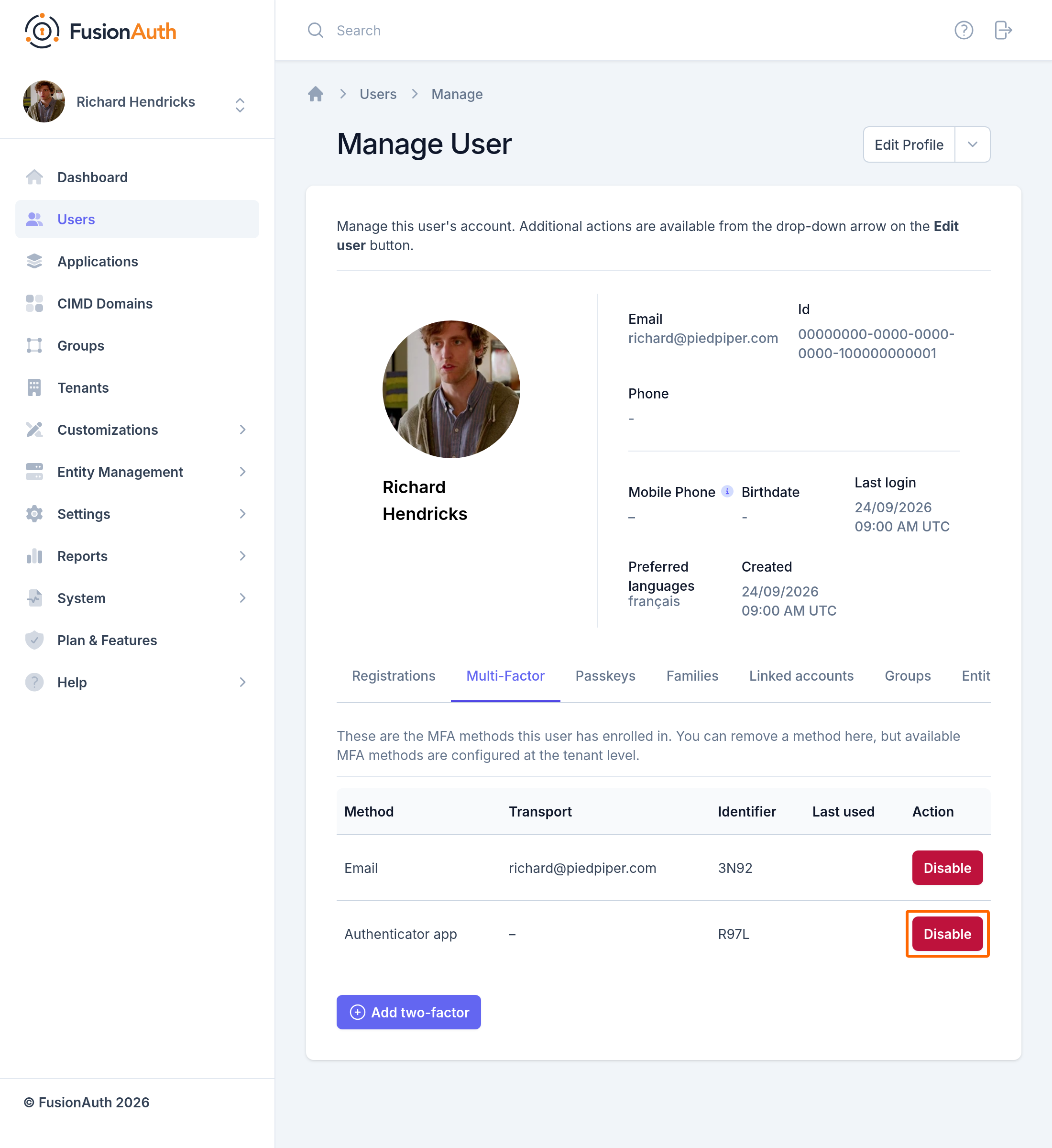
-
Confirm the removal. When the Admin UI asks for a code, enter a code from the method.
Your roles decide whether the Admin UI asks for a code:
- With the
adminrole, you remove a method from another user without a code. - With the
mfa_deleterrole, you remove a method from another user without a code when the user meets extra safeguards. The user can't be registered to the FusionAuth Application. The user also needs a verified email address or phone number, and the Tenant needs a template to notify the user of the removal. - With the
user_manager,user_support_manager, oruser_support_viewerrole, you remove only your own methods, with a code.
After a removal by an administrator, FusionAuth tries to notify the user with the Tenant's templates. For the full mfa_deleter safeguards, see Remove an MFA Method With the mfa_deleter Role.
Build Your Own Pages#
The Two-Factor APIs remove a method only after the user enters a valid code from the method, or a recovery code.
-
Show the user the methods in
user.twoFactor.methods, from the User API, and ask the user to choose one. -
When the user chooses an email or SMS method, send a code with the Send a Multi-Factor Code When Disabling MFA API:
Send a code to remove a method API_KEY=... REQUEST_PAYLOAD='{...}' curl -XPOST -H 'Content-type: application/json' -H "Authorization: $API_KEY" 'https://local.fusionauth.io/api/two-factor/send' -d $REQUEST_PAYLOADSend a code to remove a method request { "messageType": "Voice", "methodId": "RLRT", "userId": "c075e472-a732-47d6-865a-d385a5fcb525" }For an authenticator method, skip this step. The user reads the code from the app.
-
Build a page that collects the code. Accept a recovery code in the same field.
-
Call the Disable Multi-Factor API with the
codeand themethodId:Remove a method API_KEY=... USER_ID=... CODE=... METHOD_ID=... curl -XDELETE -H "Authorization: $API_KEY" 'https://local.fusionauth.io/api/user/two-factor/'$USER_ID'?code='$CODE'&methodId='$METHOD_ID
With a code from the method, FusionAuth removes only that method. With a recovery code, FusionAuth removes every method and every remaining recovery code. The request needs a methodId even with a recovery code, and any of the user's method Ids works. When the user adds a method again, FusionAuth generates new recovery codes.
Remove Every Method With the User API#
The User API removes methods without a code. Retrieve the user, empty twoFactor.methods, and send the user back with a PUT request:
API_KEY=...
USER_ID=...

user=$(curl -s -H "Authorization: $API_KEY" 'https://local.fusionauth.io/api/user/'$USER_ID)

# empty the methods array
user_without_mfa=$(echo "$user" | jq '.user.twoFactor.methods = []')

curl -XPUT -H 'Content-type: application/json' -H "Authorization: $API_KEY" 'https://local.fusionauth.io/api/user/'$USER_ID -d "$user_without_mfa"
A PATCH request with an empty twoFactor.methods array doesn't remove methods, because PATCH adds array items instead of replacing the array. For more information, see The PATCH HTTP Method.
Related
Learn how to add MFA methods to a user with the account pages, the Admin UI, the Two-Factor APIs, or the User API.
Learn about multi-factor authentication (MFA) in FusionAuth, including the supported methods, recovery codes, and trust tokens.
API documentation for the FusionAuth Disable Multi-Factor API.
API documentation for the FusionAuth Generate Recovery Codes API.