Add an External JWT IdP
On this page
The External JWT Identity Provider logs a user in to FusionAuth with a JWT from a third-party identity provider. Your application gets the JWT from the third party and sends the JWT to the Reconcile API. FusionAuth verifies the JWT signature and reads the user's identity from the JWT claims. FusionAuth then finds or creates the user and returns the same response as the Login API.
Your application exchanges a third-party JWT for a FusionAuth login.
The External JWT Identity Provider adds no login button to the FusionAuth login pages.
The External JWT Identity Provider works only through the API. The FusionAuth hosted login pages don't support the External JWT Identity Provider.
When FusionAuth has an Identity Provider for your provider, such as Facebook, or a generic one, such as OpenID Connect, use that Identity Provider and the /api/identity-provider/login endpoint instead.
For a walkthrough that uses the Lookup API and the Reconcile API with ADFS, see External JWT IdP Example Usage. To configure the Identity Provider through the API, see the External JWT API.
Add an External JWT Identity Provider#
To enable External JWT for an Application or CIMD domain:
-
In the Admin UI, navigate to Settings -> Identity Providers .
-
Click the arrow next to the add button, and select External JWT .
-
Select the Tenant for the Identity Provider, or select
Global identity provider. You can't change the scope later. For more information, see Identity Provider Scope. -
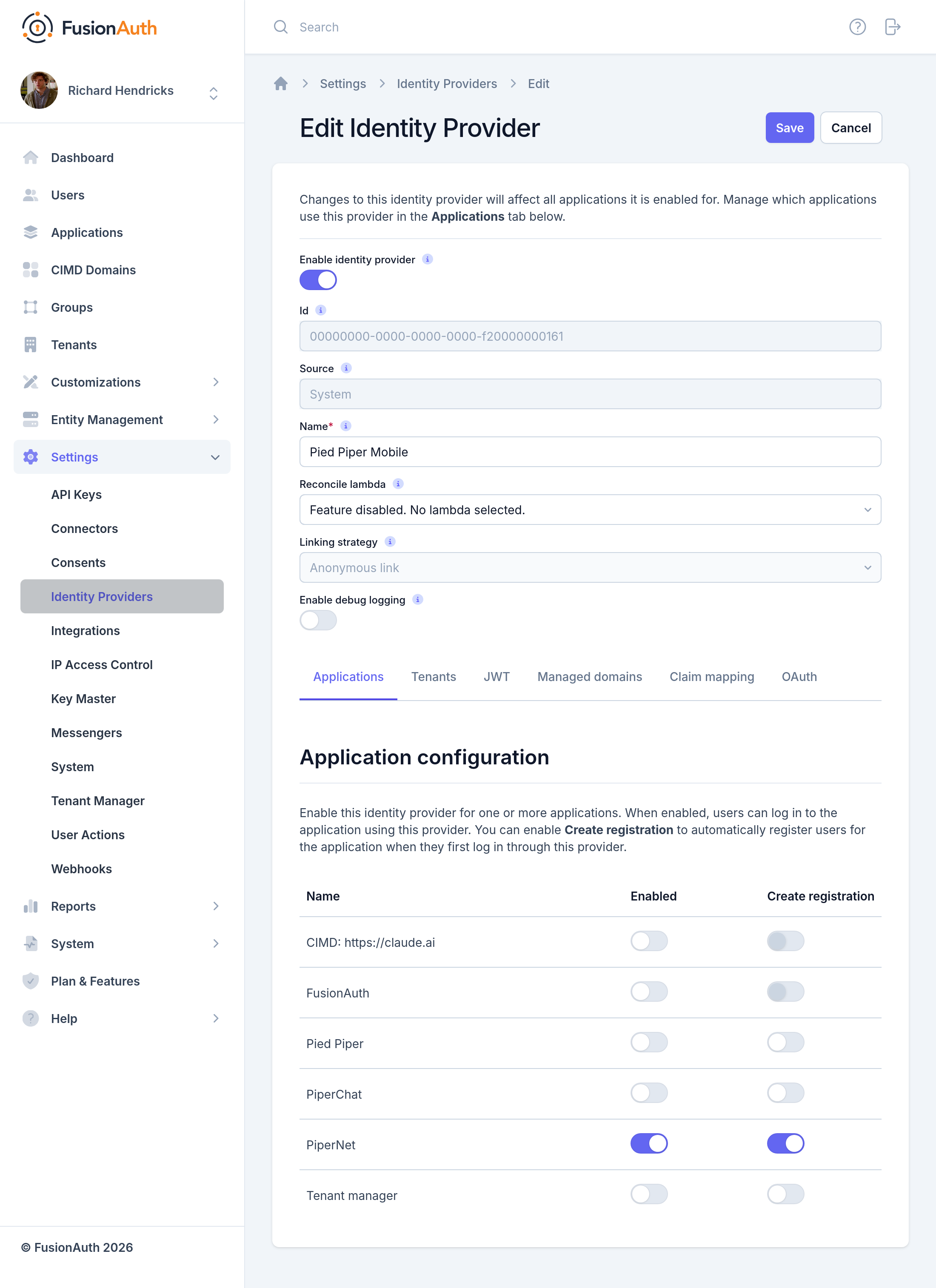
Fill out the form. Your identity provider supplies most of the values. For a description of each field, see Form Fields.
-
On the Applications tab, turn on Enabled for each Application or CIMD domain that uses the Identity Provider.
-
To register new users for the Application with the Application's default roles, turn on Create registration. When Create registration is off, a user needs a registration for the Application before the user can log in through the Identity Provider.
-
Click .
Form Fields#
The top of the form holds the following fields:
Enable identity providerWhether this External JWT Identity Provider is enabled.
IdAn optional UUID. When you leave out the Id, FusionAuth generates a unique Id.
SourceThe source of this Identity Provider.
FusionAuth sets the source only when you create the Identity Provider. FusionAuth ignores a new value on update and keeps the existing value.
The maximum length is 191 characters.
TenantThe Tenant that this Identity Provider belongs to. The field appears only when you select a specific Tenant on the previous page. When you select Global identity provider on the previous page, the field doesn't appear.
NameA unique name for the Identity Provider. FusionAuth uses the name for display only, and you can change the name later.
Reconcile lambdaA lambda that maps custom claims from the JWT to the user. The lambda can replace the claim mappings on the Claim mapping tab or run in addition to the claim mappings.
To create a lambda, navigate to Customizations -> Lambdas .
Linking strategyHow FusionAuth links the external user to a FusionAuth user. For more information, see Linking Strategies.
Available since 1.65.0 You can only change this value when the identity provider is disabled. To change the linking strategy for an identity provider that is already enabled, disable the provider, change the value, and then re-enable the provider.
Enable debug loggingCreates Event Log entries that help you debug integration errors. To read the entries, navigate to System -> Event Log .
Applications#
The Applications tab lists each Application and CIMD domain. The FusionAuth Application represents the Admin UI. Each row has the following toggles:
EnabledTurns on this Identity Provider for the Application.
Create registrationWhen a user without a registration for the Application reconciles a JWT, FusionAuth registers the user for the Application with the Application's default roles. When you turn off the toggle, register each user for the Application before the user reconciles a JWT.
Tenants#
The Tenants tab limits the number of links that each user in a Tenant can have to this Identity Provider. Links to other Identity Providers don't count toward the limit. On a global Identity Provider, the tab starts empty. To set a limit for a Tenant, click Add tenant configuration . On a tenant-scoped Identity Provider, the tab lists only the Identity Provider's Tenant.
Limit links per userWhen turned on, FusionAuth enforces Maximum link count for users in the Tenant.
Maximum link countThe maximum number of links that a user can have to this Identity Provider. When a user reaches the limit, FusionAuth rejects a new link. The Link API returns a 400, and the hosted login pages show an error.
For more information, see Identity Providers and Tenants.
JWT#
The JWT tab tells FusionAuth how to verify the JWT and where to find the user's identity in the JWT claims.
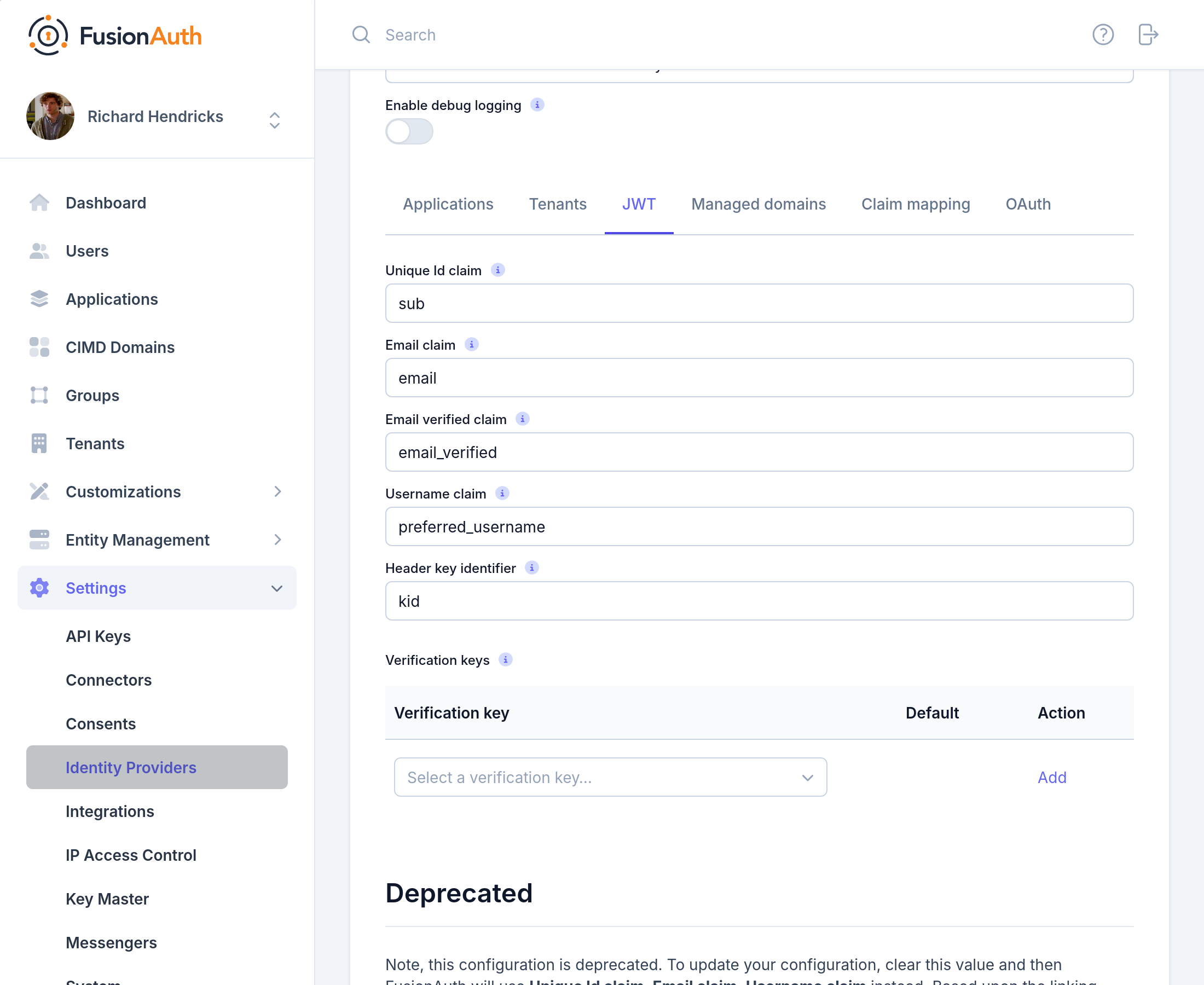
Unique Id claimThe name of the claim that contains the user's unique Id. FusionAuth links the user to this Identity Provider by this value. The Reconcile API rejects a JWT that doesn't contain the claim.
Email claimThe name of the claim that contains the user's email address. When Linking strategy links on email, FusionAuth finds or creates the user by this email address. When Managed domains has values, the email address must be in one of the domains.
When Unique claim has a value, FusionAuth ignores this field.
Email verified claimThe name of the claim that says whether the third party verified the user's email address. When Linking strategy links on email and the claim is false, the Reconcile API rejects the JWT.
Username claimThe name of the claim that contains the user's username. When Linking strategy links on username, FusionAuth finds or creates the user by this username.
Header key identifierThe name of the JWT header that identifies the key that signed the JWT. FusionAuth uses the value to choose a key from Verification keys.
Verification keysThe keys in Key MasterThe FusionAuth subsystem for managing cryptographic keys. that verify the signature of the JWT. Import the public key or certificate of each signing key that the third party uses, and add every key.
Unique claimThe name of the claim that contains the user's email address. The field is empty by default. When the field has a value, FusionAuth reads the email address from this claim instead of Email claim, and the Reconcile API rejects a JWT that doesn't contain the claim.
To use Unique Id claim, Email claim, and Username claim instead, clear this field.
Managed Domains#
Managed domains limit the users that this Identity Provider can reconcile. When the field has values, the Reconcile API rejects a JWT whose email address isn't in one of the domains. FusionAuth skips the check for a JWT without an email address. The Lookup API also uses managed domains to find the Identity Provider for an email address.
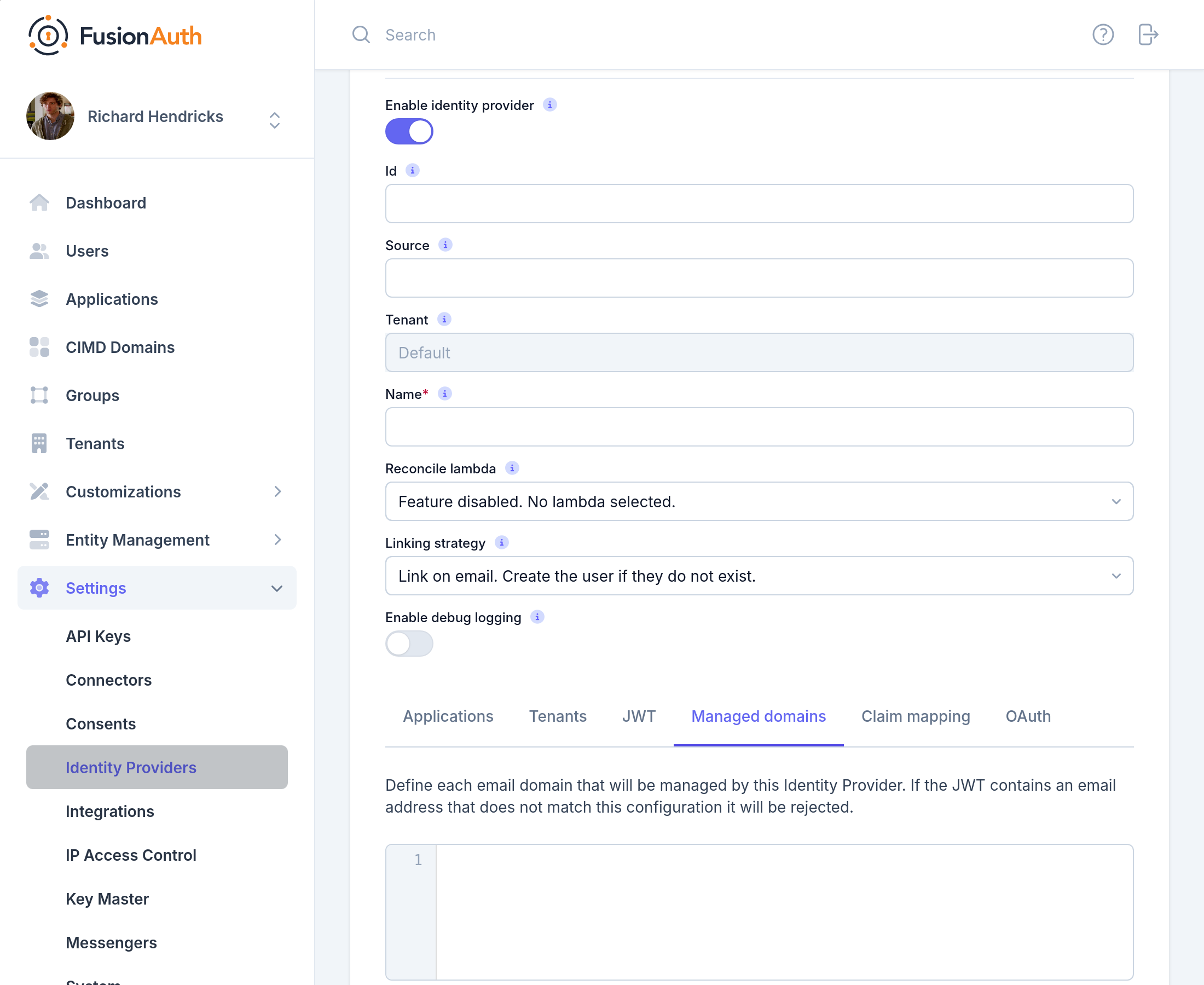
Managed domainsThe email domains that this Identity Provider manages, one domain on each line. For example, to reconcile JWTs for jared@piedpiper.com, add piedpiper.com. When you leave the field empty, the Identity Provider accepts any email address.
Only one Identity Provider in a Tenant can manage a domain. For more information, see Managed Domains.
Claim Mapping#
The Claim mapping tab lists the claim mappings, which copy JWT claims to the user. To add a mapping, click Add Claim . A Reconcile lambda can map claims instead of or in addition to the claim mappings.
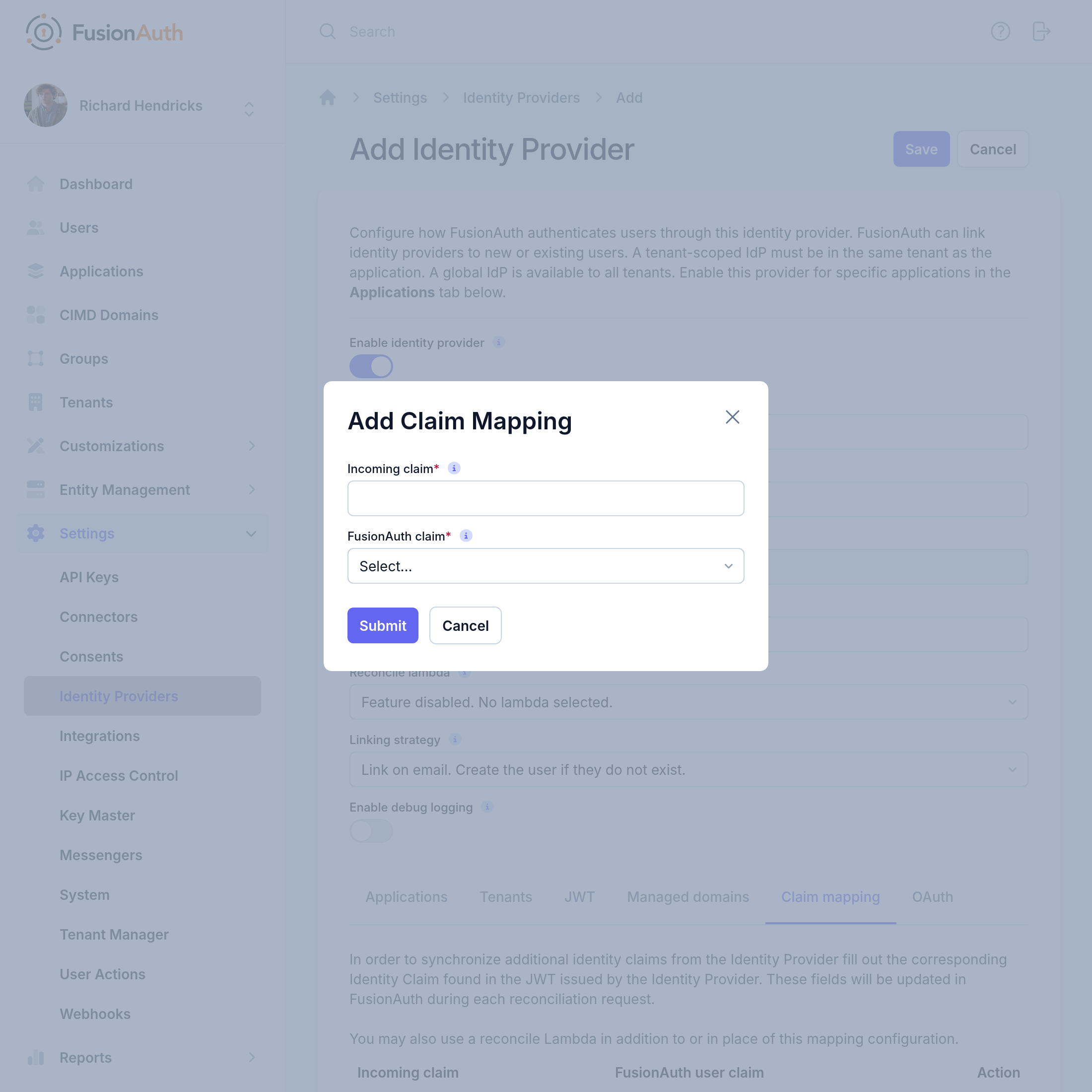
Incoming claimThe name of the claim in the JWT.
FusionAuth claimThe user field that receives the value of Incoming claim. When you select UserData or RegistrationData, FusionAuth stores the value in the user data or the registration data, with the claim name as the key.
For example, when Incoming claim is company and FusionAuth claim is RegistrationData, FusionAuth stores the value in the registration data for the Application:
{
  "registration": {
    "data": {
      "company": "Acme Corp."
    }
  }
}
OAuth#
FusionAuth doesn't use the fields on the OAuth tab. The Lookup API returns the values, so your application can find where to send the user to log in with the third party.
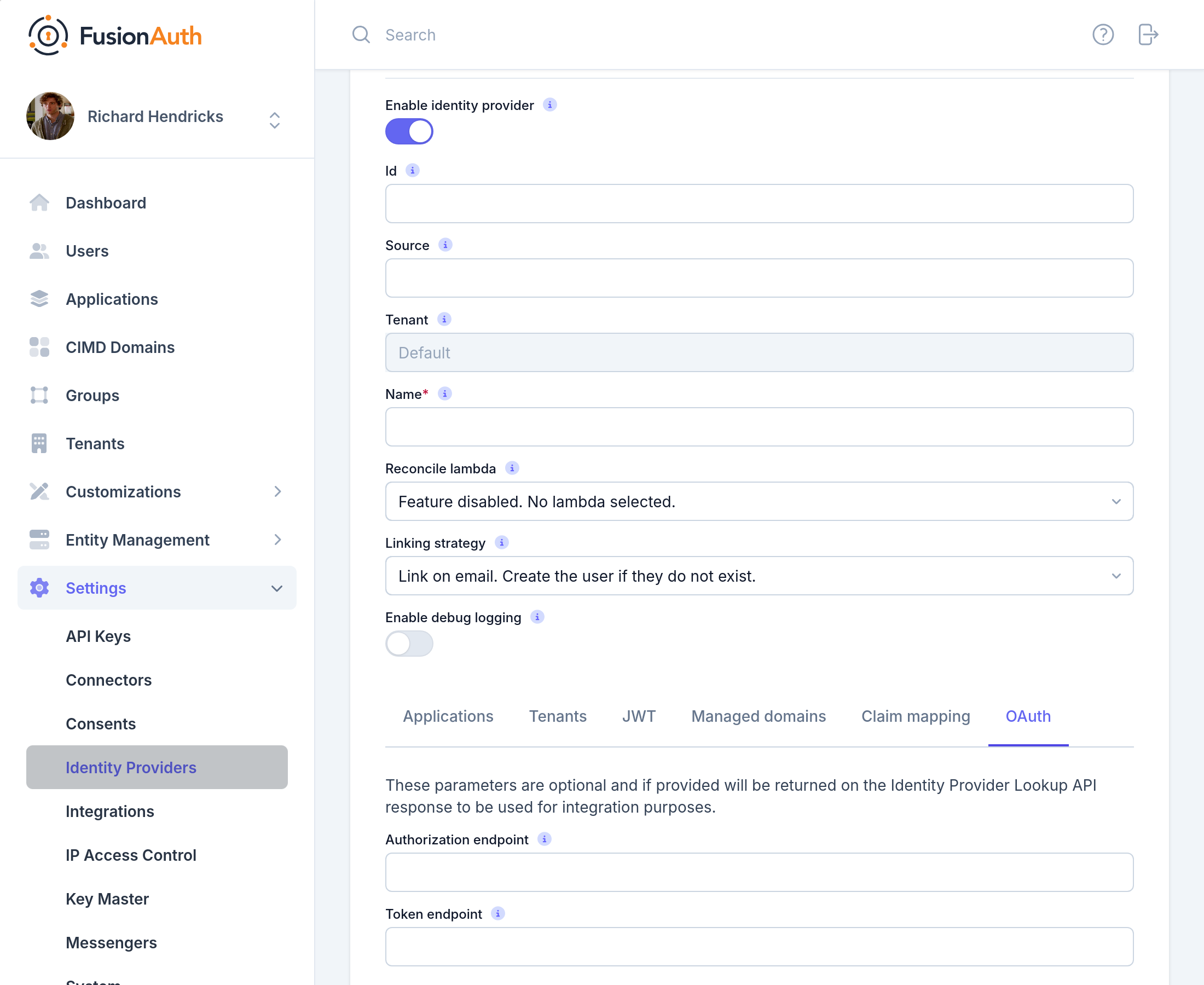
Authorization endpointThe URL of the OAuth 2.0 Authorization endpointThe OAuth 2.0 endpoint where a user logs in and grants an application access. In FusionAuth, the authorization endpoint is /oauth2/authorize. of the third-party identity provider.
Token endpointThe URL of the OAuth 2.0 Token endpointThe OAuth 2.0 endpoint where an application exchanges a grant, such as an authorization code, for tokens. In FusionAuth, the token endpoint is /oauth2/token. of the third-party identity provider.
Related
Learn how to federate identity using the External JWT Identity Provider.
Learn how the FusionAuth APIs authenticate requests.
API documentation for the External JWT Identity Provider API.
API documentation for the Reconcile a JWT Using the External JWT Provider API.