Host a SAML v2 Identity Provider
On this page
SAML is an XML-based authentication protocol. With FusionAuth, you can host a SAML Identity Provider (IdP) or use an external SAML Identity Provider.
This page explains how to configure FusionAuth's SAML v2 Identity Provider: FusionAuth provides the system of record for users, and other applications federate with FusionAuth.
To instead add an external SAML v2 Identity Provider to your FusionAuth instance, see the Add an External SAML v2 Identity Provider documentation.
Because the SAML Identity Provider uses OAuth workflows via FusionAuth's hosted login pages, you can use FusionAuth's hosted page themes to customize the look and feel.
Single Sign-On and Logout#
SAML is widely used to offer Single Sign-On (SSO) across applications. When enabled, a user can sign in to an IdP such as FusionAuth, and then other applications will share the same authentication session.
SAML also offers Single Logout, which is the inverse of Single Sign-on. With Single Logout, a user logs out of the IdP and all other applications are notified of the logout and should end the user's session.
Version 1.61.0 added support for the ForceAuthn attribute in Authn requests.
When ForceAuthn=true, FusionAuth begins the workflow with the equivalent OAuth prompt=login parameter.
When using ForceAuthn=true, the SAML service provider should verify the AuthnInstant in the Authn response to ensure authentication was forced.
Host a SAML Identity Provider with FusionAuth#
To use FusionAuth as a SAML identity provider, you must enable and configure SAML for an Application.
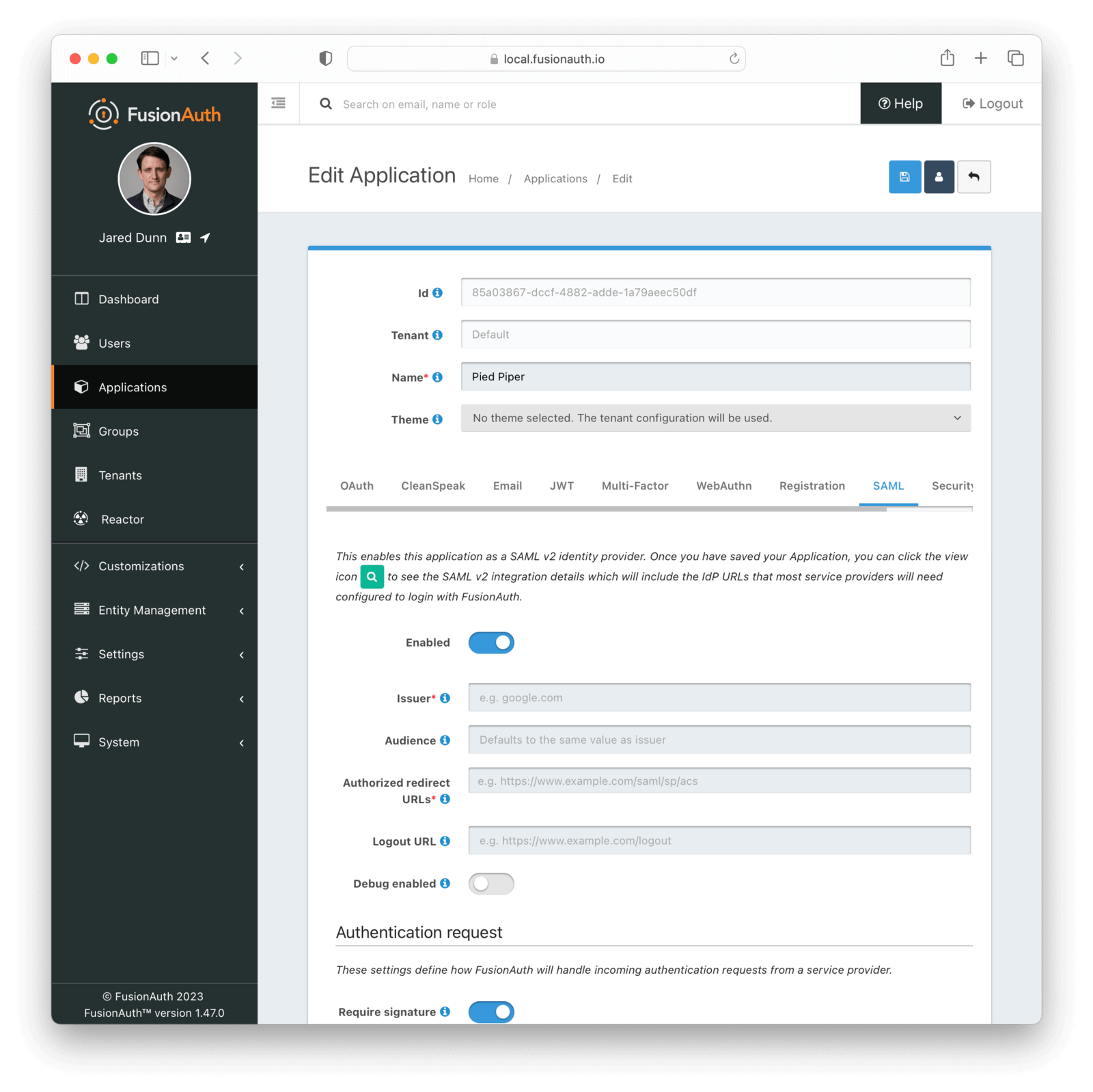
Navigate to Applications -> Your application -> SAML to configure this functionality. The screenshot below shows SAML configuration for the Pied Piper application:
Form Fields#
IssuerThis is the issuer string that the service provider will send in the SAML request to FusionAuth. FusionAuth uses this issuer value to look up this FusionAuth application in order to start the SAML login process.
The issuer string is used by service providers (e.g. Google, Zendesk, etc.) to identify themselves to FusionAuth's SAML identity provider. Often you cannot set this to a custom value in the service provider and need to read their documentation or test the integration and use the error messages to determine the correct value.
AudienceSome service providers, such as Zendesk, require a different audience in the SAML response than the Issuer set above. If you are configuring a service provider that requires a different audience, enter the audience name, otherwise leave it blank.
If this isn't specified, FusionAuth will set the audience to the same value as the Issuer.
Authorized redirect URLsOne or more URLs that FusionAuth may redirect to after the user has successfully logged in.
This is also known as the Assertion Consumer Service URL or ACS.
Logout URLThe URL used to perform the 302 redirect as the response from the /samlv2/logout endpoint. If this value is omitted, the tenant configured logout URL will be used. See the Logout URL under the Tenant -> Your Tenant -> OAuth tab.
Usually this is the starting location of the application.
Enable debug loggingMany service providers are not compliant with the SAML and XML signing specifications. This makes it challenging to get them working with FusionAuth.
If you are running into integration issues, toggle this setting on and FusionAuth will output debugging information into the Event Log during a SAML login. You can find the event log in System -> Event Log .
Authentication Request#
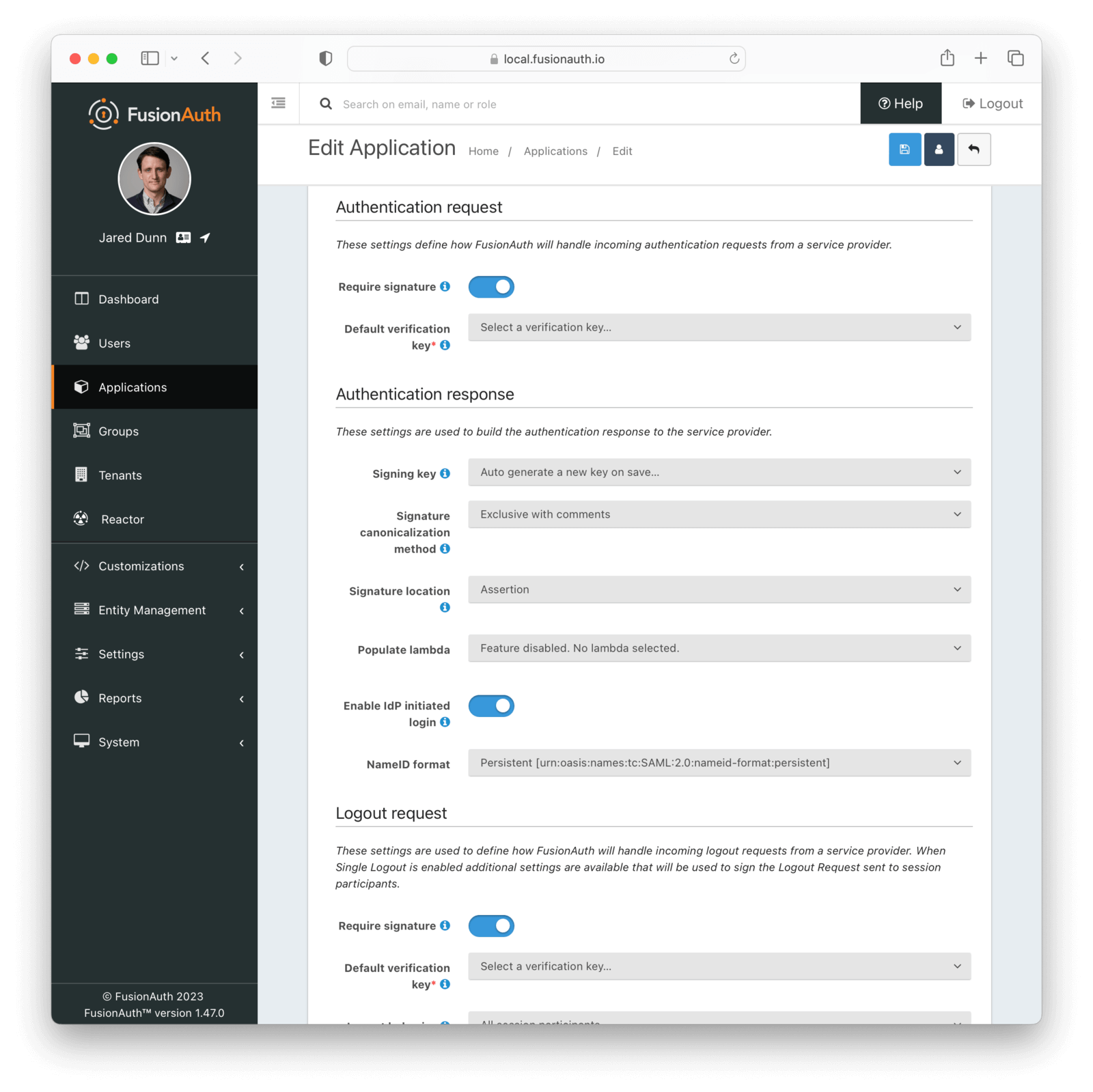
Settings in this section configure SAML request handling.
Form Fields#
Require signed authentication requestsEnable to require the SAML v2 Service Provider to sign the SAML v2 authentication request. When this is enabled, if a signature is omitted the request will be rejected.
Default verification keyThe default key used to verify the signature if the public key cannot be determined by the KeyInfo element when using POST bindings, or the key used to verify the signature when using HTTP Redirect bindings.
If a Require signed authentication requests is not enabled, this field is optional.
Enable login hintWhen enabled, FusionAuth will accept a username or email address as a login hint on a custom HTTP request parameter.
Login hint parameter nameThe name of the login hint parameter provided by the service provider on an AuthnRequest. If this parameter is present, its value will be used to pre-populate the username field on the FusionAuth login form.
For example, suppose Enable login hint is enabled and Login hint parameter name has the value login_name. When FusionAuth is set up as an IdP, the SP can send a request which includes the parameter login_name=richard@example.com, and FusionAuth will pre-populate richard@example.com into the login form the end user sees.
Note that this setting names an HTTP query parameter, not an element in the SAML AuthnRequest XML.
Authentication Response#
Settings in this section configure how FusionAuth processes the SAML response.
Form Fields#
Signing keyIn order to properly sign the SAML responses, FusionAuth requires a key pair from Key Master. You can either select an existing key here or select the first option to have FusionAuth generate a key pair to use. If no choice is selected, a new key will be automatically created and assigned.
To add, manage or import your key, navigate to Settings -> Key Master .
Signature canonicalization methodThis sets the XML signature canonicalization method that FusionAuth will use when signing the SAML response. This method is also used when FusionAuth creates a message digest in the SAML response.
This option is usually the first thing to change if a service provider is rejecting the SAML response from FusionAuth. Many service providers are not compliant with the full XML signature specification and require a fixed canonicalization method. Your best bet is to try all four values until a login succeeds.
Signature locationSome service providers may require the signature in a specific location. When Assertion is selected the signature element will be a child of the assertion. When Response is selected the signature will be placed at the top level of the response.
Response populate lambdaThis specifies a lambda that FusionAuth will invoke prior to sending the SAML response to the service provider. This allows you to write a lambda to populate additional information into the SAML response. In most cases, your lambda will add an Attribute, or more than one,
to the response.
The complete documentation for this lambda can be found on the SAML v2 response populate lambda documentation page.
Enable IdP initiated loginWhen enabled, FusionAuth will be able to initiate a login request to a SAML v2 Service Provider.
Once enabled, open the View dialog or this application to view the integration URI. You will find this value in the view dialog in the SAML v2 Integration details, and the value will be named Initiate login URL:.
NameID formatThe NameId format to send in the AuthN response to the SAML v2 Service Provider. There are two valid values:
- Persistent - The
urn:oasis:names:tc:SAML:2.0:nameid-format:persistentNameID format will be used. - Email - The
urn:oasis:names:tc:SAML:1.1:nameid-format:emailAddressNameID format will be used.
Logout Request#
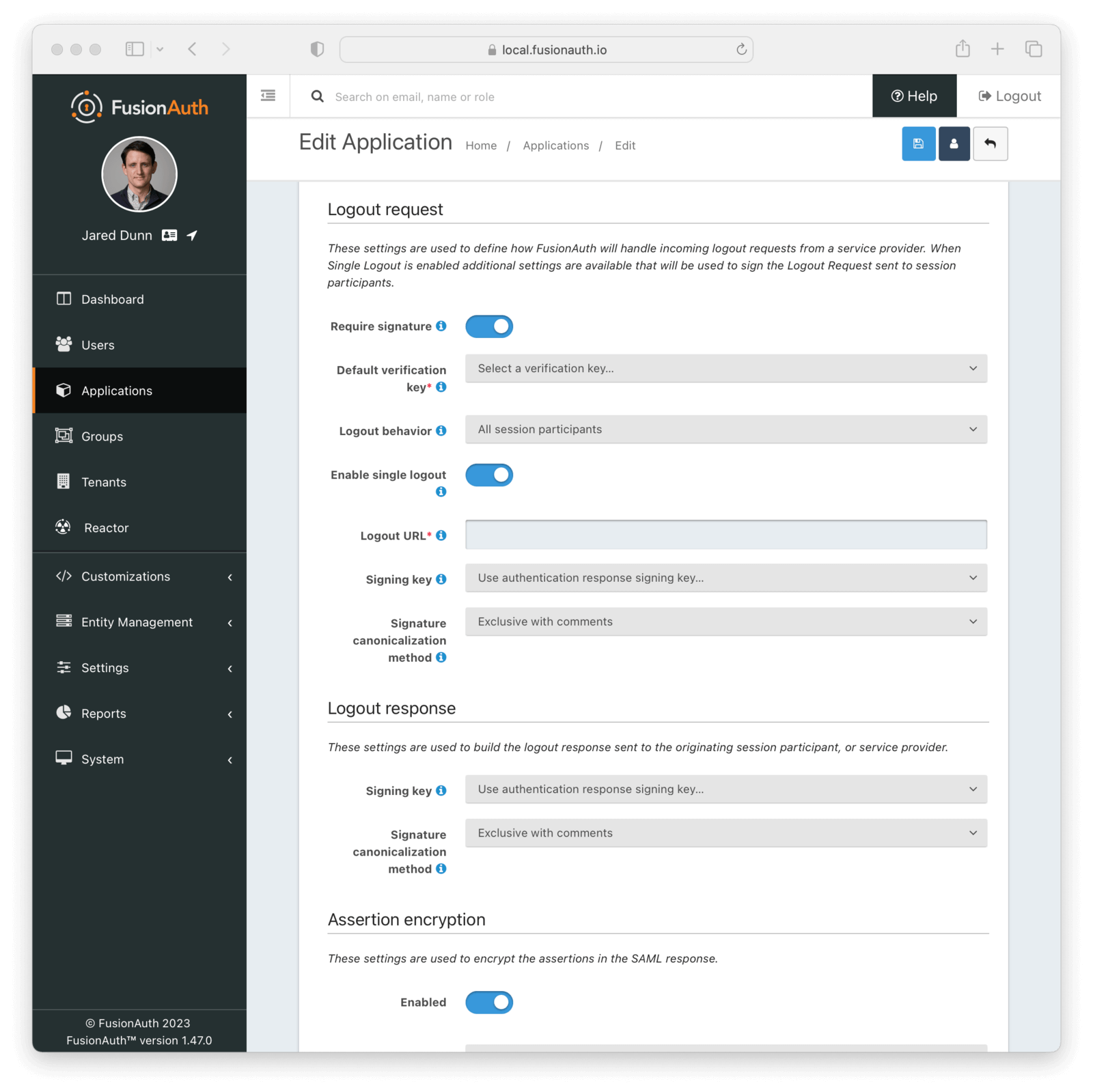
Settings in this section configure SAML Logout handling. They define how FusionAuth will handle incoming logout requests from a service provider. When Single Logout is enabled, additional settings are available that will be used sign the Logout Request sent to session participants.
Form Fields#
Require signed logout requestsEnable to require the SAML v2 Service Provider to sign the SAML v2 Logout request. When this is enabled, if a signature is omitted the request will be rejected.
Default verification keyThe default key used to verify the signature if the public key cannot be determined by the KeyInfo element when using POST bindings, or the key used to verify the signature when using HTTP Redirect bindings.
If a Require signed logout requests is not enabled, this field is optional.
Logout behaviorWhen set to All session participants, each session participant that has Enable single logout set to true will be sent a Logout Request.
When set to Only Originator, no other session participants will be notified when a logout request is sent for this application.
This configuration is functionally equivalent to the Logout Behavior found in the OAuth2 configuration.
Enable single logoutEnable Single Logout behavior. When enabled, this application will receive LogoutRequests from any other application in this tenant receives one.
Logout URLThe URL which you want to receive the LogoutRequest from FusionAuth.
If Enable single logout is not enabled, this field is optional.
Signing keyIn order to properly sign the SAML Single Logout responses, FusionAuth requires a key pair from Key Master. You can either select an existing key here or select the first option to have FusionAuth use the authentication response signing key.
To add, manage or import your key, navigate to Settings -> Key Master .
Signature canonicalization methodThis sets the XML signature canonicalization method that FusionAuth will use when signing the SAML Single Logout response.
This option is usually the first thing to change if a service provider is rejecting the SAML Single Logout response from FusionAuth. Many service providers are not compliant with the full XML signature specification and require a fixed canonicalization method. Your best bet is to try all four values until a logout succeeds.
Logout Response#
Settings in this section configure how FusionAuth processes the SAML Logout response.
Form Fields#
Signing keyIn order to properly sign the SAML Logout responses, FusionAuth requires a key pair from Key Master. You can either select an existing key here or select the first option to have FusionAuth use the authentication response signing key.
To add, manage or import your key, navigate to Settings -> Key Master .
Signature canonicalization methodThis sets the XML signature canonicalization method that FusionAuth will use when signing the SAML Logout response.
This option is usually the first thing to change if a service provider is rejecting the SAML Logout response from FusionAuth. Many service providers are not compliant with the full XML signature specification and require a fixed canonicalization method. Your best bet is to try all four values until a logout succeeds.
Assertion Encryption#
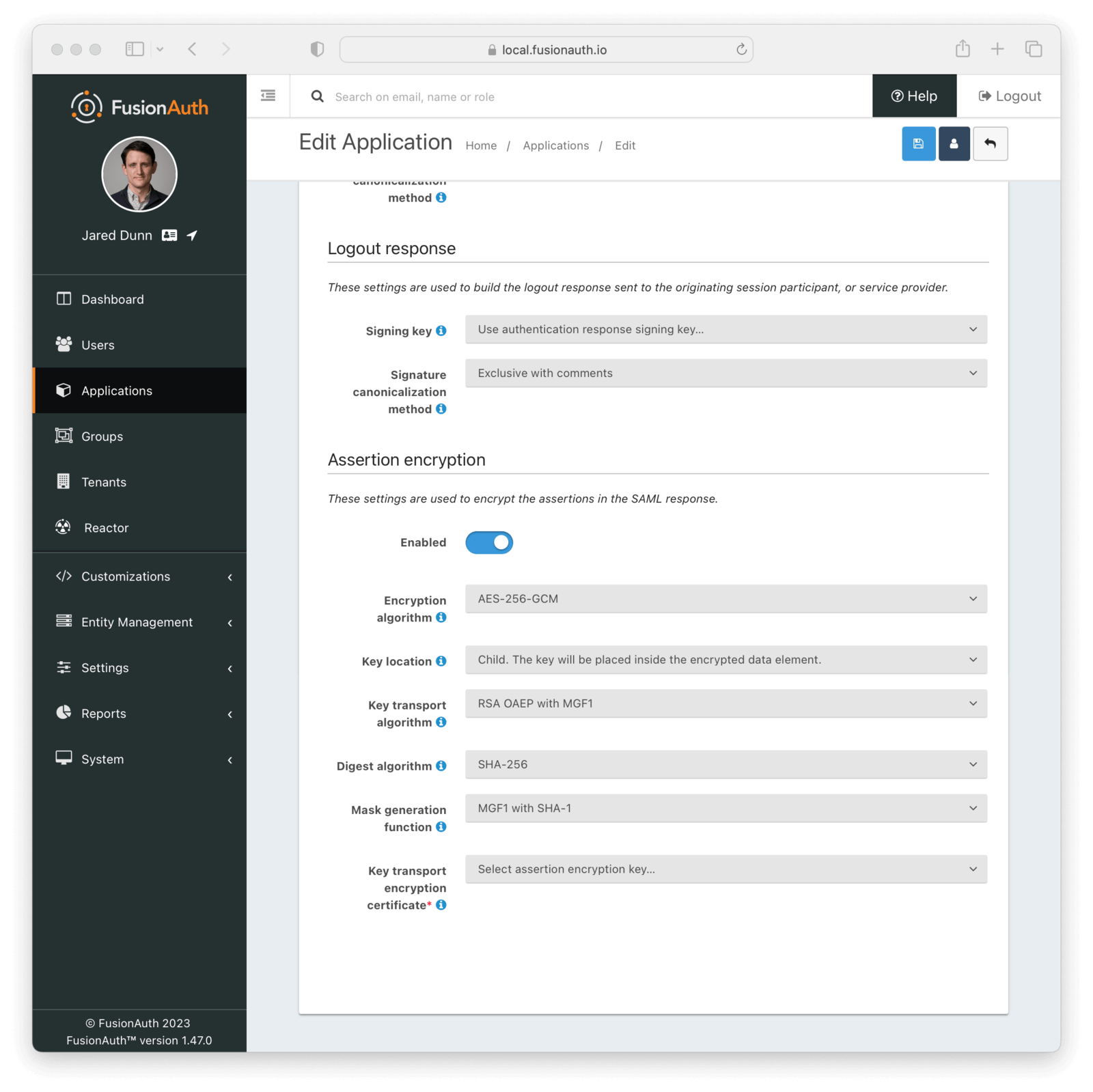
Settings in this section configure how FusionAuth encrypts the SAML Assertion response.
Form Fields#
EnabledWhen enabled, assertions in SAML responses will be encrypted.
Encryption algorithmThe symmetric key encryption algorithm used to encrypt the SAML assertion.
Key locationThe location that the encrypted symmetric key information will be placed in the SAML response in relation to the EncryptedData element containing the encrypted assertion value.
Key transport algorithmThe encryption algorithm used to encrypt the symmetric key for transport in the SAML response.
Digest algorithmThe message digest algorithm to use when encrypting the symmetric key for transport.
Mask generation functionThe mask generation function and hash function to use for the Optimal Asymmetric Encryption Padding when encrypting a symmetric key for transport. This configuration is only available when Key transport algorithm is set to RSA OAEP with MGF1.
Key transport encryption certificateThe RSA certificate from Key Master that will be used to encrypt the SAML assertion encryption symmetric key for transport.
This field is required when SAML assertion encryption is enabled.
Endpoints#
Once you have configured the SAML Identity Provider (IdP) for an application, service providers need metadata to access the IdP. To find this metadata, click the view icon on the application list page.
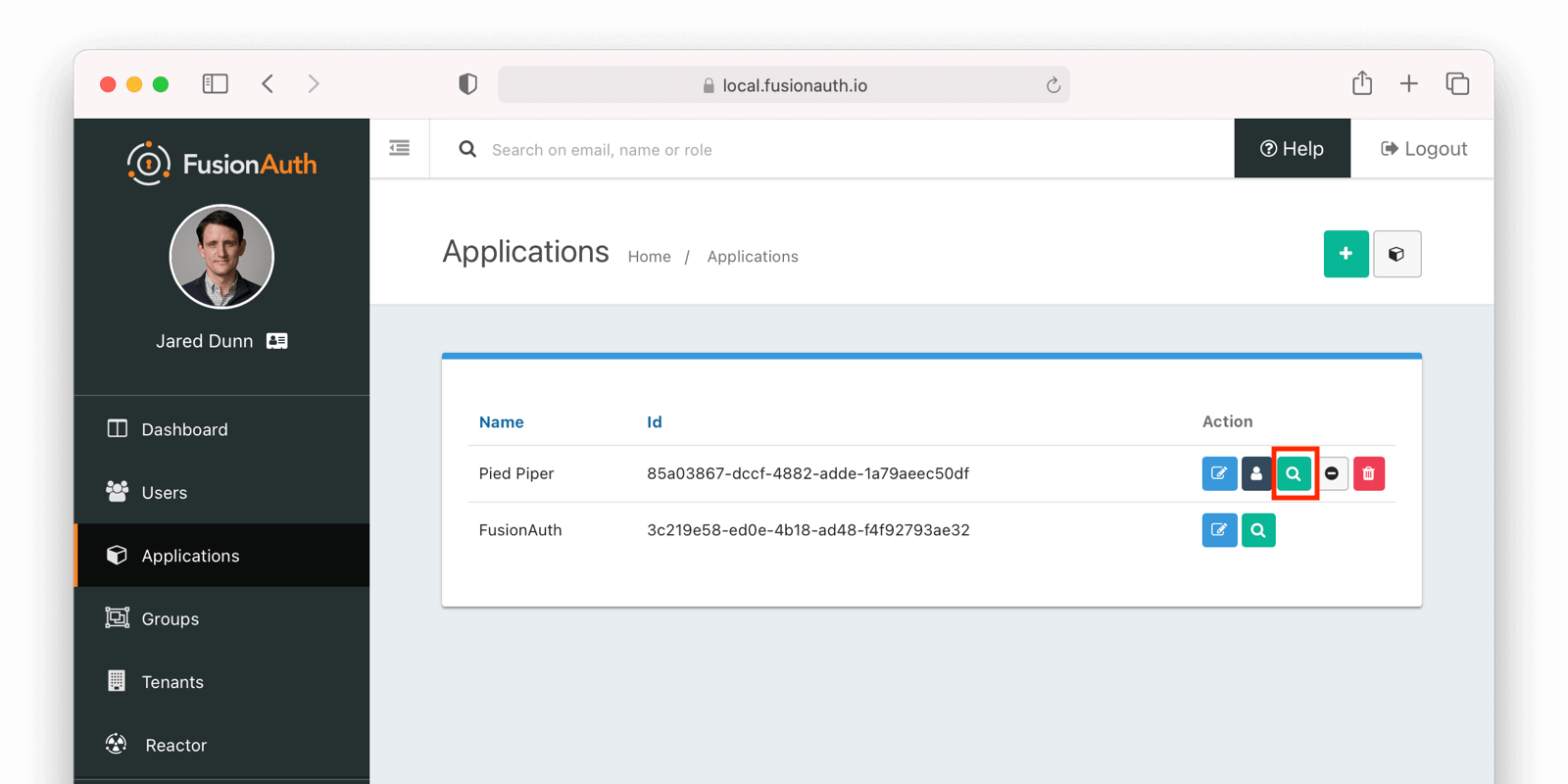
Under the heading SAML v2 Integration details, you will see all of the SAML endpoint URLs that the service provider needs, including the login URL, logout URL, and metadata URL:
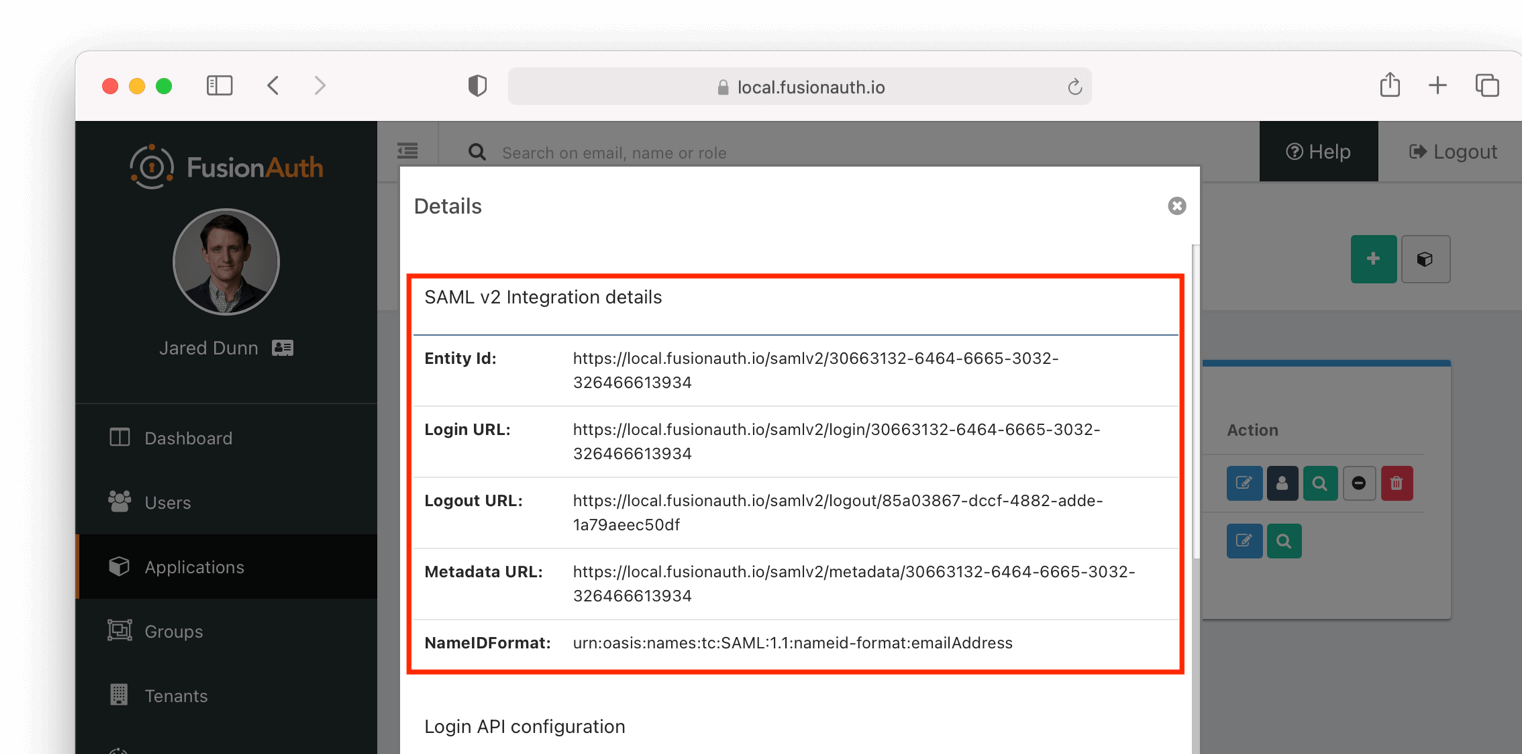
For a metadata XML file, copy and paste the URL from this dialog into a new browser tab, then save the contents of that webpage into a new file named metadata.xml.
SAML v2 IdP-Initiated RelayState#
Since version 1.55.1, FusionAuth supports an opaque value in the RelayState parameter on a request to begin an IdP-initiated SAML v2 login workflow. An opaque RelayState value will be passed unmodified to the SAML v2 Service Provider on the request to the Assertion Consumer Service (ACS) URL. The RelayState parameter and ACS URL resolution function as follows:
- If the
RelayStatevalue matches a configured Authorized redirect URLs value, that value is used as the ACS URL for the current workflow. The RelayState parameter will not be included on the request to the ACS URL. - If the
RelayStatevalue does not match a configured Authorized redirect URLs value, the RelayState parameter will be treated as an opaque value and included unmodified on the request to the ACS URL. ACS URL resolution continues as follows:- If a
redirect_uriparameter was provided on the IdP-initiated login request, it must match a configured Authorized redirect URLs value, or the request will result in an error. Otherwise, the matched value will be used as the ACS URL for the workflow. - If no
redirect_uriparameter was provided on the request, the first configured Authorized redirect URLs value will be used as the ACS URL for the workflow.
- If a
In FusionAuth versions before 1.55.1 the RelayState parameter is only used for ACS URL resolution. If provided on the request, it must match a configured Authorized redirect URLs value, or the request will result in an error. No RelayState value is passed to the ACS URL.
Attributes#
FusionAuth provides a number of attributes as part of its SAML response. These attributes include standard ones from specifications and others that are more industry de facto standards because many service providers require them. Here's the list of the attributes FusionAuth returns and the property of the user object they are pulled from:
idpulled from user.idhttp://schemas.xmlsoap.org/ws/2005/05/identity/claims/dateofbirthpulled fromuser.birthDatebirth_datepulled fromuser.birthDatedate_of_birthpulled fromuser.birthDatehttp://schemas.xmlsoap.org/ws/2005/05/identity/claims/emailaddresspulled fromuser.emailemailpulled fromuser.emailhttp://schemas.xmlsoap.org/ws/2005/05/identity/claims/givennamepulled fromuser.firstNamefirst_namepulled fromuser.firstNamehttp://schemas.xmlsoap.org/ws/2005/05/identity/claims/namepulled fromuser.fullNamenamepulled fromuser.fullNamefull_namepulled fromuser.fullNamehttp://schemas.xmlsoap.org/ws/2005/05/identity/claims/surnamepulled fromuser.lastNamelast_namepulled fromuser.lastNamehttp://schemas.xmlsoap.org/ws/2005/05/identity/claims/mobilephonepulled fromuser.mobilePhonemobile_phonepulled fromuser.mobilePhone
Of course, you can modify, delete, or add any attributes you want by configuring a SAML v2 response populate lambda for the application.
Limitations#
Using FusionAuth to host a SAML Identity Provider (IdP) has the following limitations:
-
FusionAuth only supports SAML
2.0; other SAML versions are unsupported. -
FusionAuth supports only the following
NameIDPolicyvalues:urn:oasis:names:tc:SAML:1.1:nameid-format:emailAddressurn:oasis:names:tc:SAML:2.0:nameid-format:persistenturn:oasis:names:tc:SAML:1.1:nameid-format:unspecified
To determine the correct value for
NameIDPolicy, see the supported values for your service provider. FusionAuth won't fail validation on anyNameIDPolicyvalue. If the requestedNameIDPolicyispersistent, FusionAuth will use that and return the User's unique id (user.id). In all other cases, the User's email address (user.email) will be used for the name Id.NotePrior to version
1.28.0, FusionAuth supported twoNameIDPolicyvalues, both of which useduser.emailfor the name Id:urn:oasis:names:tc:SAML:1.1:nameid-format:emailAddressurn:oasis:names:tc:SAML:1.1:nameid-format:unspecified
-
FusionAuth supports the following SAMLv2 bindings:
- HTTP Redirect
- HTTP POST
Other bindings are not supported.
-
As of version 1.30.2, if the
NameIdFormatis omitted by a service provider, FusionAuth usesurn:oasis:names:tc:SAML:1.1:nameid-format:emailAddress.
Related
Examples of SAMLv2 integrations.
Learn about the APIs for creating, retrieving, updating and disabling an Apple identity provider.
Learn about the APIs for creating, retrieving, updating and disabling a Facebook identity provider.
Learn about the APIs for creating, retrieving, updating and disabling a Google identity provider.