API Keys API
Available since 1.26.0
The FusionAuth APIs are primarily secured using API keys. This API can only be accessed using an API key that has a keyManager attribute of true. In order to retrieve, update or delete an API key, an API key with equal or greater permissions must be used. A "tenant-scoped" API key can retrieve, create, update or delete an API key for the same tenant. This page describes APIs that are used to manage API keys.
Here's a brief video covering the API keys API:
Please refer to the Authentication document for more details about using API keys.
The Key Manager Setting#
This API can only be used by API keys with the Allow this key to manage other keys setting enabled.
Below is an image of an API key being created in the administrative user interface with Allow this key to manage other keys enabled:
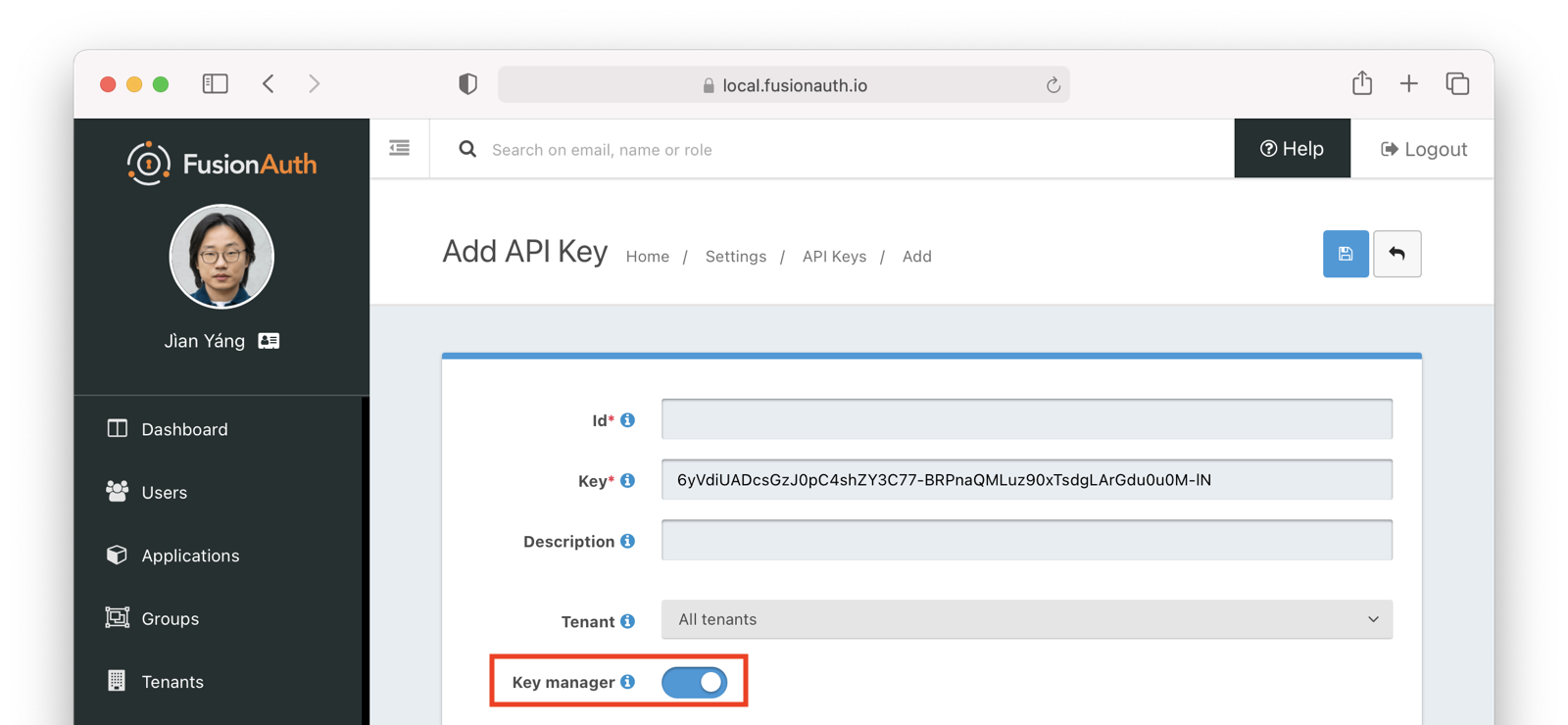
For security purposes, the Allow this key to manage other keys setting may be modified only using the administrative user interface or Kickstart. It can't be changed using this API.
Use the following APIs to manage API Keys:
| Operation | Method | Endpoint |
|---|---|---|
| Create an API Key | POST | /api/api-key/api/api-key/{apiKeyId}/api/api-key/ |
| Retrieve an API Key | GET | /api/api-key/{apiKeyId} |
| Update an API Key | PUT | /api/api-key/{apiKeyId} |
| Delete an API Key | DELETE | /api/api-key/{apiKeyId} |