Risk Signals
On this page
FusionAuth uses risk signals to determine the risk profile of a particular login attempt. By applying the signal criteria, each risk signal calculates a value of LOW, MEDIUM, or HIGH.
When any enabled risk signal reports a HIGH risk level during a login attempt, FusionAuth fires a user login suspicious event and, if configured, sends a "Threat Detected" email to the user.
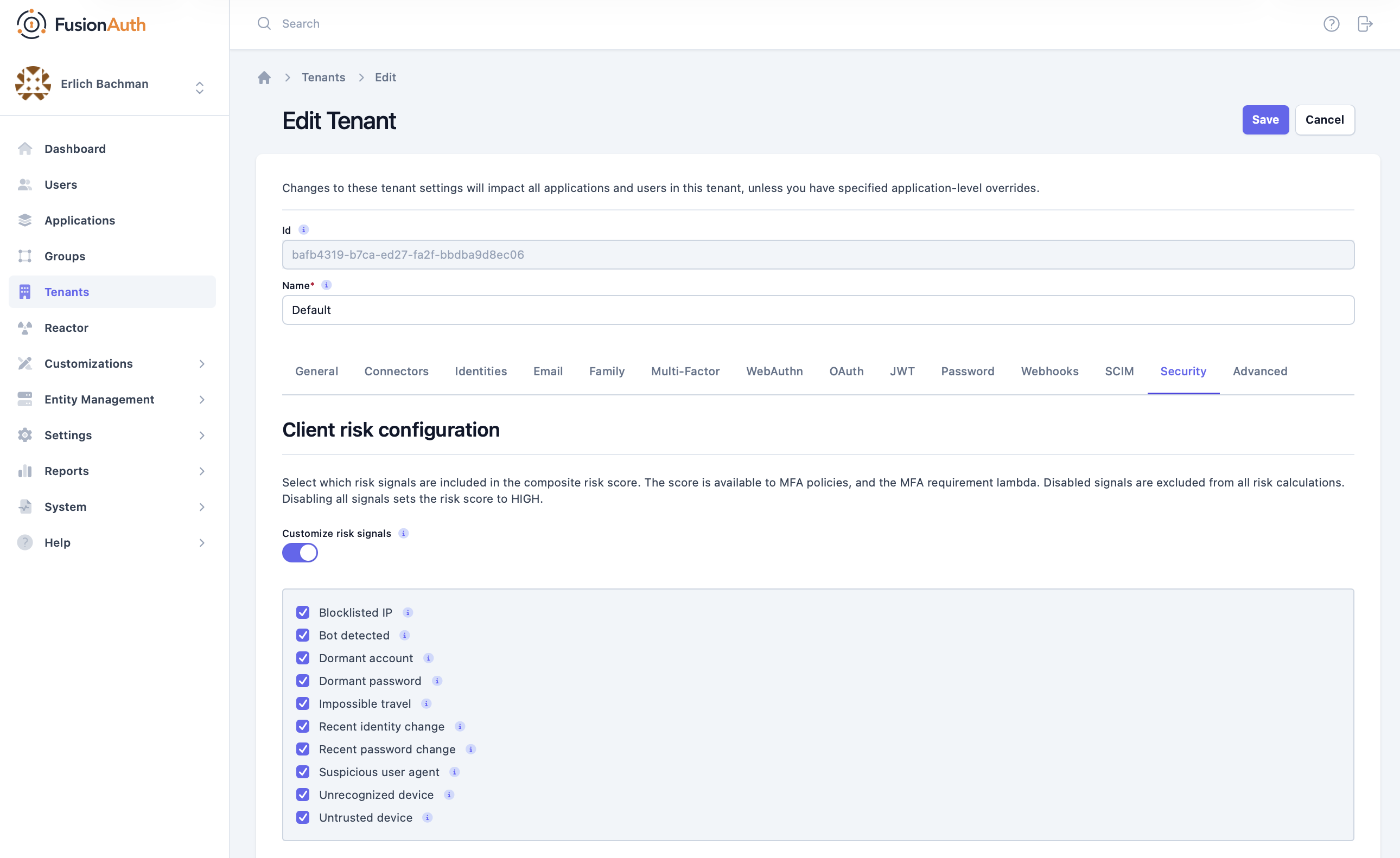
You can enable and disable each risk signal when you configure the risk configuration of a Tenant.
Risk signals include the following:
| Signal | Description |
|---|---|
UnrecognizedDevice |
Indicates whether FusionAuth has a record of this combination of user and device; could indicate a stolen credential used on a new machine. Returns HIGH if the device has never been seen before for this user, LOW otherwise. |
BlocklistedIp |
Indicates if the user's IP address is blocklisted by the infrastructure FusionAuth uses for breached password detection: that is, associated with credential stuffing campaigns, botnets, known proxies, and threat actors. Returns HIGH if the IP address appears on the blocklist, LOW otherwise. |
ImpossibleTravel |
Only available for Enterprise users. The distance between recent logins exceeds the possible value a person can travel within the allotted time frame (e.g. London UK at 1600 GMT, then Tokyo JP at 1601 GMT). Indicates VPN usage or account sharing (voluntary or otherwise). Returns HIGH if impossible travel occurred from the previous login location, LOW otherwise. |
UntrustedDevice |
If the user has previously asked FusionAuth to trust this device during a login attempt, reports LOW. Otherwise, reports HIGH. |
DormantPassword |
Indicates the age of the user's password. If the user has changed their password in the last few months, reports LOW or MEDIUM. If the user has not changed their password in a significant length of time, reports HIGH. |
RecentIdentityChange |
Indicates a recent change of the primary identifier for the account (for instance, an email address). Account takeover attempts frequently change this identifier to lock out the actual owner. Returns HIGH if an identity change occurred very recently, MEDIUM somewhat recently, LOW otherwise. |
RecentPasswordChange |
Indicates a recent change of the account password. Account takeover attempts frequently change the password to lock out the actual owner. Returns HIGH if a password change occurred very recently, MEDIUM somewhat recently, LOW otherwise. |
DormantAccount |
Returns HIGH if the user hasn't logged in for many months, MEDIUM if many weeks, LOW otherwise. |
SuspiciousUserAgent |
Indicates whether the user agent, which identifies the client making the login request, has been associated with threat actors in the infrastructure FusionAuth uses for breached password detection. Returns HIGH if the user agent string matches a known threat actor, LOW otherwise. |
BotDetected |
Detects whether or not the user's typing pattern appears human. Returns HIGH if the typing pattern appears inhuman, LOW otherwise. Only applies to login attempts that include a password form (not social or third-party enterprise login). |
Enable or disable a risk signal#
Under Tenants -> Your Tenant -> Security , navigate to the Client risk configuration section. Enable or disable individual signals with the Customize risk signals toggle.