Customize Passkeys
On this page
You can configure the FusionAuth WebAuthn implementation to meet your application's needs in a number of ways. For details on WebAuthn workflow configuration, check out the WebAuthn Admin Guide.
Themes#
If you are using FusionAuth's hosted login pages to present WebAuthn pages to users, you can customize those pages using a theme. There are several themed pages related to WebAuthn:
- User account self service
- List WebAuthn passkeys
- Add WebAuthn passkey
- Delete WebAuthn passkey
- OAuth
- WebAuthn bootstrap login
- WebAuthn re-authentication enable
- WebAuthn re-authentication login
For more information, see the themes reference.
Challenge Customization#
You can modify the lifetime of the one-time challenge generated for WebAuthn registration and authentication ceremonies. By default both are 180 seconds; change this in the tenant settings under Advanced -> External identifier durations :
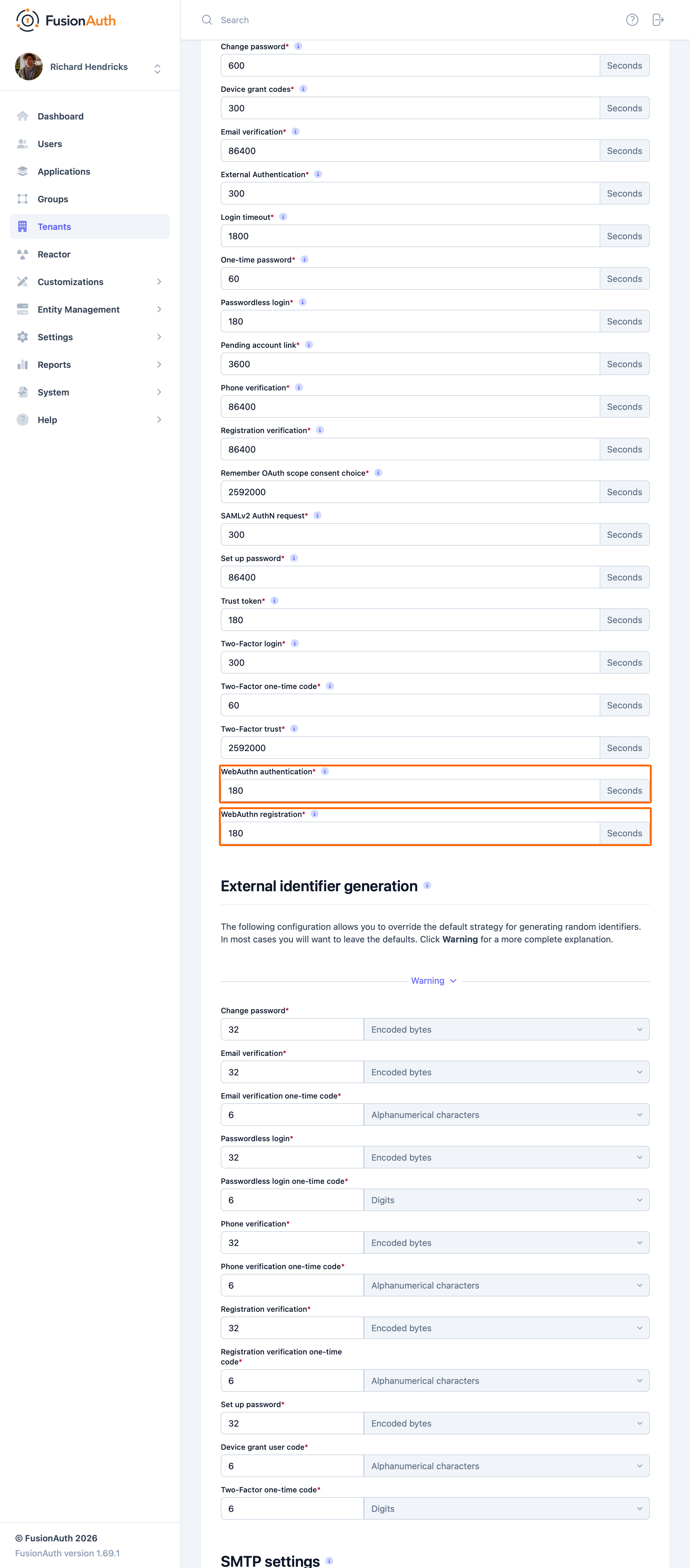
You may want to adjust the lifetime of these challenges to change how long a user has to complete a ceremony once it has been started. If an attempt is made to complete the ceremony after the challenge expires, it will fail. These values are also used as the timeout for the corresponding WebAuthn JavaScript API calls by returning the value in milliseconds as part of the /api/webauthn/register/start and /api/webauthn/start API responses. The WebAuthn JavaScript APIs treat the timeout value as a hint. The browser may allow the user more time to complete the ceremony (e.g. if the timeout is deemed too short), but FusionAuth will still expire the challenge, preventing the ceremony from being completed. The WebAuthn authentication value is used for both authentication and assertion.
Troubleshooting#
Due to the server- and client-side components of each of the WebAuthn ceremonies and compatibility depending on both the browser and operating system, troubleshooting issues can be difficult. These tips may help you when issues come up.
Browser Compatibility#
WebAuthn is now supported across a variety of web browsers, but if you experience issues, it's worth checking whether your browser is compatible. Be sure to check the notes section for limitations based on specific authenticators or operating systems and evaluate whether you may be experiencing one of those limitations.
Secure Context#
WebAuthn can only be used in secure contexts. Briefly, this means that the browser must have a valid TLS connection for the current page. If WebAuthn is called from an iframe, then both the iframe and the embedding page must be secured.
Relying Party Id#
A WebAuthn passkey is scoped to a specific relying party Id at the time it is created. Passkeys cannot be used with a different relying party Id than they were registered, and there are restrictions on allowed relying party Ids during a WebAuthn ceremony based on the browser request origin's effective domain.
If the relying party Id for a tenant is changed because of a configuration change or a domain change, passkeys registered prior to the change will no longer work. See the Relying Party Id section in the WebAuthn Admin Guide for more detail on constraints and configuration options.
WebAuthn JavaScript Binary Format#
As mentioned earlier in this guide, certain request and response fields on FusionAuth's WebAuthn APIs must be encoded as base64url strings for transport over the network, but the WebAuthn JavaScript API uses JavaScript's ArrayBuffer type for these values. See the transform sections in this guide for more information on which fields must be converted.
Related
Set up a passwordless experience using passkeys.
An overview of the passwordless capabilities of FusionAuth.
API documentation for the FusionAuth Complete a WebAuthn Passkey Assertion API.
API documentation for the FusionAuth Complete a WebAuthn Passkey Authentication API.