Delegate Access With Token Exchange
On this page
This feature requires an Enterprise plan.
1.70.0
This guide configures token exchange with the Entity policy engine. When you finish, a to-do service can exchange a User's access token for a token that targets an email service. The exchanged token identifies the User as the subject and the to-do service as the actor.
For background on how token exchange works, see OAuth Token Exchange.
Prerequisites#
To follow this guide, you need:
- FusionAuth
1.70.0or later with an Enterprise license. - An Application that Users log in to with the Authorization Code grant, in the Tenant you plan to configure.
- An API key with permission to call the Entity APIs. The examples store it in the
API_KEYshell variable.
The examples use http://localhost:9011 as the FusionAuth URL. If your instance has more than one Tenant, add an X-FusionAuth-TenantId header to each API request, or use an API key scoped to the Tenant.
Enable Token Exchange on the Tenant#
- Navigate to Tenants and click on your Tenant.
- Select the OAuth tab.
- In the Token exchange settings section, enable Enable token exchange grant.
- Set Token exchange policy engine to
Entity. - Leave Max act claim depth at
2. - Click .
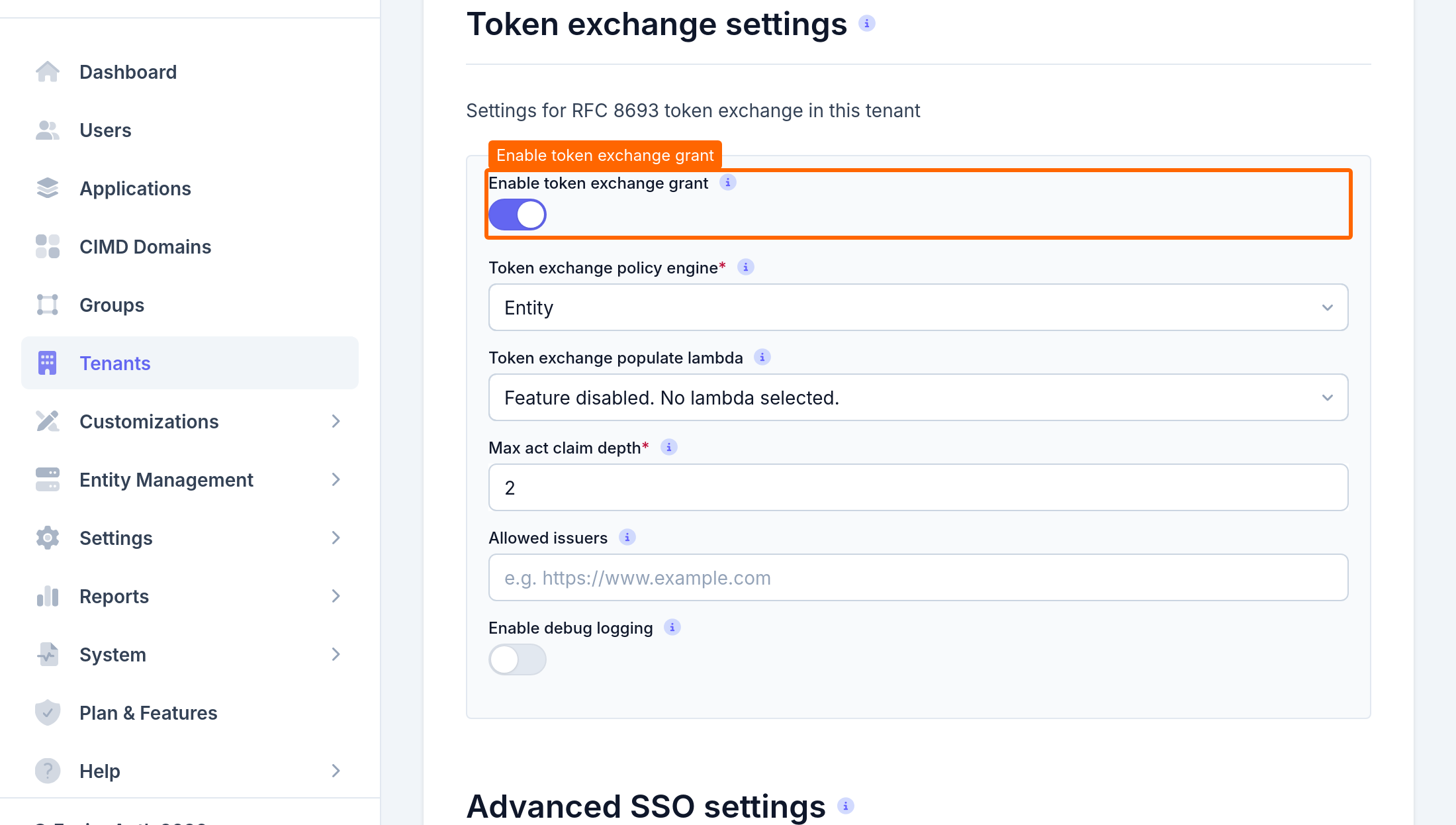
To configure the Tenant with the API instead, set tenant.tokenExchangeConfiguration.enabled to true and tenant.tokenExchangeConfiguration.policyEngine to ENTITY with the Tenant API.
Create an Entity Type#
Entities need an Entity Type. Create one for the services in this guide:
$ curl -X POST http://localhost:9011/api/entity/type \
  -H "Authorization: $API_KEY" \
  -H "Content-Type: application/json" \
  -d '{ "entityType": { "name": "API Service" } }'
Save the entityType.id value from the response in the ENTITY_TYPE_ID shell variable.
The Entity Type name appears in exchanged tokens as the sub_profile member of the act claim, for example fusionauth:API Service.
Create the Service Entities#
Create an Entity for the email service. The email service is the audience of the exchanged token, so it doesn't need any token exchange settings:
$ curl -X POST http://localhost:9011/api/entity \
  -H "Authorization: $API_KEY" \
  -H "Content-Type: application/json" \
  -d '{
    "entity": {
      "name": "Email Service",
      "clientId": "email-service",
      "type": { "id": "'"$ENTITY_TYPE_ID"'" }
    }
  }'
Save the entity.id value from the response in the EMAIL_ENTITY_ID shell variable.
Create an Entity for the to-do service. The to-do service performs the exchange, so set entity.actAsTokenExchangeClient to true:
$ curl -X POST http://localhost:9011/api/entity \
  -H "Authorization: $API_KEY" \
  -H "Content-Type: application/json" \
  -d '{
    "entity": {
      "name": "To-do Service",
      "clientId": "todo-service",
      "clientSecret": "change-this-secret",
      "actAsTokenExchangeClient": true,
      "type": { "id": "'"$ENTITY_TYPE_ID"'" }
    }
  }'
Save the entity.id value from the response in the TODO_ENTITY_ID shell variable.
Grant the To-do Service Access to the Email Service#
The Entity policy engine allows an exchange when the exchanger has a Grant on the audience Entity. Create a Grant on the email service for the to-do service:
$ curl -X POST http://localhost:9011/api/entity/$EMAIL_ENTITY_ID/grant \
  -H "Authorization: $API_KEY" \
  -H "Content-Type: application/json" \
  -d '{ "grant": { "recipientEntityId": "'"$TODO_ENTITY_ID"'" } }'
The Entity policy engine only checks that the Grant exists, so this Grant doesn't need any permissions.
Get a User Access Token#
Log in as a User through your Application with the Authorization Code grant. Save the access token from the Token endpoint response in the USER_ACCESS_TOKEN shell variable.
In a real deployment, the to-do service receives this token in the Authorization header of a request from the User's client.
Exchange the Token#
Call the Token endpoint as the to-do service. Pass the User's access token as the subject token and the email service's client Id as the audience:
$ curl -X POST http://localhost:9011/oauth2/token \
  -u "todo-service:change-this-secret" \
  -d "grant_type=urn:ietf:params:oauth:grant-type:token-exchange" \
  -d "subject_token=$USER_ACCESS_TOKEN" \
  -d "subject_token_type=urn:ietf:params:oauth:token-type:access_token" \
  -d "audience=email-service"
FusionAuth returns a new access token:
{
  "access_token": "eyJhbGciOiJSUzI1NiIsInR5cCI6IkpXVCIsImtpZCI6IjFlNTZhOWRlMyJ9...",
  "expires_in": 3599,
  "issued_token_type": "urn:ietf:params:oauth:token-type:access_token",
  "scope": "openid offline_access",
  "token_type": "Bearer"
}
The Entity policy engine copies the scopes from the subject token, so the scope value matches the User's original access token.
If the request fails, FusionAuth returns an OAuth error. The error_description value explains the cause. For example, if you omit the audience parameter, FusionAuth returns:
{
  "error": "invalid_request",
  "error_description": "The Entity Policy Engine requires an audience parameter.",
  "error_reason": "audience_required"
}
Check the Issued Token#
Decode the issued access token. Its claims look like the following:
{
  "act": {
    "sub": "f81d4fae-7dec-11d0-a765-00a0c91e6bf6",
    "sub_profile": "fusionauth:API Service"
  },
  "amr": ["pwd"],
  "applicationId": "85a03867-dccf-4882-adde-1a79aeec50df",
  "aud": ["f81d4fae-6dec-11d0-a765-00a0c91e6bf7"],
  "auth_time": 1792680000,
  "authenticationType": "PASSWORD",
  "client_id": "todo-service",
  "exp": 1792683600,
  "gty": ["authorization_code", "urn:ietf:params:oauth:grant-type:token-exchange"],
  "iat": 1792680000,
  "iss": "http://localhost:9011",
  "jti": "6b3a7d1e-4c8f-4b2a-9e55-0f1c2d3e4a5b",
  "scope": "openid offline_access",
  "sid": "3f6c1b2a-8d4e-4f7a-9b0c-1d2e3f4a5b6c",
  "sub": "c0a6ae6c-6d38-4bb5-a7c2-4d2b4e3a1f2d",
  "tid": "d7d09513-a3f5-401c-9685-34ab6c552453",
  "tty": "at"
}
The sub claim still identifies the User, and aud now names the email service. The act claim identifies the to-do service as the actor. The amr, applicationId, auth_time, authenticationType, and sid claims come from the User's original token.
When the email service receives this token, it should:
- Verify the signature with the keys from FusionAuth's JSON Web Key Set.
- Check that
issmatches the FusionAuth issuer,audcontainsemail-service, andexpis in the future. - Authorize the request based on the User in
suband the actor inact.sub.
View the Audit Log Entry#
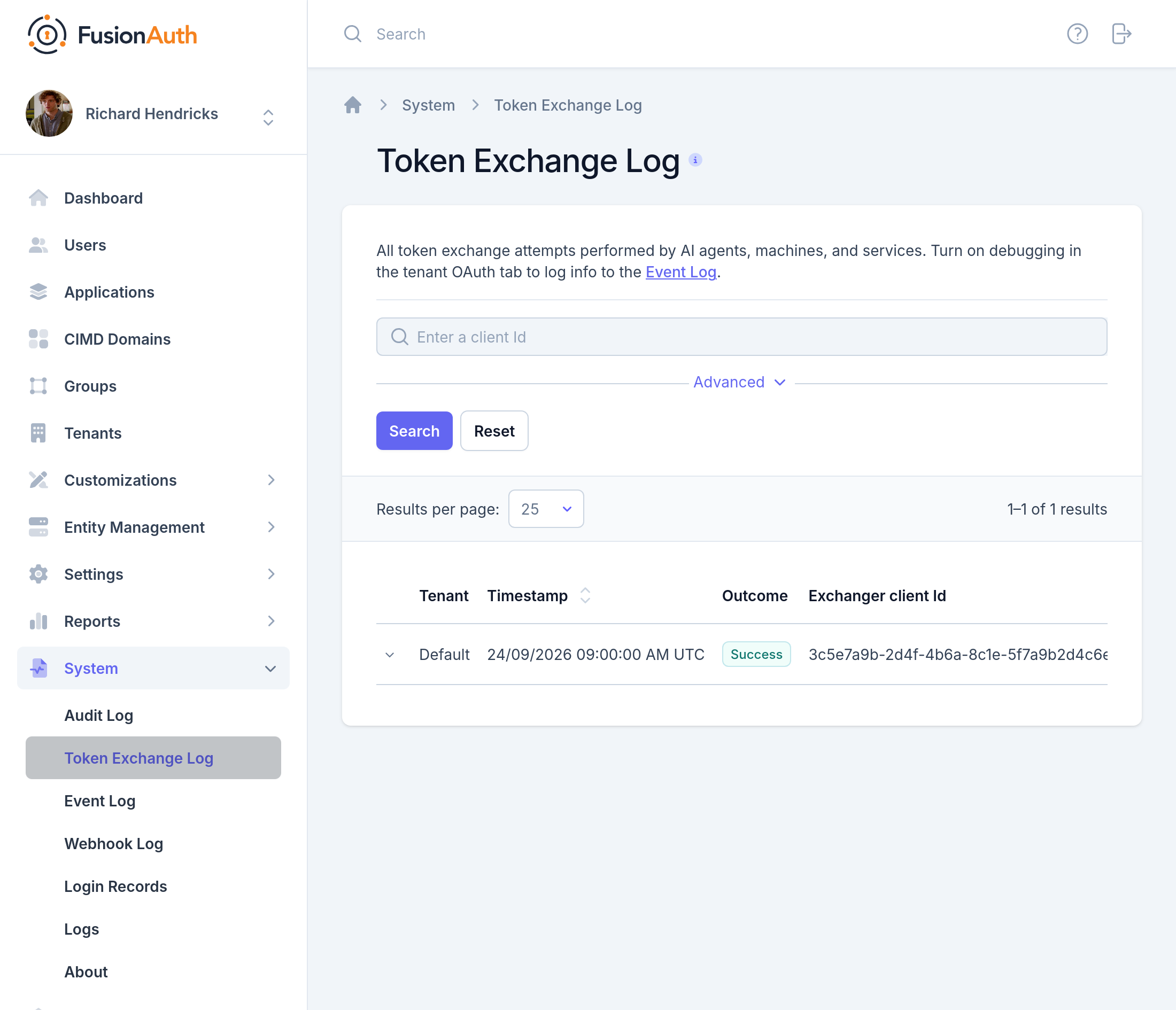
FusionAuth records each exchange attempt. Navigate to System -> Token Exchange Log to view the entry for the exchange you just made, including the policy decision and the issued token's actor chain.
Next Steps#
- To narrow scopes, apply time-based rules, or call an external authorization service, switch to the Lambda policy engine and write a Token Exchange Policy lambda.
- To add claims to exchanged tokens, write a Token Exchange Populate lambda.
- To accept tokens from another Identity Provider, add its issuer to Allowed issuers and send its tokens with the
urn:ietf:params:oauth:token-type:jwtsubject token type.
Related
Learn how FusionAuth implements OAuth 2.0 Token Exchange (RFC 8693) so that a service can call another service on behalf of a user.
API documentation for the FusionAuth Retrieve a Token Exchange Chain API.
API documentation for the FusionAuth Search the Token Exchange Audit Log API.
API documentation for the FusionAuth Issue a JWT API.